Page 1 of 1
Adjusting Track Volume After Recording
Posted: Tue Mar 01, 2022 1:49 am
by gpb124816
I understand that this is a uber noob question, but I simply cannot figure out how to adjust a track's volume after recording it. I'm not asking about automating the volume adjustment. I mean simply raising or lowering a track's volume manually after recording it. For example, a drum track is too loud relative to the other tracks' volumes. How do I reduce this single track's volume?
Thank you very much.
gpb
Re: Adjusting Track Volume After Recording
Posted: Tue Mar 01, 2022 3:53 am
by Da hand
There are many ways to do this, but since you already seem to know of the track volume fader, then instead of automating it, simply adjust it to the level you want and leave it at that setting. Nothing will be automated unless you actually automate it.
Here is where you can adjust the volume (indicated as 2) without using automation.
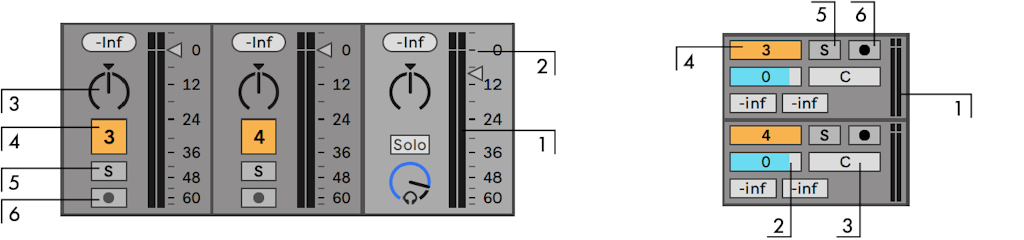
Otherwise you can:
- Adjust the Clip's "gain" inside the Audio Clip that contains your recording
- Place a Utility as an audio effect on the track and adjust its "gain" setting
Re: Adjusting Track Volume After Recording
Posted: Wed Jul 03, 2024 7:47 pm
by Prtzl8lgc
I had the same question - but those pics and numbers don't equate to "here's how you do it"... do what with the "2"? Where does it say "volume"? Lost....
Re: Adjusting Track Volume After Recording
Posted: Thu Jul 04, 2024 7:58 am
by antic604
Prtzl8lgc wrote: ↑Wed Jul 03, 2024 7:47 pm
I had the same question - but those pics and numbers don't equate to "here's how you do it"... do what with the "2"? Where does it say "volume"? Lost....
Just pull down that grey triangle or slide left that blueish bar - they're the same things, just in different views.
And frankly - those aren't "noob" things. They're the most basics of the basic. If you can't comprehend those, perhaps using a DAW isn't for you?
Otherwise, Ableton has lots of easy resources to learn:
- videos -
https://www.ableton.com/en/live/learn-live/
- user manual with "live concepts" -
https://www.ableton.com/en/live-manual/ ... e-concepts
Sorry, but there's no way around putting some work.