Tempo Change from clip in Session View?
Posted: Mon Oct 23, 2023 12:32 pm
Hey There
I'm doing a live score for a dance perfoemance, and I have different scenes set up as the play progresses.
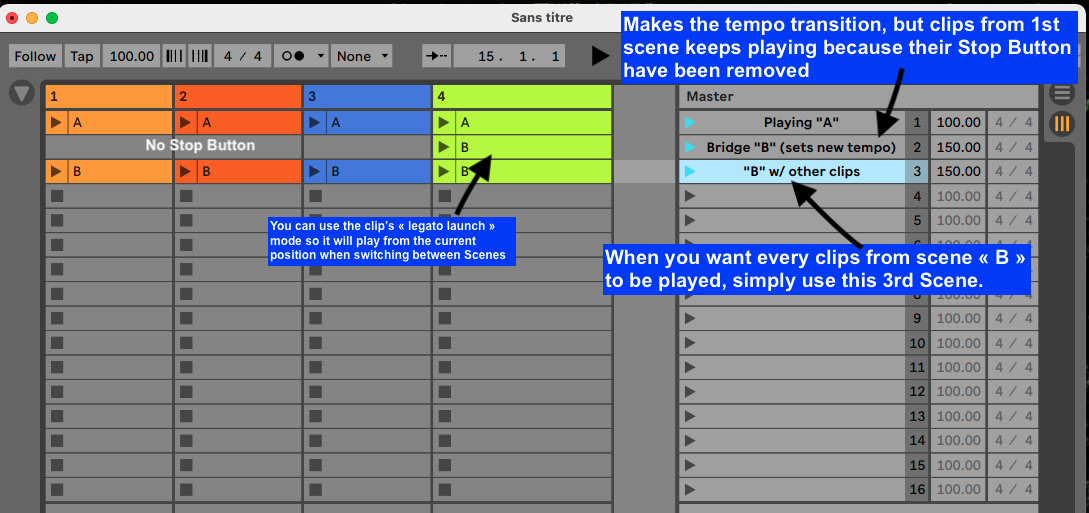
I wonder if there's any way to change the scene tempo as soon as one clip from that scene is launched rather than launching the whole scene to change the tempo.
Right now, I have a "Cue Tempo" scene so that the new tempo is set up for each new segment, and it's pretty cumbersome to have to do that manually.
Any suggestions for a different workflow are also welcome! Thanks so much
Alexis
I'm doing a live score for a dance perfoemance, and I have different scenes set up as the play progresses.
I wonder if there's any way to change the scene tempo as soon as one clip from that scene is launched rather than launching the whole scene to change the tempo.
Right now, I have a "Cue Tempo" scene so that the new tempo is set up for each new segment, and it's pretty cumbersome to have to do that manually.
Any suggestions for a different workflow are also welcome! Thanks so much
Alexis