Ableton Live 12 low network usage to network drive
Posted: Sun Sep 22, 2024 3:10 pm
Hello
I have an issue where I'm now looking for days to fix it :/ Maybe I find help here.
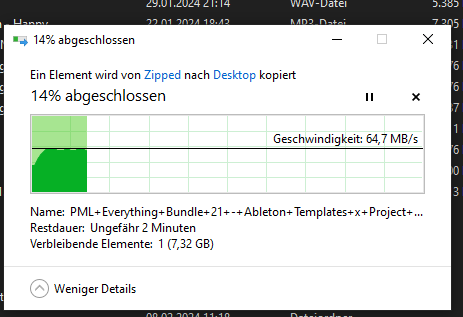
I wanted to connect my external drive (Yottamaster RAID) to my Router to make it accessible in the whole network and also over a VPN connection when on the run. I have perfect access from Windows and also a decent download rate of around 66MB:
But when opening Ableton there is almost no usage of the whole bandwidth (my Standard Template is on that Network Drive):
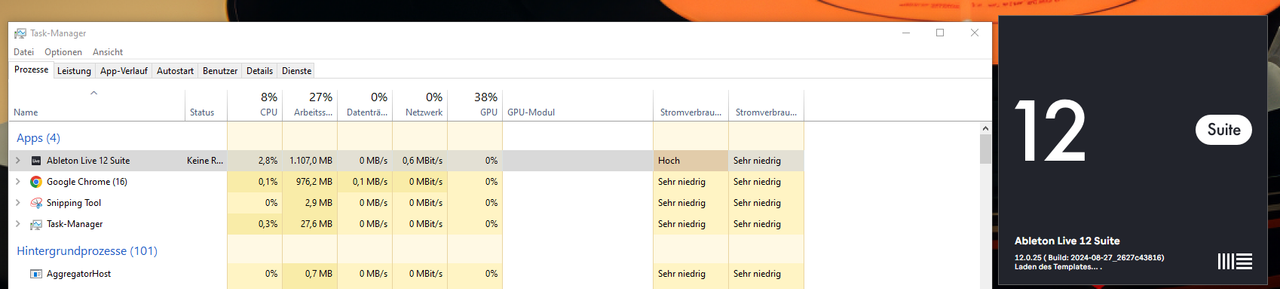
I'm really not sure how to fix this. By the way, after some time, the template opens but all the Samples preloaded on my tracks are also on the network drive. So it definitely has the connection to the drive but the performance is just really slow.
Someone else already experienced that or have an idea if there are restrictions to how Ableton uses the bandwidth and how i can fix this? Thanks in advance
Regards Robin
I have an issue where I'm now looking for days to fix it :/ Maybe I find help here.
I wanted to connect my external drive (Yottamaster RAID) to my Router to make it accessible in the whole network and also over a VPN connection when on the run. I have perfect access from Windows and also a decent download rate of around 66MB:
But when opening Ableton there is almost no usage of the whole bandwidth (my Standard Template is on that Network Drive):
I'm really not sure how to fix this. By the way, after some time, the template opens but all the Samples preloaded on my tracks are also on the network drive. So it definitely has the connection to the drive but the performance is just really slow.
Someone else already experienced that or have an idea if there are restrictions to how Ableton uses the bandwidth and how i can fix this? Thanks in advance
Regards Robin