routing vst outputs to individual tracks
Posted: Thu Jan 23, 2025 4:46 am
hello,
I am working with the DR-84, a 80s drum vst ("rompler") from Pepto Audio. I have attached a picture below that I will reference to provide context for my issue.
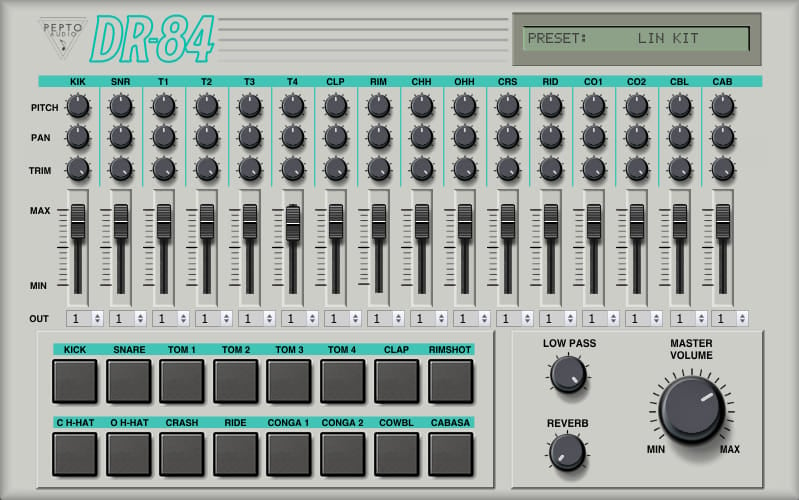
When loading ithe DR-84 into Ableton, each output is set to 1 (as you can see in the picture), so any return effects receiving input from the DR-84 receives all of the sounds (bass, snare, cymbals, etc.) equally, with no means for me to fine tune how much each sound is being sent (I want my kick and snare to have different amounts of reverb, for example).
When I change the outputs from them all being 1 to kick = 1 , snare = 2, tom 1 = 3, and so on, only the kick gets through. I understand why that is occurring within an Ableton context, but what I'd like to do, if possible, is have the all the other outputs go to their own tracks so I can send them to effects at different levels. I'm not seeing an option to route those tracks individually, and routing them to a Drum Rack on a separate track doesn't seem to be working either.
Let me know if that doesn't make any sense. Any help from y'all is appreciated much.
I am working with the DR-84, a 80s drum vst ("rompler") from Pepto Audio. I have attached a picture below that I will reference to provide context for my issue.
When loading ithe DR-84 into Ableton, each output is set to 1 (as you can see in the picture), so any return effects receiving input from the DR-84 receives all of the sounds (bass, snare, cymbals, etc.) equally, with no means for me to fine tune how much each sound is being sent (I want my kick and snare to have different amounts of reverb, for example).
When I change the outputs from them all being 1 to kick = 1 , snare = 2, tom 1 = 3, and so on, only the kick gets through. I understand why that is occurring within an Ableton context, but what I'd like to do, if possible, is have the all the other outputs go to their own tracks so I can send them to effects at different levels. I'm not seeing an option to route those tracks individually, and routing them to a Drum Rack on a separate track doesn't seem to be working either.
Let me know if that doesn't make any sense. Any help from y'all is appreciated much.
