Page 1 of 1
Correct way to delete unused audio from Project?
Posted: Tue Mar 25, 2025 3:16 am
by Citizen
I'll sometimes work on projects where I recording in a long piece of audio (5-7 mins etc) and later trim and only use a few bars of that section, which I cut and Consolidate a small section.
As I repeatedly do this over the course of the project, what is the correct ('Safe') way to delete any unused audio from my project — so I don't end up rapidly filling my hard drive full of unused audio?
I tried doing a Collect and Save, but it seemed to still keep the original long stems.
Re: Correct way to delete unused audio from Project?
Posted: Tue Mar 25, 2025 12:15 pm
by schlam
Often there are lots of unused and hidden take lanes that you have to show and delete. Even if you never use take lanes..
Re: Correct way to delete unused audio from Project?
Posted: Tue Mar 25, 2025 3:25 pm
by cids
Best to use an external audio editor as "editing" in Ableton is non-destructive
Re: Correct way to delete unused audio from Project?
Posted: Tue Mar 25, 2025 6:49 pm
by Valkon
Yes, this is a known problem (due to a hundred or so slobs, honest users cannot automatically remove all the garbage that remains in the take lane after comping or due to audio files trimming)!
We are asked to consider this a "special quirk"...
Re: Correct way to delete unused audio from Project?
Posted: Wed Mar 26, 2025 5:08 am
by Citizen
Er, right.
So does that mean that I should probably crop and consolidate and do a 'Collect and Save' and then manually go through the 'Recorded' folder in my Finder to manually remove bits I don't need.
Not optimal, but neither is a hard drive full of unused audio.
Is that the best solution?
Re: Correct way to delete unused audio from Project?
Posted: Wed Mar 26, 2025 4:28 pm
by cids
Live’s File Manager can find the unused files in a Project for you. You can then review them and decide to delete them individually or collectively. When searching for “unused“ files, Live will inspect each file in a Project folder, checking if it is referenced by any of the Live Sets, Live Clips or device presets in the Project. If not, the file is regarded as unused — even if other Projects or programs still use it.
To find the unused files for the currently open Project, choose the Manage Files command from the File menu, click the Manage Project button, and then click on the triangular-shaped fold button next to “Unused Files“ to access a summary and the Show button. Clicking the Show button makes the browser list the unused files; there, you can preview samples (see 5.1.4) and delete them if you like.
Re: Correct way to delete unused audio from Project?
Posted: Wed Mar 26, 2025 4:47 pm
by Angstrom
cids wrote: ↑Wed Mar 26, 2025 4:28 pm
Live’s File Manager can find the unused files in a Project for you. You can then review them and decide to delete them individually or collectively. When searching for “unused“ files, Live will inspect each file in a Project folder, checking if it is referenced by any of the Live Sets, Live Clips or device presets in the Project. If not, the file is regarded as unused — even if other Projects or programs still use it.
To find the unused files for the currently open Project, choose the Manage Files command from the File menu, click the Manage Project button, and then click on the triangular-shaped fold button next to “Unused Files“ to access a summary and the Show button. Clicking the Show button makes the browser list the unused files; there, you can preview samples (see 5.1.4) and delete them if you like.
The big problem with this is if the old audio is referenced in an Undo save. This is especially bad because of if the user saves as I do
Newsong-001.als
Newsong-002.als
....
Newsong-012.als
Newsong-finalmix-001.als
Newsong-finalfinalfinalmix-001.als
Then for each of these incremental saves there will be 4 "undo" saves in the undo folder. And if there are 20 incremental saves that's 80 undo files, each probably referencing some massive bogus takes. These are all counted as valid audio files and will persist.
Re: Correct way to delete unused audio from Project?
Posted: Wed Mar 26, 2025 4:58 pm
by cids
Angstrom wrote: ↑Wed Mar 26, 2025 4:47 pm
cids wrote: ↑Wed Mar 26, 2025 4:28 pm
Live’s File Manager can find the unused files in a Project for you. You can then review them and decide to delete them individually or collectively. When searching for “unused“ files, Live will inspect each file in a Project folder, checking if it is referenced by any of the Live Sets, Live Clips or device presets in the Project. If not, the file is regarded as unused — even if other Projects or programs still use it.
To find the unused files for the currently open Project, choose the Manage Files command from the File menu, click the Manage Project button, and then click on the triangular-shaped fold button next to “Unused Files“ to access a summary and the Show button. Clicking the Show button makes the browser list the unused files; there, you can preview samples (see 5.1.4) and delete them if you like.
The big problem with this is if the old audio is referenced in an Undo save. This is especially bad because of if the user saves as I do
Newsong-001.als
Newsong-002.als
....
Newsong-012.als
Newsong-finalmix-001.als
Newsong-finalfinalfinalmix-001.als
Then for each of these incremental saves there will be 4 "undo" saves in the undo folder. And if there are 20 incremental saves that's 80 undo files, each probably referencing some massive bogus takes. These are all counted as valid audio files and will persist.
So as this is new for me, where are these UNDO files stored?
Re: Correct way to delete unused audio from Project?
Posted: Thu Mar 27, 2025 2:39 am
by Angstrom
cids wrote: ↑Wed Mar 26, 2025 4:28 pm
So as this is new for me, where are these UNDO files stored?
I couldnt remember the correct name, it's actually "Backup" , if you look for "Current Project" in the browser's Places you will see at the top of the list there "Backup" , unfold that folder and all your autosaved backups are there. Unfortunately for some users like me who "fork" their sets we find ourselves with a lot of backups.
For example this set of mine from last week is a typical bundle of joy
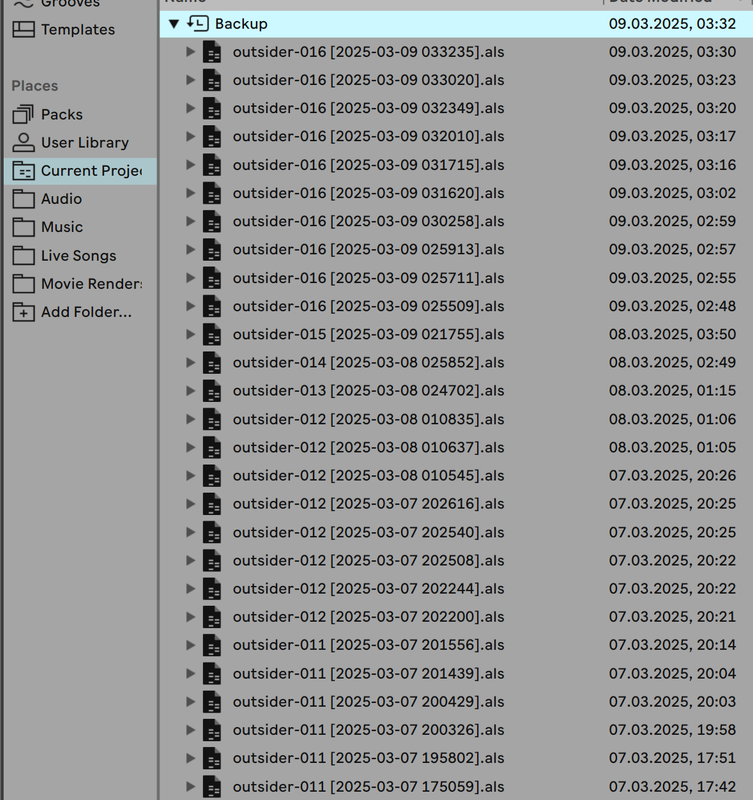
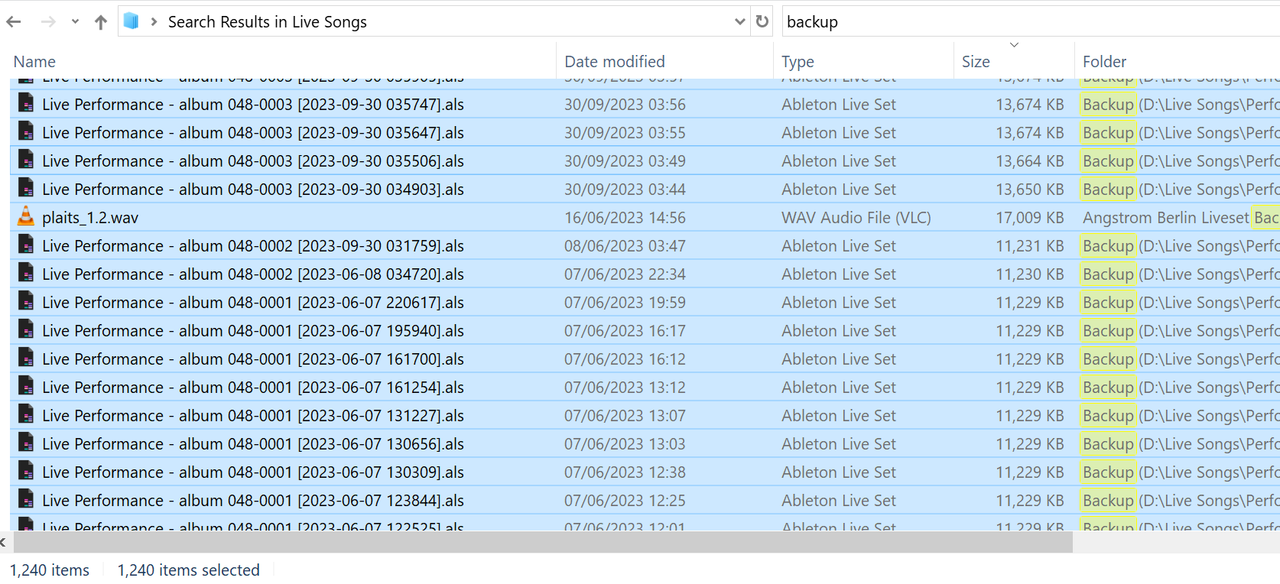
and if I search my Live songs drive for the word "Backup" I will see how many orphaned backups there are, and each of them will have a valid reference to a defunct media file or many files!
I clear them out every now and then, manually. But look how many I can generate . These are just the song files, the orphaned media for each of these is of course huge.
what I do every couple of years is kill all the dead forks, freeze, flatten, save as, then delete the backup folder then manage project to clean the resources folders, then save again .... for every song. One day I will automate this.
Re: Correct way to delete unused audio from Project?
Posted: Thu Mar 27, 2025 10:04 am
by cids
Ok, but these are relatively small files, they're not any unused samples...
Re: Correct way to delete unused audio from Project?
Posted: Thu Mar 27, 2025 12:31 pm
by Angstrom
cids wrote: ↑Thu Mar 27, 2025 10:04 am
Ok, but these are relatively small files, they're not any unused samples...
You missed my point. Each one of these is classed as an .als in a project
All als in a project which reference media files are used when calculating "unused media files"
When deleting unused media, if it is referenced in an undo/backup file, that media will not be deleted.
EXAMPLE
I start a new song, Newsong001.als
I accidentally record 8 hours of audio by mistake because my cat hit the button.
I stop the recording. Delete the recorded audio track. Leaving an empty als.
I immediately save that fixed song as Newsong002.als
I choose "manage project - remove unused media"
Outcome .... those 8 hours of audio will remain in the project.
Because... that massive audio file is still referenced in the "backup" folder. In those .als files.
Lastly-while the instigator als files individually are "small". 10 meg x 1,000 files = 10 gigabytes.
But my main issue is -
When deleting unused media, if it is referenced in an undo/backup file, that media will not be deleted.
Re: Correct way to delete unused audio from Project?
Posted: Thu Mar 27, 2025 3:05 pm
by cids
I've tested your scenario and the recording does show up as an unused file because you did not save the original one which included your cat's recording...
If you had saved that version, of course, the recording still needs to be there. Otherwise, the entire backup functionality would lose its purpose.