Need Need help outputting Midi mpe SLIDE values to midi port
Posted: Wed May 07, 2025 9:41 pm
Hello!
I'm trying to output MIDI MPE Slide values through a loopback MIDI port, but I'm having difficulties.
First, I'll say that I'm able to output every other MIDI value from Ableton that I could possibly dream of--MIDI CC messages, Program/Bank messages, Note On/Off, even MPE Pressure... But MPE Slide seems to have rules of its own.
Next, the specs of what I'm working with:
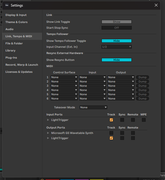
I've enabled the Track values in Link, Tempo, & MIDI for my MIDI port (called 'LightTrigger', see above), but despite doing this, MPE Slide values simply refuse to be output through my MIDI port. MPE Pressure values are displayed just fine however, taking the format of:
[160, <MIDI note value>, <MPE Pressure value>].
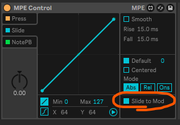
By using the built-in MPE Control M4L Device, I figured out how to force MPE Slide to put out a MIDI message for its corresponding note by checking the box "Slide to Mod". But in all honesty, I don't understand what that checkbox means, or why I have to do it this way??
See below:
And, unfortunately, for my use case I need the MPE Slide value output to precisely match what's specified in Live. In a somewhat random manner, certain Slide values are off by +-1 (so even when the Slide Curve is a straight line from 0 to 127, certain values are still being skewed as if there's an unseen 'curve' that I'm not able to straighten.)
Lastly I'll say that the MIDI Monitor appears to be capturing the accurate values that I need, so I know all this is possible, somehow...
So does anybody know what I'm missing, or what I need to do to output MPE Slide MIDI values to my MIDI port reliably?
I'm trying to output MIDI MPE Slide values through a loopback MIDI port, but I'm having difficulties.
First, I'll say that I'm able to output every other MIDI value from Ableton that I could possibly dream of--MIDI CC messages, Program/Bank messages, Note On/Off, even MPE Pressure... But MPE Slide seems to have rules of its own.
Next, the specs of what I'm working with:
- Ableton Live 12.1.11
- Windows 11
- LoopMIDI v1.0.16
- Expressive Choir by Spitfire Audio, as my MPE MIDI instrument pack https://www.ableton.com/en/packs/expressive-choir/
I've enabled the Track values in Link, Tempo, & MIDI for my MIDI port (called 'LightTrigger', see above), but despite doing this, MPE Slide values simply refuse to be output through my MIDI port. MPE Pressure values are displayed just fine however, taking the format of:
[160, <MIDI note value>, <MPE Pressure value>].
By using the built-in MPE Control M4L Device, I figured out how to force MPE Slide to put out a MIDI message for its corresponding note by checking the box "Slide to Mod". But in all honesty, I don't understand what that checkbox means, or why I have to do it this way??
See below:
And, unfortunately, for my use case I need the MPE Slide value output to precisely match what's specified in Live. In a somewhat random manner, certain Slide values are off by +-1 (so even when the Slide Curve is a straight line from 0 to 127, certain values are still being skewed as if there's an unseen 'curve' that I'm not able to straighten.)
Lastly I'll say that the MIDI Monitor appears to be capturing the accurate values that I need, so I know all this is possible, somehow...
So does anybody know what I'm missing, or what I need to do to output MPE Slide MIDI values to my MIDI port reliably?