Chain Select Doesn't Control Sequencer "Device On/Off" As Expected
Posted: Sat Feb 28, 2026 7:48 pm
Here's one to ponder:
In the section of the Live manual called Using the chain selector in a Rack there's a suggestion that DEVICE ON/OFF can be assigned to a Chain Select-mapped macro in order to conserve resources. Devices in any chain other than the currently-active one are actually switched off until their chain is selected.
The manual goes on to point out that it isn't really necessary to do this because inactive chains don't exert much resource demand, but you can do it if you want or need to.
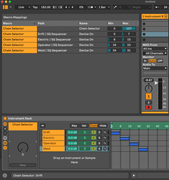
I applied the assignment technique as outlined in the manual in an instrument rack with 4 chains because I wanted to activate a unique SQ Sequencer on each chain -- the currently-active chain would have its own sequence, the sequencers on the other chains would be off. (It seems that all the sequencers on a track, if you have more than one, will run no matter what otherwise.)
However when I set up the assignments as per the manual, very strange things began to happen.
Two of the Sequencers never responded when their chains were selected, while the two others exhibited On / Off Behavior when the macro value was between 0 and... "more 0," I'd call it -- a part of the macro range at the higher end of the 0 value. Weird, right?
Unsurprisingly, it was rather tricky to find the "0 Sweet Spot" to get just the second sequencer running -- it couldn't be done consistently.
If the macro reached a value of 1, only the lowest-value assigned Sequencer was on even though it wasn't assigned to that value.
I had mapped these at first (as per the manual) to values of 1 and higher, although I did find that a bit odd in and of itself, since the first chain is the 0 chain.
When that didn't work, I tried the (to me, more logical) 0 and higher.
Still nutty.
Try it yourself and see what you get. It may be that sequencers are unique beasts that do not behave in this respect like your standard instrument or audio effect or whatever.
No drama attended this experiment -- it's not as if a project was going to live or die by it, I was just trying it to see if it would work because I recalled reading it in the manual and it would have been handy.
I didn't try applying the technique to anything other than the sequencers so I can't even report that it operates as described on other devices.
I love a mystery,
o99
In the section of the Live manual called Using the chain selector in a Rack there's a suggestion that DEVICE ON/OFF can be assigned to a Chain Select-mapped macro in order to conserve resources. Devices in any chain other than the currently-active one are actually switched off until their chain is selected.
The manual goes on to point out that it isn't really necessary to do this because inactive chains don't exert much resource demand, but you can do it if you want or need to.
I applied the assignment technique as outlined in the manual in an instrument rack with 4 chains because I wanted to activate a unique SQ Sequencer on each chain -- the currently-active chain would have its own sequence, the sequencers on the other chains would be off. (It seems that all the sequencers on a track, if you have more than one, will run no matter what otherwise.)
However when I set up the assignments as per the manual, very strange things began to happen.
Two of the Sequencers never responded when their chains were selected, while the two others exhibited On / Off Behavior when the macro value was between 0 and... "more 0," I'd call it -- a part of the macro range at the higher end of the 0 value. Weird, right?
Unsurprisingly, it was rather tricky to find the "0 Sweet Spot" to get just the second sequencer running -- it couldn't be done consistently.
If the macro reached a value of 1, only the lowest-value assigned Sequencer was on even though it wasn't assigned to that value.
I had mapped these at first (as per the manual) to values of 1 and higher, although I did find that a bit odd in and of itself, since the first chain is the 0 chain.
When that didn't work, I tried the (to me, more logical) 0 and higher.
Still nutty.
Try it yourself and see what you get. It may be that sequencers are unique beasts that do not behave in this respect like your standard instrument or audio effect or whatever.
No drama attended this experiment -- it's not as if a project was going to live or die by it, I was just trying it to see if it would work because I recalled reading it in the manual and it would have been handy.
I didn't try applying the technique to anything other than the sequencers so I can't even report that it operates as described on other devices.
I love a mystery,
o99