Page 1 of 1
External Hard Drives?
Posted: Tue Nov 21, 2006 8:21 pm
by pribeh_tom
Hey,
I've simply come to the conclusion (from what I've witnessed and been told) that Live 6 must be run with an external hard drive to store you're audio files (especially but not only) if you're working with a laptop. So I'm looking for one.
What do you guys recommend or what drives are you using?
Posted: Tue Nov 21, 2006 9:38 pm
by ARDJ
mmmm, i can't for the life of me figure out why you would think that... i run live off my laptops hd and keep most of my samples and what not on my external but only becaause i use that HD for my studio computer too.
i have this:
http://www.newegg.com/Product/Product.a ... 6822136003
with this:
http://www.newegg.com/Product/Product.a ... 6817145133
all the girls love the nexstar... you're going to want to get that.
Posted: Wed Nov 22, 2006 12:43 am
by Tone Deft
get the external for backing up your files but there's absolutely no requirement to run Live from an external drive. I have never heard of the problem you describe.
Posted: Wed Nov 22, 2006 12:59 am
by pribeh_tom
Sorry,
What I meant to say was that my (macbook pro's) internal 5200 rpm drive isn't fast enough to store my audio files on since Live 6 appears to access the hard drive a lot. I obviously use my internal hard drive to store applications. But I use a (dying) external drive to host all the audio files to reach lowest possible latencies (below 6).
Without using an external hard drive for audio files I can only set a buffer size somewhere above 256 samples reliably. I need a buffer size of at least half that and can only achieve that by providing Live with another drive simply for audio files.
Posted: Wed Nov 22, 2006 1:04 am
by Tone Deft
still might not be a problem, a latency under 50ms is acceptable, any more than that sucks, under 30 is good, under 20 is great, under 10 is godlike.
I use 5400 (it's 5400 or 7200, right? I think... anyway) rpm internal drives and rarely get drive errors, only when songs are still loading into a dj set and I start going from song to song before they've all loaded.
but anyway, firewire is supposed to be smoother because USB by nature bursts data. both have similar data throughput. for reliability, I have no clue, there are only a few mfgs. but they're put under different labels. Get one with a nice warranty, I guess.
Also, try an Apple computer forum.
Posted: Wed Nov 22, 2006 1:04 am
by pribeh_tom
Just to mention it,
I'm actually looking at a drive to provide as fast a rpm/connection as possible.
Currently the coolest looking and fastest drives I can find are the G-Drives.
http://www.g-technology.com/Products/G-DRIVE-mini.cfm
http://www.g-technology.com/Products/G-DRIVE.cfm
They're fast and quiet from what I've read, but pricey. I'm not sure if the smaller version would be slower. I'm so since its bus-powered.
Anybody else's opinion is appreciated.
Posted: Wed Nov 22, 2006 1:13 am
by ARDJ
i haven't had issues with any of my USB 2.0 drives in ableton, i use them for live performances as well
Posted: Wed Nov 22, 2006 2:48 am
by ikke
pribeh_tom wrote:Sorry,
What I meant to say was that my (macbook pro's) internal 5200 rpm drive isn't fast enough to store my audio files on since Live 6 appears to access the hard drive a lot. I obviously use my internal hard drive to store applications. But I use a (dying) external drive to host all the audio files to reach lowest possible latencies (below 6).
Without using an external hard drive for audio files I can only set a buffer size somewhere above 256 samples reliably. I need a buffer size of at least half that and can only achieve that by providing Live with another drive simply for audio files.
I use a 1600mhz PIV lappy with 256mb of ram and i use the onboard soundcard with asio4all driver version 1.8. I run everything from the internal 5xxxrpm HD. I have my buffersize at 128! ANd I can run heavy patches.. Loading into the memory is not a good idea for me though.
Who said pc with xp was not fast and reliable?

Posted: Wed Nov 22, 2006 2:57 am
by pribeh_tom
Hey Ikke,
I wouldn't 'dis your results. That's fabulous. I wish I could get those results. I'm going to try run Vista when it comes out to see if I can get better results. I just actually switched to using this macbook pro for live performance because I couldn't get any good results with my previous PC Laptops.
One thing is for sure. I don't understand how LIVE works.....
nor exactly how to get the best results with it yet.
what, where?
Posted: Wed Nov 22, 2006 3:50 am
by DJ Divine Justice
So what would you guys put where?
I would think to install apps directly on the comp and the have sample, audio libraries, and anything else extensive( or that may become so ) on an external.
Posted: Wed Nov 22, 2006 1:32 pm
by pribeh_tom
Divine,
That's what everyone recommends for me to do and I've been asking a lot of places.
check this...
Posted: Wed Nov 22, 2006 6:15 pm
by Niko
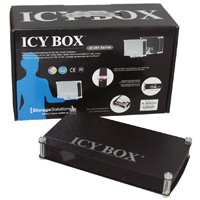
Save lots of money and get yourself a nice "ICY box" (about 50 euros).
After that buy yourself any hard disk you want (here you can choose up to 250 gig)...
Simply screw open the icy box, place the HD in it, connect it and have fun...
You can get a version with usb2 connection and one with firewire too.
Here's a link to give you guys an idea:
http://www.bigpockets.co.uk/site/images/HDD/ENC0030.jpg
Good luck!
Posted: Wed Nov 22, 2006 6:17 pm
by Creashinn
I can see having two seperate HD... Not everyone makes just music on there computer of choice. And not everyone has the latest in processing power or the ram to run ableton and cpu heavy plugins. So having a dedicated HD for your sample library would be a smart choice... I don't know what to recommend really, but look around.
Posted: Wed Nov 22, 2006 9:51 pm
by Michael-SW
Leave enough empty space on the internal drive (25% or so at least) and make sure it is defragged (not needed on Macs?).