Page 1 of 5

iMac or Macbook

Posted: Tue May 01, 2007 9:21 pm
by Amberience
Hi all! I'm a student studying music, just about to graduate this year, so I figured I'd take advantage of my student status whilst I still can.

I'm looking at the following:

iMac 17inch 1.83ghz 1GB RAM
160gb HDD 7200rpm
I can get this for £700.30 including the apple care extended warranty.

Macbook 13inch 1.83ghz 1GB RAM
80gb HDD 5400rpm
I estimate I can get this for £760-£780 including the apple care extended warranty.

--

Now. My questions are these:

Would hooking up a USB2.0 HDD spinning at 7200rpm to the Macbook, be as good as the internal HDD on the iMac in terms of track count and read speed?

Are there massive performance differences between the Macbook and iMac? They're the same CPU, same RAM, same combo drive. The only major difference is the hard drive.

I want this setup to record my band and to do an upcoming gig with. There could be more gigs in the future though too.

So it needs to be portable. The iMac is portable for the band, because my guitarist drives. But it isn't portable for the upcoming gig, because it is a long way away and I would have to struggle with a 2U rack size firewire interface also.

Am I going to suffer if I get the Macbook over the iMac?

1. I cannot afford the Macbook Pro.
2. I cannot afford 2 GB of ram.
3. I cannot afford a bigger internal hard disk, nor do I see the point - they all spin at 5400.
4. I could just about squeeze for an external hard disk, but I only see the point of doing that if it is acceptable in terms of track count. I want to record 8 tracks simultaneously.
5. I'm not worried about graphics or anything - this is a purchase that is only for music production.

My current AMD setup can record 8 tracks simutaneously easy. And it can playback at least 30 tracks with a compressor on each track.

This would be a brand new purchase, so I know that it would perform well in a lot of areas, but I want your opinions. This would be my first mac purchase, so I'm being careful. I don't want to get burnt.

Posted: Tue May 01, 2007 9:43 pm
by rbmonosylabik
If I had to do it all over again (and maybe I will have to in the near future, time to upgrade my computer is drawing near) and had to choose between those two, I'd go with the Macbook. Lugging around an iMac is no fun at all, specially if you don't have a proper small but resistant case for it.

I'm using a USB 2.0 external HD (laCie) for all my audio stuff (projects, samples, etc), and Live on my iMac seems to choke on audio way less often than when I was using it just with the internal HD partitioned.

The ideal thing would be for you to bring your gear along to test the computer before buying. Do some mean stuff to it and see if it can deal with it with the stock RAM. Also, getting third party RAM is cheaper than getting the Apple RAM.

Hope this helps.

Posted: Tue May 01, 2007 10:35 pm
by Amberience
rbmonosylabik wrote:If I had to do it all over again (and maybe I will have to in the near future, time to upgrade my computer is drawing near) and had to choose between those two, I'd go with the Macbook. Lugging around an iMac is no fun at all, specially if you don't have a proper small but resistant case for it.

I'm using a USB 2.0 external HD (laCie) for all my audio stuff (projects, samples, etc), and Live on my iMac seems to choke on audio way less often than when I was using it just with the internal HD partitioned.

The ideal thing would be for you to bring your gear along to test the computer before buying. Do some mean stuff to it and see if it can deal with it with the stock RAM. Also, getting third party RAM is cheaper than getting the Apple RAM.

Hope this helps.
Hmmm.. that would then mean that I would have to buy an external hard disk drive first. Would Apple mind me plugging in and messing around in store???

Posted: Tue May 01, 2007 10:46 pm
by hacktheplanet
Macbook.

Posted: Tue May 01, 2007 10:58 pm
by airconteka
I was faced with the same decision and I am glad I went the macbook route. You can get 7200 internal drives for it , mind you I opted for an external firewire drive and the 2 gig of ram is very affordable (about $us150). The portability is worth it however the screen size sucks so you might need to factor in a monitor as well.

Posted: Tue May 01, 2007 11:16 pm
by Amberience
Can you elaborate on why the screen sucks? Do you mean just the size of it?

Posted: Tue May 01, 2007 11:38 pm
by airconteka
yep the screen size, the screen itself looks great but if you are working with multiple windows you will get the shits pretty quickly.

Posted: Tue May 01, 2007 11:53 pm
by Amberience
I'm due a tax return this year, probably around £200. So I reckon I'll go for the Macbook. 1GB of ram initially, then if I need to I'll upgrade that later on.

I'm also looking at a Western Digital external HDD, which is £61 (inclusive of shipping)

Would work out great I reckon.

Posted: Wed May 02, 2007 11:19 am
by Amberience
So the Macbook price:

Image

The guy also said apart from the HDD difference, the graphic processor on the iMac is a little better than the Macbook, but because its just for audio, it's not that much of a problem..

Looks like what I'm going to do then is get the Macbook, and an external 7200rpm USB2 hdd.

Posted: Wed May 02, 2007 11:24 am
by beatpoet
I got a 2.0 c2d refurb macbook a few months back saved about 200 euro on the new one.

Check it out.

Posted: Wed May 02, 2007 4:39 pm
by MrTiddles
I'm gonna play devil's advocate here, and say the iMac. Purely because of the amount of punishment I've put through, and it takes up a lot less space when you're playing out too. I've got a photo of my setup on my Myspace if you fancy a butchers.

Posted: Wed May 02, 2007 4:42 pm
by b0unce
+1 for iMac

its my philosophy that you know if a laptop is the right choice. If you're unsure, you dont need one. imo.

much more bang-for-the-buck with an iMac, and a 17incher would be plenty portable for those times you need it to be.
http://www.ilugger.com/

Posted: Wed May 02, 2007 4:51 pm
by RhythmSickness
if you use usb 2.0 for sample based stuff you're going to bottleneck your system time and time again.
Firewire is always better as it is dedicated, and doesn't require any input from the system.
+1 for the iMac from me as well, just to be ornery

Posted: Wed May 02, 2007 4:59 pm
by Amberience
b0unce wrote:+1 for iMac

its my philosophy that you know if a laptop is the right choice. If you're unsure, you dont need one. imo.

much more bang-for-the-buck with an iMac, and a 17incher would be plenty portable for those times you need it to be.
http://www.ilugger.com/
£50 for the case, £50 for shipping. No f**king way I'm paying that.

My soundcard is firewire, so I'm only left with USB2.0 for audio. And USB2.0 is fast enough surely. Does anyone agree that I'm going to bottleneck my system??

Posted: Wed May 02, 2007 5:05 pm
by RhythmSickness
Image

Image
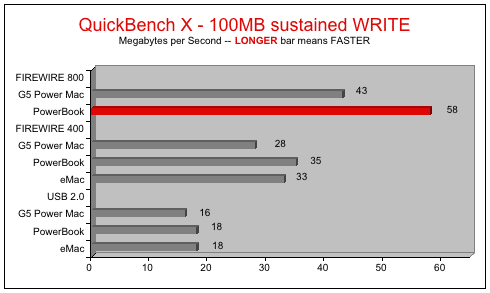
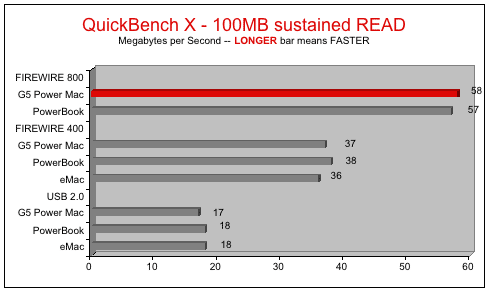
barefeats.com wrote: 1. USB 2.0 is much slower than FireWire 400 and 800. Apple states that the USB 2.0 ports on their Macs support transfer rates up to 480 megaBITS per second (Mbps), which translates to 60 megaBYTES per second (MB/s). The most we saw was 144 megaBITS per second or 18 megaBYTES per second.

Think about it. FireWire 400 is rated at 400 megaBITS per second (50 megaBYTES per second) -- 80 megaBITS slower rating than USB 2.0 -- yet when exact same drive/enclosure is plugged into the FireWire 400 port, it goes almost twice as fast!

You can't blame it on the drive, because, as you can see from the FireWire 800 tests, the drive is capable of transfer rates much higher. Some blame it on Apple's USB 2.0 drivers or the USB 2.0 bridge chips. I can't comment on that.