Page 1 of 1
7.03 .. where on earth is it taking its preferences from?
Posted: Thu Mar 27, 2008 1:56 am
by Angstrom
Hi,
where on earth is 7.03 taking its preferences from?
I have installed 7.03 and it installed the updates, but it decided to install the updates to my documents and settings folder. I never use that as my Library folder, I have a separate partition for it
I checked 7.01 and 7.02 ... both of those point to the correct location F:/Live library
7.03 decided it wanted to pollute my C drive all on its own ?
something odd there.
also, I have my control surfaces are all turned off in 7.02, to avoid nasty glitches.
In 7.03 they are active again ... this part seems to have come from the Live 7.01 preferences. Very strange.
I am uninstalling 7.03 to avoid this weird divergence, I don't fancy manually synching these two libraries.
Posted: Thu Mar 27, 2008 2:09 am
by Angstrom
Ok, I went for a second install and it now seems to have figured out where my library is.
but I am seeing a hell of a lot of these:

now, surely I shouldn't see these. There should be an automatic routine shouldnt there? Like : "if it's a newer file being installed then just replace it, else if it has changed on the disk then ask the user"
now, that particular file will
not have changed (so why ask me?). It is asking about every single file in my library.
I don't really want to "replace all", because there are a very few factory presets that have changed. Hmmm

I think I need to leave this install to another day.
Posted: Thu Mar 27, 2008 10:47 am
by stefanvdm
Hi Angstrom,
Sorry about this, obviously this is not what should happen, something went wrong here. 7.0.3 (as all other versions before) should use existing preferences and especially the Library specified there.
Certainly we tested all this and normally it works fine, can you therefore give me some more details about what exaclty happened?
- Which OS are you using?
- Did you use a 7.0.3beta in between 7.0.2 and 7.0.3? If so, did you use your Library at F: with the beta? Which beta versions? (7.0.3b2 and so on)
- In your first post you mention a Library at F:/Live library , the message box however mentions F:/Live6 library , is this a typo or are there two different folders? The latter name hints that this once was a Live6 library which was converted?
- After your first installation of 7.0.3, did you choose the library at F:\ in the preferences before uninstalling? If there are two different folders, which one?
Thanks,
Stefan
Posted: Thu Mar 27, 2008 1:24 pm
by Angstrom
stefanvdm wrote:
- Which OS are you using?
- Did you use a 7.0.3beta in between 7.0.2 and 7.0.3? If so, did you use your Library at F: with the beta? Which beta versions? (7.0.3b2 and so on)
- In your first post you mention a Library at F:/Live library , the message box however mentions F:/Live6 library , is this a typo or are there two different folders? The latter name hints that this once was a Live6 library which was converted?
- After your first installation of 7.0.3, did you choose the library at F:\ in the preferences before uninstalling? If there are two different folders, which one?
Thanks,
Stefan
Hi stefan,
- Did you use a 7.0.3beta
I used a 7.03 beta for a while, I used versions 7.03 b3 and 7.03 b4 , I am reasonably sure I had b5. I'm pretty sure that my Library was automatically at it's usual position with these betas, as I would have noticed the big empty list. Although I couldn't say this for certain.
I hadn't been using the betas recently, I was working in 7.02 during the last week.
- In your first post you mention a Library at F:/Live library
yes, I intentionally called it "Live Library" in my post to try and eliminate confusion. It is really called "Live 6 Library" for historic reasons ... and yes it was a converted Live 6 Library, that conversion happened way back during the L7a days.
7.01 and 7.02 both use the library at "F:/Live 6 Library"
After your first installation of 7.0.3, did you choose the library at F:\ in the preferences before uninstalling?
no, I didn't choose the correct library before uninstalling. I only looked at the path.
My process was something like this
- install 7.03 for the first time
- Live tells me I have no lessons or anything much, but then automatically leaps into action installing things. I notice the new lesson on session drums for example.
- I look at the L7.03 Live browser and wonder where everything was
- open preferences- 'installed packages' to see what was listed there
- open preferences and look at the path to see where the library might be.
- close L7.03
- open L7.02 to see what the correct path should be
- open L7.01 to see what the path was in there
- open L7.03 to look at the settings again - notice the controlsurface settings are not current. close L7.03
- open L7.02 to check that controlsurfaces are off, and they were.
- uninstall L7.03
- post on forum
- try for another install of L7.03
- receive the various 'overwrite' alert messages.
- uninstall
- turn off computer, go to bed, then wake up again (!)
- wonder if I had accidentally installed for "all users" instead of my usual"install only for me"
- re-install L7.03 "for all users" just to see what happens
- L7.03 is pointing at the correct Library, but does not attempt to update anything. It seems "all users " was not the issue.
- uninstall
- reinstall L7.03 with the option "install only for me"
- open it to see what happens
- lessons table of contents reads: "Live 7 Beta status and Change logs, L7 beta testing - things you should think about before testing ..."
The installer has now decided not to update the various packages, the lessons are from the beta.
I will send you the other information you asked for.
Posted: Thu Mar 27, 2008 2:49 pm
by Angstrom
just an image to show the strange version of 7.03 I seem to have created for myself. It has the lessons from the beta.
I have superimposed the Live 'about' screen.
The lessons page is accessed by clicking on "more lessons" , I think that's where the new Session Drums lesson should be listed

Posted: Thu Mar 27, 2008 3:02 pm
by stefanvdm
Most probably the issue was caused by the beta versions you were running in between. For safety reasons, 7.0.3 betas use a separate Library, which is located by default at My Documents\Ableton\BetaLibrary.
7.0.3 then continued to use this as default Library.
You can get rid of the Beta Lessons in the Preferences, and if you search for update packs there, you will find out whether there are any updates that were not installed and install them manually if you wish.
Hope this helps?
Stefan
Posted: Thu Mar 27, 2008 3:26 pm
by Angstrom
thanks,
I un-installed the "testing Live 7" lessons and the live pack "testing Live 7 Basics", and then I installed "Live 7 lessons" and the pack "Live 7 Basics" manually because they weren't installed automatically
This presented me with the "do you want to overwrite all these files" dialog shown in post #2.
So I just chose "yes overwrite them all" and I will wait and see what that has done.
Obviously the files were there but the pack somehow wasn't registered with Live 7.03
Posted: Thu Mar 27, 2008 3:34 pm
by Angstrom
actually it seems to have
no idea what packs I have installed.
look. Drum machines is both not-installed and installed.


this is the case for almost everything.
any idea what I should do here?
if I re-install everything will I double up all the files and then have to manually delete all the older ones .
I think I had better wait until I have a spare weekend until I upgrade to Live 7.03. I need to get a remix finished and this is frightening me.
Posted: Thu Mar 27, 2008 4:22 pm
by stefanvdm
I think the situation is as follows:
The packs are installed, you can see that in the browser. But they are an older version, and there are update packages available, which are correctly shown as "Not installed". If you select one, you can see the version number in the description below. If you choose "Install" for that pack, the update will be installed.
Posted: Thu Mar 27, 2008 4:44 pm
by Angstrom
Hmm,
right I see, so by "not installed " it actually means "not updated". I think there's quite a difference between those two phrases.
I was confused by the methodology and terminology there.
Even though I manually "searched for updates" and expected a list with text something like "there are updates for DrumMachines, do you want to update?"
instead I was simply faced with the same list I had just come from, so I thought that was a failed search. It was actually asking me to Uninstall something after that search!
Also the pack list with "uninstalled" items seems to reinforce the idea that the library has just broken. I suggest (at least) changing that text to "update available" ... if an update is available and a previous version is already installed.
Just to prove I'm not a complete idiot. here's what I saw. Take a look at Step 3 .. does that look like it is prompting me to an update action? It looks to me like it wants me to un-install Analog more than anything else!
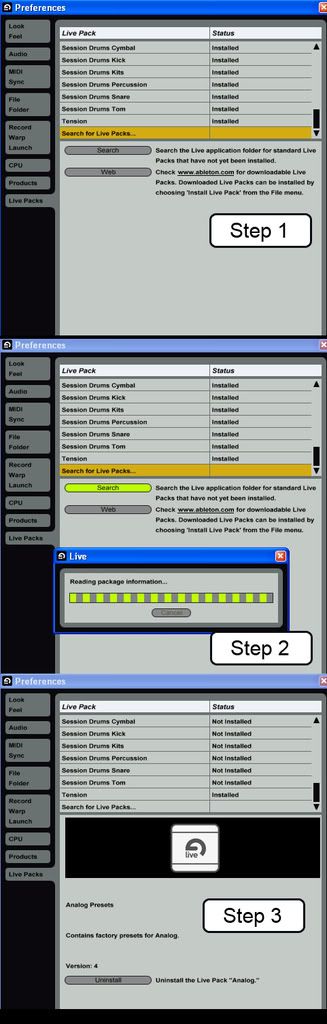
I guess I was thrown off balance by the previous stages of trying to get 7.03 to install with a library. I think I can manage from here.
well, Ill go back to 7.02 now and continue what I was doing. I will apply this update later.
thanks Stefan.
Posted: Fri Mar 28, 2008 4:08 pm
by stefanvdm
Thanks for the detailed report, this is indeed a little bit strange.
The information displayed on this page will be more understandable in the next Bugfix-Release.
Stefan
Posted: Fri Mar 28, 2008 5:49 pm
by jonny72
On the subject of the factory Live Packs, where is the correct place to download them from and to ensure you've got the latest versions?
I thought it was here:
http://www.ableton.com/livepacks
But either the text on that page is wrong, or it hasn't been updated with the latest versions of the Live Packs. For example; I've got Analog v4 whilst the download page says v1, I've got Electric v5 with v1 listed on the download page. Plus the Drum Machines aren't listed on the download page at all.
I'm sure I've downloaded from another page before but I can't navigate to it now.
Finally, does the Check For Updates check Live Packs as well as the main application?
Posted: Fri Mar 28, 2008 6:42 pm
by stefanvdm
Some of the package updates are included in the application update, they are not available separately.
If you download and install 7.0.3 you get some package updates included with it.
This is due to the fact that some of the newer package versions would not work or at least not work well with an older version of Live.