Page 1 of 3
Targus Numeric Keypad as Controller?
Posted: Fri Oct 24, 2008 1:36 am
by fmpfilms
Ok, so most of us have seen this:
 http://createdigitalmusic.com/2006/11/2 ... eton-live/
But what about this?:
 http://www.targus.com/us/product_Detail ... KU=PAUK10U
Same principle, but on a smaller scale. I feel like it would be useful for triggering scenes or effects. For what I do, I think it would be perfect, especially since it gives me 2 more USB ports. They're fairly expensive for such a simple unit IMO, but maybe there's an alternative product out there that's basically the same thing. I'm going to do some more research. What do you guys think?
Posted: Fri Oct 24, 2008 2:18 am
by Mike Goodwin
I have been toying around with the idea of even hacking and rebuilding the guts of a keyboard for use with Live or Traktor. Does this little keypad have usb ports on the back of it? If so that would be pretty slick. You could put your handy dandy led lamp over it and place it where you need it. If you bought it from faderfox it would cost $200 im sure.
Posted: Fri Oct 24, 2008 3:06 am
by fmpfilms

+1
And since we're on the subject...
Posted: Fri Oct 24, 2008 3:35 am
by fmpfilms
And since we're on the subject. We should really start using these:
http://www.plum.bz/
25 bucks.

It's like a monome with no lights. I'm fine with that.
Posted: Fri Oct 24, 2008 4:02 am
by kaffein
I you want to stick with qwerty or dvorak...
http://www.typematrix.com/
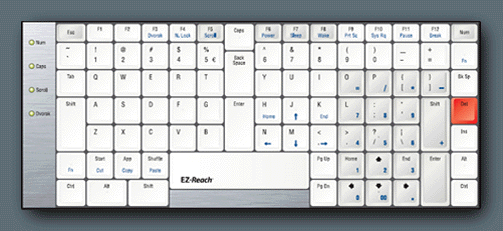
USB one coming soon...
Posted: Fri Oct 24, 2008 4:13 am
by kaffein
I've looked into point of sale keyboards in the past and found some interesting options...
Programmable 16key 100$ ( if only midi sequencer data could be sent to it with LEDs XD )
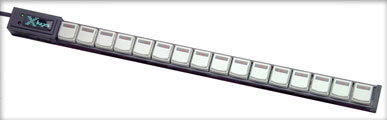 http://www.fentek-ind.com/xks16.htm
20 key programmable
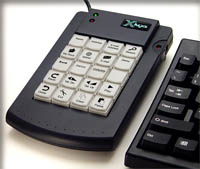 http://www.fentek-ind.com/keypad.htm#kp20xd
I've also seen a 16x16 point of sale keyboard in the past... All blank keys. If anyone has seen it please post.

Posted: Fri Oct 24, 2008 9:05 am
by Kirb

Here's mine; I've been using it for a while, and it's definitely convenient while making beats with my mpc and drumracks to have dedicated common commands, especially for 10 bucks.
Posted: Fri Oct 24, 2008 9:35 am
by logic_user99
+1 for 'best thread of the day so far'
@Kirb - do you use that little jigger for editing your 'played' beats, or maybe even for programming them by hand? Hmm...
@fmpfilms - SOLD! I can't see how it could be any use a keyboard for typing, but as a controller (with a copy of ControllerMate) that thing's be pretty much priceless, no?
I needs to get me some of this custom-keyboard action, although I've already got FAR too many controlly bits and bobs on my desk (Nocturn, USB gamepad, 49 key controller, Oxygen

.
When using an 'extra' USB keyboard like one of the above products, would it overide my Mac's laptop keyboard? I'd hate to have 'spacebar issues' mid-set... If it'll work independently, I'm going to have one of those 'PLUM' boads I think.
Posted: Fri Oct 24, 2008 10:22 am
by Kirb
Hey Logic_user,
When I'm building layered beats/rhythms with my mpc triggering drumracks, I find I often want to turn Overdub on/off, turn the metronome on and off, maybe tap a new tempo, etc. So I used a labelmaker to 'dedicate' those commands (plus some others) to keys. I have a Remote Zero also, but I find I like to use that for 'song-specific' commands and shortcuts (as far as its assignable buttons go), and my usb 10-key for stuff that stays the same song to song.
I use pc's but I'm pretty sure that OSX sees every usb keyboard as an independent unit. That Plum board does look tasty.
Posted: Fri Oct 24, 2008 10:33 am
by ghast
Wow! I'm gonna go ahead and order the plum. I would love to see it work in addition to my existing keyboard, instead of replacing it. Surely, there must be some sort of utiliity out there to allow this. Perhaps some kind of usb editor (PC). Maybe, even some way to convert it to a midi device?
Posted: Fri Oct 24, 2008 3:41 pm
by monkeyboy
ghast wrote:Wow! I'm gonna go ahead and order the plum. I would love to see it work in addition to my existing keyboard, instead of replacing it. Surely, there must be some sort of utiliity out there to allow this. Perhaps some kind of usb editor (PC). Maybe, even some way to convert it to a midi device?
Why not tape down the Caps lock key on the plum keyboard. Voila - 2x your number of keys (unless I'm missing something?)
Posted: Fri Oct 24, 2008 4:38 pm
by robotsound
i use one of those USB game pad things for your left hand with all the buttons and scenes and hat switches and stuff. very handy.
Posted: Fri Oct 24, 2008 5:57 pm
by Mike Goodwin
fmpfilms wrote:
+1
Sexy!
Re: And since we're on the subject...
Posted: Fri Oct 24, 2008 6:01 pm
by Mike Goodwin
fmpfilms wrote:And since we're on the subject. We should really start using these:
http://www.plum.bz/
25 bucks.
It's like a monome with no lights. I'm fine with that.
SEXY SEXY!
Posted: Fri Oct 24, 2008 6:04 pm
by globalgoon
the problem with keyboards is that if you press more than 4 keys simultaneously, only 4 will be recognised. For some (the x keys) only 1 key will be recognised out of those multiple keys you pressed!!