[SHARE] Full DJ Template Isotonik 4.3

Learn about building and using Max for Live devices.
S4racen
Posts: 5987
Joined: Fri Aug 24, 2007 4:08 pm
Location: Dunstable
Contact:

Re: [UPDATE 4] Control Clip 2.4 Updated...

Post by S4racen » Sun Jan 10, 2010 12:03 am

Update 5:

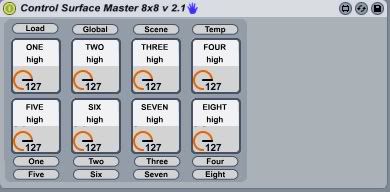
Having now learnt the beauty of snap to grid and bpatchers i've relooked at my control surface device and redone it from scratch so as to avoid any conflicts and tidied things up nicely....

Image

http://www.maxforlive.com/library/device.php?id=115

It's now being added into my tidied up main patch but sits very well as a patch on it's own if you have 8 knobs lying around doing nothing....

Cheers

D

S4racen
Posts: 5987
Joined: Fri Aug 24, 2007 4:08 pm
Location: Dunstable
Contact:

Re: [UPDATE 5] You don't need an APC40 (M4L)...

Post by S4racen » Sun Jan 10, 2010 7:59 am

http://darrencowley.blogspot.com/2010/0 ... asics.html

Demonstrates how using gswitches within a patch can dramaticaly reduce the number of midi controls you need to map complicated patches....

Updates to the patch:

Shift functionality added within the patch, map a midi button to this and you have doubled the amount of control you can have over the patch without the need for any midi translating or using up additional cc's

Finished a scene of Gaters (thanks JuanSOLO for the idea) that work with the new shift functionality

Created a virtual knob that assigns itself within the patch to whatever scene is in focus

Removed the Control surface knobs for now as these can sit seperately anyway....

Cheers
D

S4racen
Posts: 5987
Joined: Fri Aug 24, 2007 4:08 pm
Location: Dunstable
Contact:

Re: [UPDATE 5] You don't need an APC40 (M4L)...

Post by S4racen » Wed Jan 13, 2010 12:07 am

Update 5:

Now online for download

UPDATE: 6

http://www.maxforlive.com/library/device.php?id=137

Now mappable through midi to a nanokontrol, in fact anything with a bank of 16 buttons to play the effects and choose the track and then 5 buttons to select scene, 1 shift button and 3 more buttons.... so that's 25 buttons.... (and the nanoKontrol only has 24 so i had to map one effect button to fader number 9)

Added the ability (thanks to JuanSOLO for the idea) to change the size of the slices in the beatjumps, a bank of gaters to cut the sound rhythmically and some rudimentary beatrepeat stuff.......

Cheers
D

ps i'm a way off of the number one download on max4live.com! Help!!

S4racen
Posts: 5987
Joined: Fri Aug 24, 2007 4:08 pm
Location: Dunstable
Contact:

Re: [UPDATE 5] You don't need an APC40 (M4L)...

Post by S4racen » Wed Jan 13, 2010 6:54 pm

All good to get now!!

Cheers
D

jon_moore
Posts: 320
Joined: Thu Oct 23, 2008 4:50 pm

Re: [UPDATE 5] You don't need an APC40 (M4L)...

Post by jon_moore » Thu Jan 14, 2010 4:05 pm

Top work Darren. Appreciated.
JM

http://leftside-wobble.blogspot.com/

MacBook Pro 2.8 (10.5.6)

S4racen
Posts: 5987
Joined: Fri Aug 24, 2007 4:08 pm
Location: Dunstable
Contact:

Re: [UPDATE 6] APC40 Control Surface - DJ Edition

Post by S4racen » Tue Jan 26, 2010 11:49 pm

Update 6:

Things are much clearer now i've plugged the apc in and learnt how to listen and disable some of it's controls

Image

User Guide
1. Top row of controls are mapped to stop buttons of APC40
2. Left hand rack is the numbered paramter of the device in focus across the first 8 tracks
3. Right Hand rack is control over the choice of the rack number (far right) in this track, up to five racks can be placed before it
4. Boxes in middle, from left....
Left Box.... Mapped to Activate, Cue and Record Arm buttons on APC, oblong toggles are switches, bottom buttons are available when shift is lit
(metronome buttton is shift) different controls per scene as below
Middle box.... Map the Load Button to something (i use the tap tempo button) or add a keystroke to it, do this for every instance of the device so all load
at once
The number box shows the display of the scene that your in control of, this is temporary until i can provide visual feedback to the APC40's scene launch
buttons
Knob below Load button is mapped to the Cue Level Knob and it's function changes per scene with a shifted function for each (detailed below)
Live Slider is as yet unused (details below of development plans)
Right Box... Currrently shows (when shifted) the scene that is in control by name and those available, until the scene launch buttons can be disabled on
their own in standard mode i'm unable to add the extra functionality i'd planned as these are reserved for additional audieffects that complement the
functionality of the rest of the scenes controls


Scene One

Stop Buttons = Display playing status of track and update the lights on the APC40
Activate = Standard Mapping
Cue = Standard Mapping
Rec / Arm = Standard Mapping
Cue Level = Standard Mapping

Scene One Shifted

Stop Buttons = Clip Launch Quantization with update of lights on APC40
Activate = Not yet active, ignore the labels, answers on a postcard for best use
Cue = Standard Mapping
Rec / Arm = Not yet active
Cue Level = Not Yet Active

Image

Scene Two

Stop Buttons = Loop control, turn off set a 1, 2 or 4 bar loop, manually set a loop or halve or double a loop that's been set down to a 1 beat loop
Activate = Not yet Active
Cue = Standard Mapping
Rec / Arm = Not Yet Active
Cue Level = Not Yet Active

Image

Scene Two Shifted

Stop Buttons
1, Follow Action behaviour, play again or play below which kicks in at 1 beat before the end of the clip so works down to 1/4 quantization, this allows you to muck about with loops yet know that your clip will trigger the next clip to play at the right time rather than half way through the loop you were in if you currently use follow actions
2, Entitled Clip as i wanted to have this button bring the focus of the clip into view and then float the patch as a floating window, press again and your back to see the device (some way off doing this)
3,4,5 select the sends that can be punched in below
6,7, 8, Choose Crossfader assign position

Activator / Cue / Rec Arm all act as punches for the sends displayed on the buttons themselves, think of having a ping pong delay that's filtered to fvck but with a large level of feedback for some sonic business... (i'll be working on my sends as a result of this device as i've never given them enough attention

Cue Level = Not yet Active

Image

Scene Three

Stop Clip Buttons = each corresponds to the pro-rated position in the clip, you haver the choice of the buttons representing 1/4 slices capturing two bars or 1/8 slices capturing just one bar. The metronome lights flash across the APC40. The red highlighted button is the slice glitch size, down to 1/64th. Pressing plays the slice at the size chosen, let go and the audio returns to where it would have been like the slip mode of the CDJ900. When holding a slice playing and moving the Cue Level knob the glitch will change in size, when moving between slices but letting go of the first chosen slice will not end the slice your playing (convoluted explanation, best just press the buttons and see ow it plays, then get crazy with the cue level knob)

Image

Scene Three Shifted

Currently only chooses whether you're dealing with a one bar or two bar capture of audio, the cue level however controls the smoothing effect on the slices which can subtly change the effect based on the audio you are slicing


Things to do.....

1,Disable the scene launch buttons in the standard mode so that 5 banks of new controls can be added
2, Reverser that works on the stop all clips button
3, Reset left hand device on master track select and right hand device on shift plus master track select button
4, Navigation of browser with scene number five on the shifted stop buttons
5, Onerownome on scene 3
6, Shift functionality of scene 3, 4... Suggestions please?
7, Disable and take control of Master Volume control giving both knob and fader functiopnality per scene for effects
8, Add functionality in this area so user can dial in reset values for devices avoiding need to dig into patch to locate the message boxes
9, Give visual feedback on the scene launch buttons of which scene is in control

As you can see i've got a fair bit to do but i've also got a fair bit that has yet to be defined so i'm more than grateful if anyone would like to contribute deas to what the controls may be assigned to....

Cheers
D
Jaju
Posts: 30
Joined: Tue Jul 05, 2005 7:04 pm
Location: Denmark

Re: [UPDATE 6] APC40 Control Surface - DJ Edition

Post by Jaju » Wed Jan 27, 2010 9:36 am

wow you're moving fast! This is becoming a controllerist revolution :-)

S4racen
Posts: 5987
Joined: Fri Aug 24, 2007 4:08 pm
Location: Dunstable
Contact:

Re: [UPDATE 6] APC40 Control Surface - DJ Edition

Post by S4racen » Wed Jan 27, 2010 1:19 pm

Cheers man,

Just devised an emergency button, when selected a loop length 1, 2 or 4 will kick in at the end of the clip if the clip below (and that is chosen as the follow method) is a blank space... I often find if i'm getting crried away on a longer clip that i haven't set a loop on, when it ends and nothing is below for the follow action it takes me a second to catch on and the obvious reduction in audio is unwanted.....

Any other ideas people?

Cheers
D

technog0d
Posts: 265
Joined: Mon May 26, 2008 1:14 pm
Location: Philly
Contact:

Re: [UPDATE 6] APC40 Control Surface - DJ Edition

Post by technog0d » Wed Jan 27, 2010 1:54 pm

Darren,

Good stuff! Now we just need video to see how it works in action.

Mike
Websites:
Max For Live Community site:
http://www.max4live.info
http://www.noisemakers.info

Controllers: Lemur, Ohm 64, Monome, APC40, Launchpad
Daw: Live 8 Suite
Audio Interfaces: Apogee Ensemble & Duet
Monitors: JBL LSR 4300

S4racen
Posts: 5987
Joined: Fri Aug 24, 2007 4:08 pm
Location: Dunstable
Contact:

Re: [UPDATE 6] APC40 Control Surface - DJ Edition

Post by S4racen » Wed Jan 27, 2010 2:08 pm

Bought a webcam at the weekend for that very purpose... Coming Soon!

Cheers
D

S4racen
Posts: 5987
Joined: Fri Aug 24, 2007 4:08 pm
Location: Dunstable
Contact:

Re: [UPDATE 6] APC40 Control Surface - DJ Edition

Post by S4racen » Thu Jan 28, 2010 1:58 pm


S4racen
Posts: 5987
Joined: Fri Aug 24, 2007 4:08 pm
Location: Dunstable
Contact:

Re: [UPDATE 6] APC40 Control Surface - DJ Edition

Post by S4racen » Thu Jan 28, 2010 11:27 pm

You'll need this file http://www.maxforlive.com/library/device.php?id=199 if you want the device on more than one track, the original acts as the master and can have the 8 knobs to the left midi mapped and then for the other tracks insert a slave version so that you don't get glitchy feedback on the effects your controlling....

Cheers
D

S4racen
Posts: 5987
Joined: Fri Aug 24, 2007 4:08 pm
Location: Dunstable
Contact:

Re: [UPDATE 6] APC40 Control Surface - DJ Edition

Post by S4racen » Sat Jan 30, 2010 10:24 pm

http://darrencowley.blogspot.com/2010/0 ... -this.html

New Video, scene three with the beatjumping is finished.....

Off to play with some beatrepeat style effects....

Cheers
D

Jaju
Posts: 30
Joined: Tue Jul 05, 2005 7:04 pm
Location: Denmark

Re: [UPDATE 6] APC40 Control Surface - DJ Edition

Post by Jaju » Sat Jan 30, 2010 11:31 pm

Looks more and more wicked! Still don't have an apc to try it out though :-(

I'm thinking that it would be really interesting if you were able select more than one track at the same time and in doing so would communicate with all the 'APC Control Surface' patches on these tracks at once – so your gestures on the apc would effect all these selected tracks. I don't know how you handle the mapping in you patch, so I don't know if this would be difficult to implement or not, but I do think it would be hella cool to be able to dynamically select one or more tracks for manipulation at any time!

Sincerely Janus

S4racen
Posts: 5987
Joined: Fri Aug 24, 2007 4:08 pm
Location: Dunstable
Contact:

Re: [UPDATE 6] APC40 Control Surface - DJ Edition

Post by S4racen » Sun Jan 31, 2010 1:26 am

You can only blue hand one device at a time hence the solution with the left hand rack, if you wanted to group together a number of tracks though you could do so through sends that bounce back to an audio track with another device sitting upon it.... (you'd obviously lose the looping abitlity though as there'd be no clip in the track....

It's just the stop clip buttons that are specific to being in focus at the time and some like the quantization are global anyway....

As i'm using it more and more i'm thinking of new ways to configure things, and given the modular approach i took in building it, modifications are relatively easy.... If only i could disable the scene launch buttons!!

Cheers
D

Post Reply