Multiple Track Performance/Midi Splitting Ideas 4 Live Sets
Multiple Track Performance/Midi Splitting Ideas 4 Live Sets
Does anyone have any good ideas on different set ups for live performance where the performance settings change from track to track? For example, I use a Novation Remote SL. In a live show I might perform any number of tracks. I use multiple hardware and soft synths/samples and also use midi to trigger patches and visuals. I use the racks in Ableton to split key zones so I can play different sounds from various sources on the same keyboard. I then use Automap to control whatever synths/soft synths/samplers I want. I change the midi channel on my Remote SL and have a midi channel assigned to each track (that midi channel then split to various synths within Ableton e.g. Midi Channel 1 might be C0 - B1 = Kontakt, C1 - B3 = Nord Lead, C4 - C6 = MicroKorg). That means using one midi channel on the Remote SL and setting up 3 midi channels for just one track. The problem with this method is that I can only use 16 channels (Which will cover 16 tracks but my band has a lot more than 16 tracks) and it means having a lot of midi channels (over 30 midi channels for routing). What I'm looking for solutions to would be a way of having different presets for tracks so that I could then just change a preset for a performance rather than selecting between 1-16 midi channels. Is it possible to do this with a rack? Maybe have different templates depending on what track is being performed where you can split the midi to different key zones and send it out on different channels with just one midi channels per synth/soft synth/sampler (I could get away with only using about 8 midi channels this way)? I want to be able to set presets up for performing any track in our catalogue rather than being limited to a maximum of 16 tracks. I thought about just loading different Live sets per song but I want to be removed from my laptop as much as possible and don;t want the time lag of loading different sets between songs. What does everyone else do?
Re: Multiple Track Performance/Midi Splitting Ideas 4 Live Sets
Have you looked into programming your setup via arrangement presets on your Novation Remote SL instead of within Ableton Live?
Re: Multiple Track Performance/Midi Splitting Ideas 4 Live Sets
I have thought about that but it sort of defeats the point of having Automap and having access to control whatever synth/effect I want whenever. Thanks for the reply though.
Re: Multiple Track Performance/Midi Splitting Ideas 4 Live Sets
Racks have the chain selector. Basically you could assign up to 127 different preset 'setups' in one channel that you could switch amongst at the turn of a knob. You can automate the knob turn in arrangement view, or make the clips set to + or - relative increments of the current position.
If you were to assign a knob I would suggest it be a rotary encorder that has clicks. Or assign to two buttons (one + and one -). At the very worst, assigned to several buttons (each assigned to a position of the knob).
The chain selector can be found when you expand the key region of a Rack, above the keys you can drag the slider around and it selects different parts of the chain.
To assign a layer of the rack to the chain, you just move/expand a section under the region that you'd wan it selected for.
You can assign this to either macro knobs or just a straight up MIDI assign.
If you were to assign a knob I would suggest it be a rotary encorder that has clicks. Or assign to two buttons (one + and one -). At the very worst, assigned to several buttons (each assigned to a position of the knob).
The chain selector can be found when you expand the key region of a Rack, above the keys you can drag the slider around and it selects different parts of the chain.
To assign a layer of the rack to the chain, you just move/expand a section under the region that you'd wan it selected for.
You can assign this to either macro knobs or just a straight up MIDI assign.
Re: Multiple Track Performance/Midi Splitting Ideas 4 Live Sets
Thanks. I actually just figured that out for myself today. It is very useful. I wonder if there is a way to select the necessary chain using a midi clip? I've been trying but it doesn't seem to work. Possibly something buggy with it though (At the moment macro knob 1 doesn't seem to assign properly though number 2 does. Weird?) I'll keep at it. My ideal would be to be able to trigger a track along with visuals and synth patches by launching a scene. I'm very close, just one or two more hurdles.
Re: Multiple Track Performance/Midi Splitting Ideas 4 Live Sets
You can trigger via midi clip, as long as you keep in mind that it is relative to whatever position the knob is at  Also, I think the clip has to constantly be playing. (to avoid it recording audio you can turn off the overdub). Not sure if you are aware of this but the easiest way to jump to the parameter to edit is to click the knob, then go right to the clip properties and it should already be selected for editing.
And that 1st knob business is very fishy. best of luck
Also, I think the clip has to constantly be playing. (to avoid it recording audio you can turn off the overdub). Not sure if you are aware of this but the easiest way to jump to the parameter to edit is to click the knob, then go right to the clip properties and it should already be selected for editing.And that 1st knob business is very fishy. best of luck
-
outershpongolia
- Posts: 2230
- Joined: Wed Dec 31, 2008 8:40 am
Re: Multiple Track Performance/Midi Splitting Ideas 4 Live Sets
Absolute values for the chain selector would be incredibly useful in my setup..yur2die4 wrote:You can trigger via midi clip, as long as you keep in mind that it is relative to whatever position the knob is at
And that 1st knob business is very fishy. best of luck
EDIT: (as far as clip envelopes go)
Re: Multiple Track Performance/Midi Splitting Ideas 4 Live Sets
Yes, I did figure out how to select a chain using a midi clip. It works fine but took me a while to figure out why nothing was happening. After I put the value up to full I realised it it a percentage of the total value that's selected so if its left at 0 then any percent of 0 is still 0. At least I think thats what's going on. I have it doing what I want which is the main thing. Thanks for the advice guys. Anymore ideas? Keep them coming!
-
outershpongolia
- Posts: 2230
- Joined: Wed Dec 31, 2008 8:40 am
Re: Multiple Track Performance/Midi Splitting Ideas 4 Live Sets
If you make clips to swtich around the chain selector you need to make sure that the real chain is set at 0, then all of your +(chain)'s will work in the clips.. So basically if you use the automated way of switching chains with clips, you can't do it manually throughout your set or you'll mess up what the clips are going to do.. if you catch my drift.
-
Pitch Black
- Posts: 6722
- Joined: Sat Dec 21, 2002 2:18 am
- Location: New Zealand
- Contact:
Re: Multiple Track Performance/Midi Splitting Ideas 4 Live Sets
FWIW, I have buttons on my Novation ReMote61 set to transmit absolute-values for the chain selector. I assign the button to the CC that the chain selector is mapped to, then set the Minimum and Maximum limits for the button at the same (desired) value inside the ReMote. It means the same button always selects the same chain with none of that "relative" crap...
In the pic below I have one chain per song, selected by pushing one of the Remote's 24 programmable buttons.
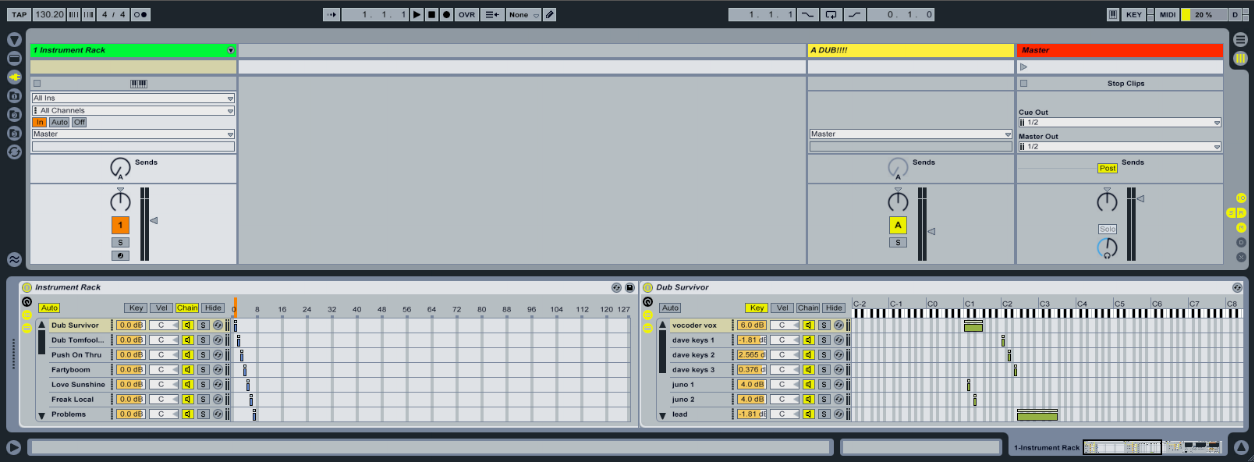
In the pic below I have one chain per song, selected by pushing one of the Remote's 24 programmable buttons.
MBP M1Max | Sonoma 14.7 | Live 12.1 | Babyface Pro FS | Push 3T | clump of controllers
Soundcloud
Ableton Certified Trainer
Soundcloud
Ableton Certified Trainer
-
outershpongolia
- Posts: 2230
- Joined: Wed Dec 31, 2008 8:40 am
Re: Multiple Track Performance/Midi Splitting Ideas 4 Live Sets
^ Oh yeah, that's how I did it in the first place.
You can't do that AND use clips to select them UNLESS you always "zero out" where you're chain selector is..
So, say you're at 0, and you make all your chainselect clips according to that, if you then mess around manually you won't be in the right place when those clilps are launced unless you always go back to 0. Is that makin' any sense?
Either way i've sorted it out for my own purposes, i'm just using the clips to switch instruments, so I can have a synth or bass to mess around with at all times, and not have to worry about changin them..
You can't do that AND use clips to select them UNLESS you always "zero out" where you're chain selector is..
So, say you're at 0, and you make all your chainselect clips according to that, if you then mess around manually you won't be in the right place when those clilps are launced unless you always go back to 0. Is that makin' any sense?
Either way i've sorted it out for my own purposes, i'm just using the clips to switch instruments, so I can have a synth or bass to mess around with at all times, and not have to worry about changin them..
Re: Multiple Track Performance/Midi Splitting Ideas 4 Live Sets
Yes, thats making sense to me. I actually assigned the chain selector to a Macro knob first so I'm automating the Macro knob which means that the knob must be kept turned fully on in order for the right chain to be selected. I might play about with automating the chain selector itself next to see what I come up with.
Pitch Black - I saw you give a demo on Ableton in Dublin. It was great to see. Just wondering if you or anyone has come up with an ideal way of using a Remote SL with Live? I prefer using Automap Universal mode so I can control plug ins. I would be nice to able to control Ableton too though but I just don't like the restricted set up Automap takes on with Live, both practically and in terms of how Ableton seem to be very closed about how they let people use their software (reminds me of Apple's approach with the iPhone apps).
Pitch Black - I saw you give a demo on Ableton in Dublin. It was great to see. Just wondering if you or anyone has come up with an ideal way of using a Remote SL with Live? I prefer using Automap Universal mode so I can control plug ins. I would be nice to able to control Ableton too though but I just don't like the restricted set up Automap takes on with Live, both practically and in terms of how Ableton seem to be very closed about how they let people use their software (reminds me of Apple's approach with the iPhone apps).
-
Pitch Black
- Posts: 6722
- Joined: Sat Dec 21, 2002 2:18 am
- Location: New Zealand
- Contact:
Re: Multiple Track Performance/Midi Splitting Ideas 4 Live Sets
Hey Derek - cheers! I'm afraid to say I don't use Automap at all. I either just assign things on the fly as needed in the studio, or pre-assign the things I know I want to modulate live. I'm happy not to have all the options available at any time (which would require looking at the screen, which is a no-no for me for performing) I suppose the stock answer would be: M4L? One of the big ideas of Max for Live, it seems to me, is that you can create the controller<->Live interface you want.
MBP M1Max | Sonoma 14.7 | Live 12.1 | Babyface Pro FS | Push 3T | clump of controllers
Soundcloud
Ableton Certified Trainer
Soundcloud
Ableton Certified Trainer
Re: Multiple Track Performance/Midi Splitting Ideas 4 Live Sets
Besides using the Automap, have you played with the User Remote Scripts? You can make up to 6 surface control settings that allow you to automatically control macro knobs when you select-highlight the instrument/fx. It also allows you to to a controller. I find it to be very convenient. Particularly the idea that you can have more than one. It is the same concept as the 8 Device Control knobs on the APC40.
Re: Multiple Track Performance/Midi Splitting Ideas 4 Live Sets
I haven't delved into the remote scripts too much. I have read about them and have seen what others have done for the Nocturn and the Korg controllers. It looks interesting. I may look into it and see if I can find a detailed how to and write something for the Remote SL. I keep holding out for Ableton and Novation to fully integrate Automap into Live. I'd be a very happy guy if that happened.