Multiple Track Performance/Midi Splitting Ideas 4 Live Sets

Share your favorite Ableton Live tips, tricks, and techniques.
yur2die4
Posts: 7333
Joined: Sat Oct 03, 2009 3:02 am
Location: Menasha, Wisconsin
Contact:

Re: Multiple Track Performance/Midi Splitting Ideas 4 Live Sets

Post by yur2die4 » Thu Feb 18, 2010 2:07 am

Well, for when you get around to trying that out, I always refer people to this link :)

http://createdigitalmusic.com/2009/07/2 ... s-control/

The surface control stuff really helps my workflow.

DerekC
Posts: 49
Joined: Tue Oct 09, 2007 9:28 pm
Location: Dublin, Ireland
Contact:

Re: Multiple Track Performance/Midi Splitting Ideas 4 Live Sets

Post by DerekC » Thu Feb 18, 2010 4:13 pm

Okay, I created a remote script for the Remote SL. It's not exactly what I want but it does allow me to have a lot of control over Ableton without witching to Ableton Automap. I can control all my VSTs and external instruments and then switch to Live with no delay. If only there were a way of working in Pan control, Track On/Mute, and bank changes it'd be perfect. Oh and named feedback on the LCD's of the SL would be great too. If anyone else has any ideas let me know! I'll put this script online along with the automap template when it's ready. I'm using Automap Pro so I'm going to incorporate some keyboard command shortcuts and fine tune it first.

yur2die4
Posts: 7333
Joined: Sat Oct 03, 2009 3:02 am
Location: Menasha, Wisconsin
Contact:

Re: Multiple Track Performance/Midi Splitting Ideas 4 Live Sets

Post by yur2die4 » Thu Feb 18, 2010 10:14 pm

You catch on fast. Very admirable! I do not have this particular controller, but I looked into "Mackie Emulation" to see if it has Mackie support, I think there might be something there. Often times things involving mackie control do communicate with the program and give you visual feedback via the display. They also usually have pan/send/etc.

DerekC
Posts: 49
Joined: Tue Oct 09, 2007 9:28 pm
Location: Dublin, Ireland
Contact:

Re: Multiple Track Performance/Midi Splitting Ideas 4 Live Sets

Post by DerekC » Thu Feb 18, 2010 10:59 pm

Thanks. I'm all done with my remote script. I'll write a read me file and put it up on the Novation site tomorrow. Too fed up with it right now to bother! I want to make sure all the other Automap plug ins work okay while using it too. I had a look at Mackie Emulation. It's confusing and no one seems to be able to give step by step instructions. I had limited success with controlling volumes and changing banks although without visual feedback. In getting that much working none of the other Automap stuff (VSTs and external synths) were working. I will take a look at it again. If anyone has any pointers on how to achieve this it'd be great. I asked Novation support but they said they couldn't help as they don't support Mackie Emulation. There was a guy on a forum (I think it was this one) who claimed to have done it but he didn't back it up with any explanations on how he did it or any proof of it working for that matter. If anyone wants to help out please get in touch!

DerekC
Posts: 49
Joined: Tue Oct 09, 2007 9:28 pm
Location: Dublin, Ireland
Contact:

Re: Multiple Track Performance/Midi Splitting Ideas 4 Live Sets

Post by DerekC » Fri Feb 19, 2010 2:47 pm

I've uploaded the remote script and related files on the Novation site (http://www.novationmusic.com/community/ ... fdb152be4d). Let me know if there are any issues. Hope some of the users here find it helpful.

outershpongolia
Posts: 2230
Joined: Wed Dec 31, 2008 8:40 am

Re: Multiple Track Performance/Midi Splitting Ideas 4 Live Sets

Post by outershpongolia » Mon Feb 22, 2010 4:40 pm

Pitch Black wrote:FWIW, I have buttons on my Novation ReMote61 set to transmit absolute-values for the chain selector. I assign the button to the CC that the chain selector is mapped to, then set the Minimum and Maximum limits for the button at the same (desired) value inside the ReMote. It means the same button always selects the same chain with none of that "relative" crap...

In the pic below I have one chain per song, selected by pushing one of the Remote's 24 programmable buttons.
Image
About using the chain selector to select your instruments..

I have about 12 loaded in right now.. and I noticed that (obviously) they are ALL ON, so even if they aren't currently being used the Device On/Off switch is ON, so that they are ready to go when the right chain is selected.

Is it necessary (or even possible) to automate turning the devices on each chain ON when the chain is selected and then Off when a new chain is selected? I figure if they are all ON they are eating CPU, but if ONLY the current chain is ON then the rest would be off and won't use CPU..


So the basic question is, are they eating CPU when their chain is not selected.. and then if they are, how would I get them to turn off when the chain isnt selected, I'm assuming it'd be in the clip envelope sort of the way I have made the chain select clips, only theyd have a device on and device off thing goin on...
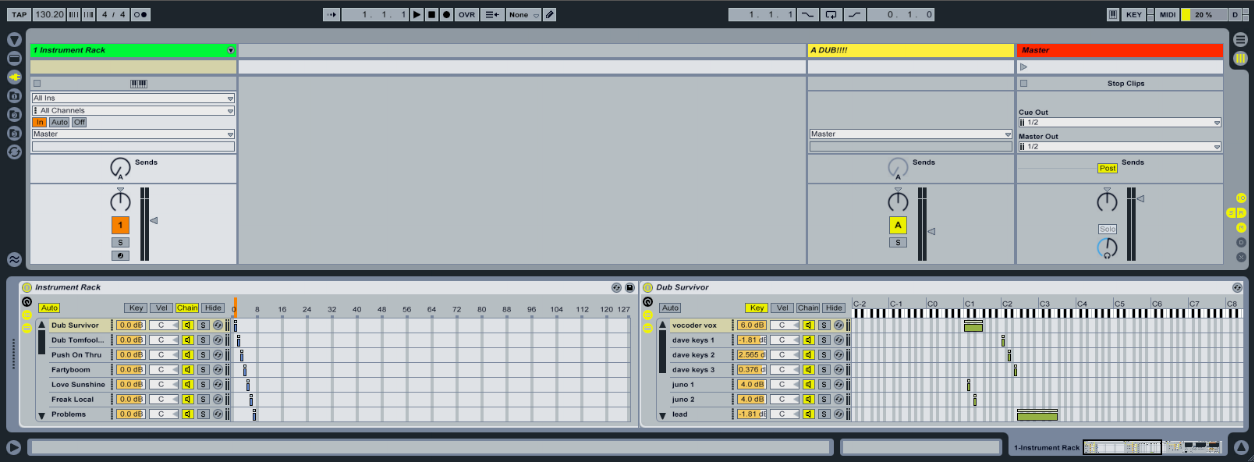

fakemoney
Posts: 79
Joined: Mon Oct 05, 2009 3:17 pm
Location: Brooklyn, NY
Contact:

Re: Multiple Track Performance/Midi Splitting Ideas 4 Live Sets

Post by fakemoney » Wed Feb 24, 2010 4:00 pm

another way around this (maybe a little late now) is to set up dummy clips, route them out of Live via IAC bus and back in. I do this with my live sets; every track has an instrument rack with 32 chains and every chain selector is mapped to a macro knob of the enclosing rack. Every one of these racks receives the SAME CC from the dummy clip (i use channel 10, cc7, for no real reason...) so that when I fire the dummy clip, all of my racks will change states for whatever I'm working on. At the start of a new song where I want to change all my shit up, I'll have a scene that I'll color red. Red scene= bank switch... and that way i don't really lose any of my control surface elements to bank changes.

At least in theory, unused chains don't eat CPU but i know there's been some fuss about this recently...?

adf
Posts: 12
Joined: Wed Sep 27, 2006 3:12 pm
Location: London
Contact:

Re: Multiple Track Performance/Midi Splitting Ideas 4 Live Sets

Post by adf » Sat Mar 06, 2010 6:20 am

outershpongolia :

I was worried about the amount of CPU chains are taking up as well so ended up using separate tracks for each instrument and using a clip to send out multiple cc messages, one cc number for each device setting its state, turning one on and all others off.

Problem is, each new instrument requires all the clips to be updated as its another cc message to add to them to turn on/off the new device.

You can manually directly trigger the devices on off from a midi controller cc message without it spazzing out the clips doing it; if you set the internal clips cc automation to start at minimum then go to max then back to minimum for the ones you want to turn off. Essentially 'Zeroing' the devices states each time. It does mean its turning a load of devices on and off at the same time, not sure if that hits the CPU much, doesn't seem to on mine except where I'm using 3rd party plugs.

Thats the only way I've found of being able to automate instrument changes for songs and also be able to do it manually from a controller without Ableton losing track of what is on and off. Let me know if you have any better ways or find any more info on keeping chains CPU efficient.

*From testing I've found that muting a chain with tons of devices on thats not processing audio or even muting the track that contains the chain doesn't seem drop the CPU load. But turning off the device group does drop the CPU.

flippo
Posts: 486
Joined: Fri Feb 05, 2010 6:06 am
Location: Melbourne

Re: Multiple Track Performance/Midi Splitting Ideas 4 Live Sets

Post by flippo » Sat Mar 06, 2010 10:19 am

outershpongolia wrote:
Pitch Black wrote:FWIW, I have buttons on my Novation ReMote61 set to transmit absolute-values for the chain selector. I assign the button to the CC that the chain selector is mapped to, then set the Minimum and Maximum limits for the button at the same (desired) value inside the ReMote. It means the same button always selects the same chain with none of that "relative" crap...

In the pic below I have one chain per song, selected by pushing one of the Remote's 24 programmable buttons.
Image
About using the chain selector to select your instruments..

I have about 12 loaded in right now.. and I noticed that (obviously) they are ALL ON, so even if they aren't currently being used the Device On/Off switch is ON, so that they are ready to go when the right chain is selected.

Is it necessary (or even possible) to automate turning the devices on each chain ON when the chain is selected and then Off when a new chain is selected? I figure if they are all ON they are eating CPU, but if ONLY the current chain is ON then the rest would be off and won't use CPU..


So the basic question is, are they eating CPU when their chain is not selected.. and then if they are, how would I get them to turn off when the chain isnt selected, I'm assuming it'd be in the clip envelope sort of the way I have made the chain select clips, only theyd have a device on and device off thing goin on...
With certain devices it does matter. Most native stuff I think.

I run a similar setup. I have a couple of scenes in my padKontrol with each pad assigned to a note value. Each note value corresponds to a 'song', and these are used to simultaneously select the chains for that song on each track, as well as turn on the devices within those chains.

So the chains for each 'song' occupy one space on the chain selector from 0 upwards - the chain selecter is then assinged to a macro knob under a rack. The 'Device on' buttons for he devices within each chain are set to the corresponding spot on the same macro. Then I assign midi mapping to that macro using note values. Say you've got 12 tracks, you'll have spaces 0-11 occupied on your chain selector - hit midi map, select the macro, set minum to 0, max to 11, and hold down two notes that are 12 semitones apart. You can of course use a rotary encoder but I find it a bit testy since the chains are one space apart on the macro, seems much safer to me to smack a pad.

You can change up individual tracks on the fly with another controler, mess everything up and be random, and still know that no matter how much you lose track of things, if you hit that note on that channel everything will snap to a given 'song's' device settings own chains across the board - be it effects on your audio channels or instruments etc.

That was kinda awkward to explain - I can do screen shots if you really need?

adf
Posts: 12
Joined: Wed Sep 27, 2006 3:12 pm
Location: London
Contact:

Re: Multiple Track Performance/Midi Splitting Ideas 4 Live Sets

Post by adf » Tue Mar 16, 2010 10:00 am

flippo: Just tried your method , it works great, thanks!

Post Reply