Share your favorite Ableton Live tips, tricks, and techniques.
-
monked
- Posts: 17
- Joined: Wed Mar 03, 2010 9:16 pm
Post
by monked » Thu Mar 04, 2010 2:21 pm
Does anyone know how to do this with either the audio effects in ableton or a 3rd party plugin?
I have been using Cubase for a while and this is very easy to do with the "VST Dynamics" plugin. I find it useful to pull the bass out of tracks I am sampling from. I'm hoping to achieve the same thing with either ableton or any 3rd party vst.
here's a description of how it works i ncubase...
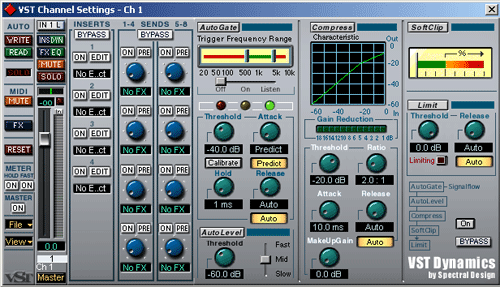 "Autogate this means that sounds below or above a certian frequency will go true. For example auto gate is set on 500 hz and 10 khz every sound below 500 hz will not pass and every sound above 10 khz will not pass. You can use this for getting the high frequency out of basses."
hope someone knows?
thanks in advance.
-
#1thelark
- Posts: 985
- Joined: Thu Nov 05, 2009 4:06 pm
Post
by #1thelark » Thu Mar 04, 2010 3:43 pm
I think that you are talking about a bandpass filter. You can definitely achieve that with abletons onboard devices... f.ex. by using EQthree or EQeight. You can turn them on and of to get that gate effect by using dummyclips, I suppose..
-
monked
- Posts: 17
- Joined: Wed Mar 03, 2010 9:16 pm
Post
by monked » Thu Mar 04, 2010 5:42 pm
Not quite to be honest but thanks for the suggestion.. The gate only opens when it detects the frequencies in the range that you have selected. You can also set the threshold, attack, release as per normal. Its this eq/gate combo that i need.
-
Tone Deft
- Posts: 24152
- Joined: Mon Oct 02, 2006 5:19 pm
Post
by Tone Deft » Thu Mar 04, 2010 6:04 pm
Live 8 - Multiband Dynamics
In my life
Why do I smile
At people who I'd much rather kick in the eye?
-Moz
-
yur2die4
- Posts: 7333
- Joined: Sat Oct 03, 2009 3:02 am
- Location: Menasha, Wisconsin
-
Contact:
Post
by yur2die4 » Fri Mar 05, 2010 3:15 am
I agree with what Tone Deft said.
You can read a heck of a lot about Multiband Dynamics' capabilities in the manual.
It is roughly 3 compressors, 3 gates, one of each within 3 user defined frequency widths (high/mid/lo).
The manual goes into nice detail on the compression/gate concepts applied.
-
monked
- Posts: 17
- Joined: Wed Mar 03, 2010 9:16 pm
Post
by monked » Fri Mar 05, 2010 1:03 pm
thanks guys, didn't realise there was a gate on the mbd. I'll have a read through the manual and experiment with it tonight.
thanks again.

-
monked
- Posts: 17
- Joined: Wed Mar 03, 2010 9:16 pm
Post
by monked » Sun Mar 07, 2010 5:11 pm
ok guys, I've been experimenting with the multi band compressor and am not getting the desired results. Ive read through the section in the live manual, experimented, re-read it, tried again etc - with no joy.
Basically I just think the gate really needs an eq section to be able to achieve this. Rather then gate out the signal that falls below the signal in db, i want the gate to be able to open when the frequency range that i select is present, and close when its not. This was the draw back of the multi band compressor, as I can sure enough single out frequency bands, but no access to a gate section to achieve the desired results. I have tried with the various ableton plugs and i doubt i'm gonna get there.
Can anyone recommend any 3rd party plug-ins that have an eq section on a gate? I dont mind paying what it costs as i'd be happy to not have to use cubase and will have some money to play around with once i'm sure i can sell the damn thing!
thanks again.
-
yur2die4
- Posts: 7333
- Joined: Sat Oct 03, 2009 3:02 am
- Location: Menasha, Wisconsin
-
Contact:
Post
by yur2die4 » Sun Mar 07, 2010 7:25 pm
The other option is building a rack. Containing 3 EQ racks, assign macros to frequency controls. and throw a gate into whichever frequency range you want gated

(after the EQ). This is the old fashioned way of making multiband compression in Live haha.
Sorry I am not very helpful with recommending alternative options.