First, thank you to this board for opening my eyes to the External Instrument plug-in. This little gadget is quite handy indeed!
I'm having a problem, though, that I can't figure out. I want to use this plugin to manage parts playing in a multi-timbral synth plug-in (Stylus RMX and Omnisphere to name two). I instantiate the plug-in in a MIDI track then create MIDI tracks for each part using the EI plug to route MIDI to the instrument and audio back to the part track. All that works great.
The problem is that when using this configuration, I can't find any way to freeze the part tracks either individually or on the whole. I've been able to freeze tracks that use the EI plug when I'm routing the MIDI and audio to/from an actual external device, but not to a plug-in instantiated within my Live project. Am i doing something wrong or does this just not work?
Mike Klein
Campania Studios
External instrument Plug-in and Track Freezing
welcome to the forum!
You should be able to do what you're describing, i'm trying to figure out what the problem might be.
try this: make an audio channel in Live, set the monitoring to "in" and route the audio from synth to there. Basically a subgroup. You should be able to freeze that. from there you can select all your midi clips and deactivate and it won't send notes to synth which will save on cpu
You should be able to do what you're describing, i'm trying to figure out what the problem might be.
try this: make an audio channel in Live, set the monitoring to "in" and route the audio from synth to there. Basically a subgroup. You should be able to freeze that. from there you can select all your midi clips and deactivate and it won't send notes to synth which will save on cpu
2.4 ghz Macbook Pro 8gb RAM, SSD, Live 9 Suite, Puremagnetik, Minimal Talent
Thank you for the response! That suggestion doesn't work for me either. I suspect I'm doing something incorrectly. Let me post a screenshot to see if that helps uncover what I may need to change.
Here's the screen showing a MIDI track (midi pt2) using the Ext Inst plugin routing the MIDI data over to the track Stylus RMX channel 2 and getting the audio back from the Stylus "B" (3/4) pair of outputs. I have just selected Freeze Tracks and the resulting error message is shown.
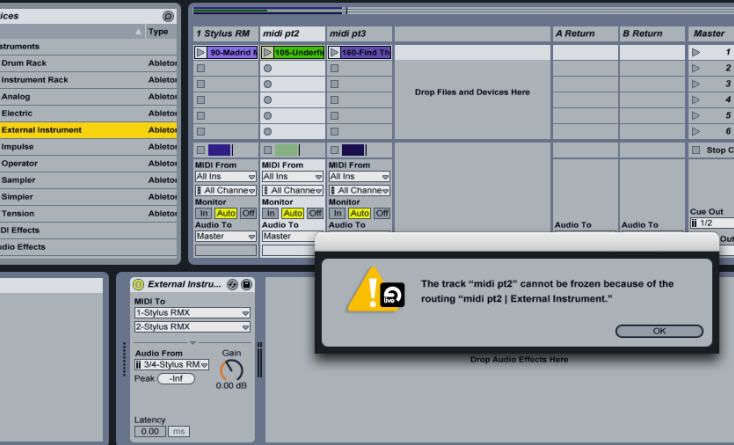
This will play correctly but as you can see the Freeze Tracks won't. The error message doesn't help me understand why Freeze Tracks isn't working.[/img]
Here's the screen showing a MIDI track (midi pt2) using the Ext Inst plugin routing the MIDI data over to the track Stylus RMX channel 2 and getting the audio back from the Stylus "B" (3/4) pair of outputs. I have just selected Freeze Tracks and the resulting error message is shown.
This will play correctly but as you can see the Freeze Tracks won't. The error message doesn't help me understand why Freeze Tracks isn't working.[/img]
Mike Klein
Campania Studios
Campania Studios
man dude,i'm not sure what the deal is. does stylus have different out puts you are routing from for each channel?
I routed different midi to the same instrument in reason and everything froze fine.
I'm not sure why the subgroup channel didn't work either. There are a couple different routing things you gotta do for that. Can you post a screen shot for that?[/img]
I routed different midi to the same instrument in reason and everything froze fine.
I'm not sure why the subgroup channel didn't work either. There are a couple different routing things you gotta do for that. Can you post a screen shot for that?[/img]
2.4 ghz Macbook Pro 8gb RAM, SSD, Live 9 Suite, Puremagnetik, Minimal Talent
-
spookyrockstar
- Posts: 25
- Joined: Wed Jan 24, 2007 3:45 am
- Location: Berkeley, CA
Although you can freeze an external instrument that is wired via REWIRE in the way mentioned above, you cannot freeze a multi-out VST if midi/external instruments are routed to it.
Same thing if you are using the sidechain feature in the compressor. Once you've routed audio/midi from one track to another in Live, both the source and the output become unfreezable. PITA. I hope they're working on this for Live 8.
Same thing if you are using the sidechain feature in the compressor. Once you've routed audio/midi from one track to another in Live, both the source and the output become unfreezable. PITA. I hope they're working on this for Live 8.
Thanks Spooky! I won't waste any more time trying to get this to work for me. I think the only way to go is to render the output of the plug-in to audio tracks and disable the MIDI as Jekblad said.spookyrockstar wrote:Although you can freeze an external instrument that is wired via REWIRE in the way mentioned above, you cannot freeze a multi-out VST if midi/external instruments are routed to it.
Same thing if you are using the sidechain feature in the compressor. Once you've routed audio/midi from one track to another in Live, both the source and the output become unfreezable. PITA. I hope they're working on this for Live 8.
Mike Klein
Campania Studios
Campania Studios
Yes, I have. It doesn't work in any case. I can successfully Freeze a track that has Stylus instantiated with no other tracks feeding it MIDI or taking feeds of it's audio. But once other tracks come into the picture, Freeze no longer works.ARDJ wrote:very interesting indeed... i will try this when i get in the studio later. just thinking out loud, have you tried doing it with 1 channel, then two channel etc.
Mike Klein
Campania Studios
Campania Studios
-
spookyrockstar
- Posts: 25
- Joined: Wed Jan 24, 2007 3:45 am
- Location: Berkeley, CA
Yeah, the only work around for this is to either bounce it to audio, then remove the VST and disable the midi (I remove the vst to reclaim the RAM).
Or conversely, you can also use a separate instance of the vst for each instrument, which won't get expensive on CPU (cuz now you can freeze) but WILL get expensive on the RAM, depending on the VST you're using!
Like I said, PITA.
Or conversely, you can also use a separate instance of the vst for each instrument, which won't get expensive on CPU (cuz now you can freeze) but WILL get expensive on the RAM, depending on the VST you're using!
Like I said, PITA.
Re: External instrument Plug-in and Track Freezing
Are there any new knowledges about freezing of multichannel instruments? There are several postings describing that this is not possible, and also some entries in the feature wishlist. Also the ableton support answered that there is no possibility. But look at this:
http://emusician.com/tutorials/making-t ... ndex1.html
The author describes freezing a multichannel Kontakt. My experience: freezing works with StylusRMX using this routing, but it produces empty audio files. So unfortunately useless?
http://emusician.com/tutorials/making-t ... ndex1.html
The author describes freezing a multichannel Kontakt. My experience: freezing works with StylusRMX using this routing, but it produces empty audio files. So unfortunately useless?
using: MacBook Pro 2.53 Intel Core 2 Duo 4 GB RAM, OSX.5.8, Live 8.2.1
Re: External instrument Plug-in and Track Freezing
I discussed the problem with the author in emusician.com. He gave me some very helpful hints. I've tested them, and the result is that freezing multichannel instruments IS POSSIBLE with restrictions, using external instruments and following some rules. Take a look on this tutorial and the comments at the end of page:
http://emusician.com/tutorials/making-t ... ndex1.html
With my setup it was possible to freeze seven channels (mixer output B-H, not A) of a StylusRMX.
http://emusician.com/tutorials/making-t ... ndex1.html
With my setup it was possible to freeze seven channels (mixer output B-H, not A) of a StylusRMX.
Last edited by FourPole on Fri Mar 05, 2010 12:22 pm, edited 1 time in total.
using: MacBook Pro 2.53 Intel Core 2 Duo 4 GB RAM, OSX.5.8, Live 8.2.1
Re: External instrument Plug-in and Track Freezing
Thanks for pursuing this further, FourPole. I think there must have been some changes in Live 8 to facilitate this because prior to Live 8's introduction it was the consensus that this couldn't be done. I'm glad to see that it can be.
Mike Klein
Campania Studios
Campania Studios
Re: External instrument Plug-in and Track Freezing
is this possible for Live 9 yet?