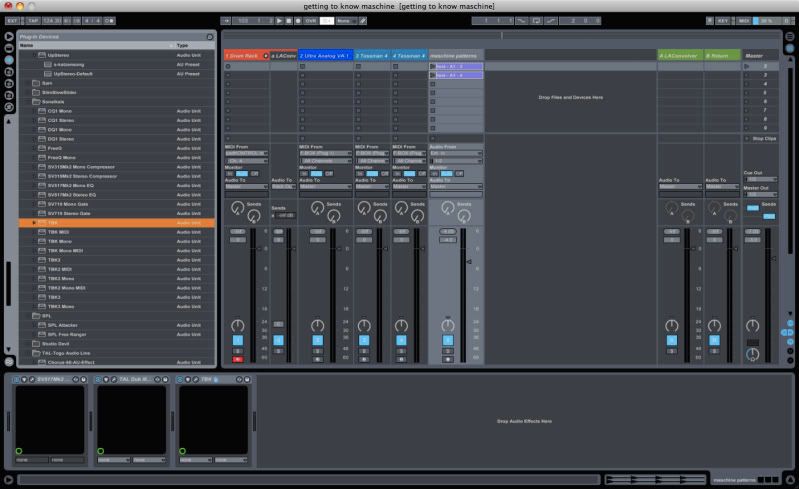
how are you using live with other daws? i dont get it..

Discuss music production with Ableton Live.
Pitch Black
Posts: 6722
Joined: Sat Dec 21, 2002 2:18 am
Location: New Zealand
Contact:

Re: how are you using live with other daws? i dont get it..

Post by Pitch Black » Sat Mar 20, 2010 10:45 pm

SubFunk wrote:the lack of screen shots and zooming (via shortcuts) is absolute major, the amount of shifting the window priorities in live is driving me nuts, and it gets terribly cluttered and is visually a nightmare when you have many tracks and automations open (the total oposite of the neat session view) no folder tracks, no ghosts or aliases, no choice of propper time lines (a la logic) no possibility to have one 'switch' floating window of any plugin (a la logic) no tool box, weak automation editing, no autozoom high lighted track, general lack of shortcuts important for arranger tasks, the list goes on and on...
+1 Absolutely agree.

Although I love Live to the point of evangelism, I find the Arrange view sorely underpowered. Yes I come from 15 years on Logic and have gotten very used to it's feature set, but simple things like no key command to toggle all automation views on/off drives me nuts. I don't want to see red lines over my page all the time, and having to select all tracks and then go thru the rigmarole of getting the "none" option to come up (sometimes a two step process in itself) is arrrrgh!
MBP M1Max | Sonoma 14.7 | Live 12.1 | Babyface Pro FS | Push 3T | clump of controllers
Soundcloud
Ableton Certified Trainer

Rave
Posts: 6153
Joined: Mon Oct 03, 2005 9:26 am

Re: how are you using live with other daws? i dont get it..

Post by Rave » Sat Mar 20, 2010 11:13 pm

I currently use live for nearly everything. However, I have returned to cubase for vocal / recording because it is simply better at it. Plus my euphonix really comes to life with cubase. :)

stonefree
Posts: 4
Joined: Fri Oct 31, 2003 1:50 am
Location: San Francisco
Contact:

Re: how are you using live with other daws? i dont get it..

Post by stonefree » Sat Mar 20, 2010 11:54 pm

Yesterday I was working on a song done entirely in Cubase 5. The bassline I had just wasn't cutting it and I needed to try out a lot of different ideas, plus I'm not a great bassist, so it takes me a lot of takes to come up with a great line! So I bounced several different loops from the song with the old bass muted. Loaded them up in Live and used a foot pedal to trigger recording of my bass then immediately audition it. If I didn't like the recorded clip I pushed the undo button on my Mackie Control. If I liked it, I pushed the down button to move to the next clip to record. At the end I had about 8 different usable clips that I could audition with different parts of the song using my APC40. I picked the best one and re-imported it into Cubase.

I want to try setting up Ableton synced via MTC to Cubase so I can get the best of both when desired. Cubase would be on my desktop PC with a MOTU 828mkii and Live would be on my Macbook Pro with an MBox2. They'd sync over MTC with S/PDIF providing the timing reference. All incoming audio would be sent into the 828 and routed accordingly.
Ed Mazur
House on the Hill Music
www.soundcloud.com/edmazur
www.houseonthehillmusic.com
San Francisco based label showcasing all varieties of house, especially deep house combined with tougher grooves and adventurous sounds

tlennon
Posts: 1627
Joined: Tue Mar 25, 2008 4:58 am
Location: New Jersey
Contact:

Re: how are you using live with other daws? i dont get it..

Post by tlennon » Sun Mar 21, 2010 12:34 am

A couple of the work flow design items I miss in Live that I enjoy in Protools is hiding tracks and being able to zoom almost to the size of the screen for detailed editing. And the other is working with dual monitors. I love having the full mixer and the linear editor employed at the same time.
Terrence Lennon
Image

nathannn
Posts: 3317
Joined: Thu Dec 07, 2006 2:38 am
Location: U.S.

Re: how are you using live with other daws? i dont get it..

Post by nathannn » Sun Mar 21, 2010 1:26 am

monobeach wrote:
nathannn wrote: i stumbled upon a feature that i have been requesting for ages and didnt even think it existed in another daw..
its called BEAT MAPPING within logic.
from what i have read and seen with the video's beat mapping allows you to record a track without a click going and then lets you adjust the click to your track (instead of the other way around).
YES!!!!!!!!!
is this not possible with the "stretch notes" feature using midi or tap tempo, which inserts a warp marker on an audio track every time you tap?
no, because i dont want to conform the audio to the time line
i want the time line to conform to the audio.
The Push / Novation Launch Pad / Novation Launch Pad Pro / Novation Launch Key
/ Launch Control XL / Machine MkII / Machine Studio / BeatStep / Livid OhmRGB / Livid Code V2 / Apc 40 MKII

no computers or synths

20 Copies of Ableton Live Lite.

nathannn
Posts: 3317
Joined: Thu Dec 07, 2006 2:38 am
Location: U.S.

Re: how are you using live with other daws? i dont get it..

Post by nathannn » Sun Mar 21, 2010 1:32 am

mr.ergonomics wrote:ehh, I think this feature is in live...just make a track tempo 'master' in arrange (the tempo follows the tracks tempo/warpmakers then)
this also is not the same as beat mapping
here is a video explaining beat mapping


http://www.youtube.com/watch?v=aqS1UX51teQ
The Push / Novation Launch Pad / Novation Launch Pad Pro / Novation Launch Key
/ Launch Control XL / Machine MkII / Machine Studio / BeatStep / Livid OhmRGB / Livid Code V2 / Apc 40 MKII

no computers or synths

20 Copies of Ableton Live Lite.

Pitch Black
Posts: 6722
Joined: Sat Dec 21, 2002 2:18 am
Location: New Zealand
Contact:

Re: how are you using live with other daws? i dont get it..

Post by Pitch Black » Sun Mar 21, 2010 2:32 am

nathannn wrote:
mr.ergonomics wrote:ehh, I think this feature is in live...just make a track tempo 'master' in arrange (the tempo follows the tracks tempo/warpmakers then)
this also is not the same as beat mapping
here is a video explaining beat mapping
http://www.youtube.com/watch?v=aqS1UX51teQ
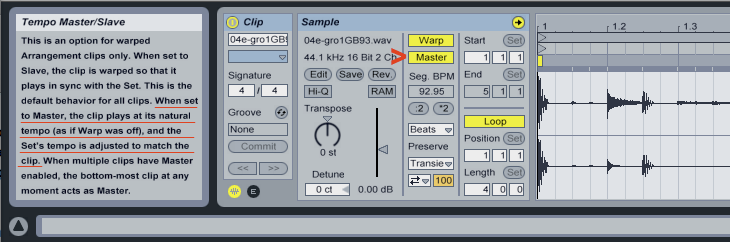
Nathannn, I don't understand what you're on about. Setting a warped track to Master in the Arrange View gives exactly the same result as that video.
ie: Live's timeline conforms to the clip's internal tempo.

Image

-Record or import a "free time" clip into Arrange View
-Warp it or Autowarp it
-Switch the "Slave" button to "Master" in clip view

Live's tempo now follows the "free time" recording

Or am I missing something?

mr.ergonomics
Posts: 919
Joined: Thu Nov 08, 2007 3:12 am

Re: how are you using live with other daws? i dont get it..

Post by mr.ergonomics » Sun Mar 21, 2010 5:16 am

Pitch Black wrote: ..... but simple things like no key command to toggle all automation views on/off drives me nuts. I don't want to see red lines over my page all the time, and having to select all tracks and then go thru the rigmarole of getting the "none" option to come up (sometimes a two step process in itself) is arrrrgh!
oh yeah big +1

mr.ergonomics
Posts: 919
Joined: Thu Nov 08, 2007 3:12 am

Re: how are you using live with other daws? i dont get it..

Post by mr.ergonomics » Sun Mar 21, 2010 5:34 am

SubFunk wrote:What do you mean exactly? Why i don't like live's arrangement view that much?

Well, it is a lot of things, and i am never happy with any type of workaround as long as i have the choice of using another program, which i own anyways.

the lack of screen shots and zooming (via shortcuts) is absolute major, the amount of shifting the window priorities in live is driving me nuts, and it gets terribly cluttered and is visually a nightmare when you have many tracks and automations open (the total oposite of the neat session view) no folder tracks, no ghosts or aliases, no choice of propper time lines (a la logic) no possibility to have one 'switch' floating window of any plugin (a la logic) no tool box, weak automation editing, no autozoom high lighted track, general lack of shortcuts important for arranger tasks, the list goes on and on...


I don't know logic, maybe it's really better, I only can compare cubase. but I do agree with all your points, I miss them too. but for me (this is absolutely subjective of course) live is a new daw and workflow concept and I can't go back to the old one. that said, I have hope that we don't have to wait too long for this features in live.
all a matter of taste, as much as i love live's session view, i dislike the arrangement. you can do a track in live of course, i was more talking about that it influences the way you work and therefor ultimately the result, i said it once, take a BMW 6er or a porsche carrera, both are top class mega fast sport cars, i am sure the porsche makes you drive more agressively, same accounts for the use of software, IMO.
I tend to think the same way and that's why I'm so obsessed ergonomic in general :-) - but in the last time I have a feeling that this is just brain fuck. it's only a problem if you think about it and then it's really a big problem.... the people who do really interesting stuff (...I think I'm not one of them) just do it regardless of the equipment. I have noticed this so damn often and I hate the fact - but that's my observation.

SubFunk
Posts: 7853
Joined: Sat Jan 28, 2006 3:41 pm
Location: A Big Toilet Called Berlin
Contact:

Re: how are you using live with other daws? i dont get it..

Post by SubFunk » Sun Mar 21, 2010 9:49 am

It is absolutely true that it does not matter what you use in the end, but is that the point of discussion?

i easy make you a good sounding track in any daw, reason or fruity loops or PT, no matter.

still i argue that using any of them will because of their conceptional nature put a certain workflow upon you that does influence the results in a certain way, it is of course the user not the tools, but it is to an extend the nature of psychology, like i stated in my example with the sport cars... contradiction? well, the world is full of them.

and i can use live for (nearly) everthing (just doing audio for a docu film right now, and there i have clear shortcomings) but like Paddy i use logic about a decade longer then live, but i also love live like mad (the session view and it's routing flexibility) i own logic also therefor: why should i go through the headache of live's arrangement?

with live you clearly see and feel that it is made from ground up for stage performance, and is just slowly adapted for the studio... which i consider wrong! imagine traktor would try to become a full fledged DAW, utter fail just like live, look at the state of live! i think it has a lot to do with trying to make it something the core of the program simply doesn't give.

my2cents
*** Image GAFM ***

mr.ergonomics
Posts: 919
Joined: Thu Nov 08, 2007 3:12 am

Re: how are you using live with other daws? i dont get it..

Post by mr.ergonomics » Sun Mar 21, 2010 1:58 pm

subfunk, as I said, I tend to think the same regarding workflow and influence and I really don't want to talking up lives daw features. but I come to the conclusion that too much thinking about this (like I do) is brain fuck. and I just want to point out that there are different ways and not everyone dislikes the arranging in live. I really don't want to convince anybody to use the arrange view, and again as I said, I sometimes feel the urge to use cubase for it's features too.

have a good sunday 8)

SubFunk
Posts: 7853
Joined: Sat Jan 28, 2006 3:41 pm
Location: A Big Toilet Called Berlin
Contact:

Re: how are you using live with other daws? i dont get it..

Post by SubFunk » Sun Mar 21, 2010 2:32 pm

mr.ergonomics wrote:subfunk, as I said, I tend to think the same regarding workflow and influence and I really don't want to talking up lives daw features. but I come to the conclusion that too much thinking about this (like I do) is brain fuck. and I just want to point out that there are different ways and not everyone dislikes the arranging in live. I really don't want to convince anybody to use the arrange view, and again as I said, I sometimes feel the urge to use cubase for it's features too.

have a good sunday 8)
same here. no worries it's just a healthy discussion, me loving live there is not doubt about it, but i am also very critical at times...

and i totally agree with the 'brain fuck' issue, when i think of how much fun and how creative it was using just an ER-1 and EA-1 for live playing or just a SU-10 and an old tapedeck to make tunes...

p.s. just playing around with maschine, and what i really don't get i have to say is why on earth can we not have shortcuts for window settings, i don't want floating windows, i love live's 2 window 'policy' not clutter and all... but permanent resizing the parts of it, is really a total workflow killer. even maschine only has 1 single window, but shortcuts to reach focus of items that are zoomed out, or hiding the browser (but with one single button and in TOGGLE mode) that can't be to hard to make, can it?

what i mean is a single key or midi shortcut (or even a toggle) possibility for switching instantly between this, just as an example...
(and no the browser cmd+alt+b for the browser is crap, you need two hands or break 3 fingers)

that would be so convenient, that permanent resizing with the mouse, is highly annoying.

SWITCH
Image
and SWITCH
Image
voila! (and back or with another shortcut to another 'view')
*** Image GAFM ***

jlgrimes
Posts: 1781
Joined: Mon Jan 22, 2007 1:55 am
Location: Atlanta, Ga

Re: how are you using live with other daws? i dont get it..

Post by jlgrimes » Sun Mar 21, 2010 3:12 pm

nathannn wrote:with live you cant use any vst's or vsti's..
so what are you people doing when rewiring live to another daw?

the only reason i could see rewiring live to another daw for would be to use the feature's in another daw that
live is lacking in arrange view.
with out proper rewire support this really becomes useless..
i have read some of you mix in another daw..
what is the advantage in that? we know your not doing it because you think it sounds better in another daw... you cant bypass live's audio engine this way..
if you are recording in live and then exporting stems into another daw , the stems were still made in live so your not bypassing anything.

maybe some one has figured out how to use vst's and vsti's in rewire mode?

this seems like a real tedious process if the only advantage (if you want to call it that) is to see the stems moving fader peaks with a mixer that looks different than lives but is still virtual.

the only reason im writing this is because i found it interesting that some of you are also using other daw's, i figured that the advantage to using another daw would be to bypass live's arrange view. but its not really possible unless you are only using lives effects and instruments..

I find that while Live is very stable and efficient when composing songs, at high track counts Sonar becomes more efficient.

I rewired about 24-30 tracks from Reason into Live. Live wouldn't even play this many tracks. Importing the tracks into Sonar worked fine. (Sonar did show about 50% disk usage though. This is on a 1 TB 7200 rpm hard drive with about 700Gigs of free space).

sowhoso
Posts: 846
Joined: Thu Dec 27, 2007 1:14 am

Re: how are you using live with other daws? i dont get it..

Post by sowhoso » Sun Mar 21, 2010 3:19 pm

nathannn wrote:with live you cant use any vst's or vsti's..
so what are you people doing when rewiring live to another daw?
with Reaper and Rearoute (not Rewire) you have access to all vst's and vsti's in Live. why I use Reaper:

--Reaper is more CPU efficient and more stable (Live 7 here)
--some of my 3rd party plugins crash Live (particularly stuff from IKMM)
--Mixing in Reaper seems easier to me; routing is more flexible

Live is a great writing/arranging tool :wink:

maestronobones
Posts: 19
Joined: Tue Jan 05, 2010 4:11 am

Re: how are you using live with other daws? i dont get it..

Post by maestronobones » Sun Mar 21, 2010 8:28 pm

I rewire Live into Pro Tools when recording live elements such as guitar performance, percussion, and vocals, because Pro Tools handles low latency monitoring much better than live IMHO, I usually end up having to manually correct for live's input and output latency in live performance elements, but PT takes care of all that and monitors with minimal latency.

I may be missing something in live (obviously I'm missing plenty lol) but this works for me. Plus I just like pro tools quick punch and playlists a LOT more for recording live.

sequencing, beatmaking, etc is all in live tho.

Post Reply