how are you using live with other daws? i dont get it..
Re: how are you using live with other daws? i dont get it..
@subfunk- This a feature of Protools I love. Configuration and saved views that you can easily switch between and have as many as you want.
Terrence Lennon

Re: how are you using live with other daws? i dont get it..
and me in logic, hit a single button, bang the view you want, hit another button bang another customised view, it is such an incredible workflow enhancer and time saver and time is money!tlennon wrote:@subfunk- This a feature of Protools I love. Configuration and saved views that you can easily switch between and have as many as you want.
the non pop up window policy in live is super great, i love it, but it could be simply more consequent like maschine's, only one window, but you hit a key and have different layout settings... superb! not resizing back and forth with the mouse.
***  GAFM ***
GAFM ***-
Machinesworking
- Posts: 11551
- Joined: Wed Jun 23, 2004 9:30 pm
- Location: Seattle
Re: how are you using live with other daws? i dont get it..
Started out using Live as a second DAW to Logic. Logic had bugs in v7.0 and I ended up working in Live during initial inspiration etc.
Live has only recently gotten decent at MIDI editing, and even now, surgical stuff isn't there, so I've literally started a song in Live, moved MIDI and VI instruments to Logic, then moved the MIDI back, bounced to audio, and moved back to Logic for mix down.
I'm moving towards Digital Performer again, because the workflow there is more conducive to bouncing back and forth to Live, and it's also capable of being a live host. Basically like Subfunk said, screensets, zooming, MIDI editing, SysEx, and a better Arrangement View in general is offered by DP and Logic. Unfortunately this includes a much better MIDI Beat Clock sync. Honestly had I started in Live, I might not want for the features of the other DAWs I've used, but once you know that there are better workflows for finishing songs, it's hard to sit there mousing around in Live trying to get the same thing done that would have took no time in Logic or DP.
Live has only recently gotten decent at MIDI editing, and even now, surgical stuff isn't there, so I've literally started a song in Live, moved MIDI and VI instruments to Logic, then moved the MIDI back, bounced to audio, and moved back to Logic for mix down.
I'm moving towards Digital Performer again, because the workflow there is more conducive to bouncing back and forth to Live, and it's also capable of being a live host. Basically like Subfunk said, screensets, zooming, MIDI editing, SysEx, and a better Arrangement View in general is offered by DP and Logic. Unfortunately this includes a much better MIDI Beat Clock sync. Honestly had I started in Live, I might not want for the features of the other DAWs I've used, but once you know that there are better workflows for finishing songs, it's hard to sit there mousing around in Live trying to get the same thing done that would have took no time in Logic or DP.
-
Pitch Black
- Posts: 6722
- Joined: Sat Dec 21, 2002 2:18 am
- Location: New Zealand
- Contact:
Re: how are you using live with other daws? i dont get it..
Zachary!Machinesworking wrote:Honestly had I started in Live, I might not want for the features of the other DAWs I've used, but once you know that there are better workflows for finishing songs, it's hard to sit there mousing around in Live trying to get the same thing done that would have took no time in Logic or DP.
Re: how are you using live with other daws? i dont get it..
yeah.. i dont want to warp anything (i know the method you described wouldn't really warp the track but your method only sets a master tempo.. it dont set a groove also.).. i want to adjust the grid to fit the track instead of adjusting the track to fit the grid.Pitch Black wrote:Nathannn, I don't understand what you're on about. Setting a warped track to Master in the Arrange View gives exactly the same result as that video.nathannn wrote:this also is not the same as beat mappingmr.ergonomics wrote:ehh, I think this feature is in live...just make a track tempo 'master' in arrange (the tempo follows the tracks tempo/warpmakers then)
here is a video explaining beat mapping
http://www.youtube.com/watch?v=aqS1UX51teQ
ie: Live's timeline conforms to the clip's internal tempo.
-Record or import a "free time" clip into Arrange View
-Warp it or Autowarp it
-Switch the "Slave" button to "Master" in clip view
Live's tempo now follows the "free time" recording
Or am I missing something?
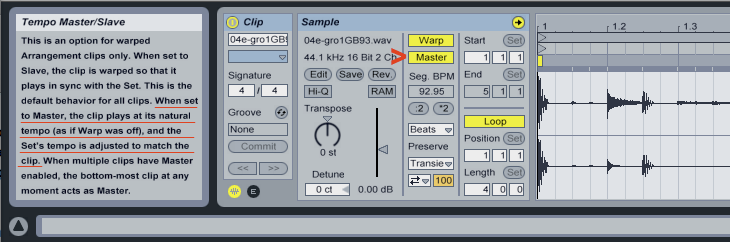
maybe what i want isn't what beat mapping is.. i don't know because i haven't been able to demo logic yet.
i think there isn't a demo so i might just demo it from a torrent.
what i want is to adjust the grid to the free time track so the grid lines will be on the transients regardless of swing or timing errors.
then i want to be able to open up the piano editor and all markers to be set in place to the free time track.
the reason for this would be so i would not have to push forward or backwards any midi drum hits in the piano roll, everything would line up to the master track..
i thought this is what beat mapping does in logic... maybe what i want doesn't exist.
btw,
please excuse my bad english.. im from the u.s.a
The Push / Novation Launch Pad / Novation Launch Pad Pro / Novation Launch Key
/ Launch Control XL / Machine MkII / Machine Studio / BeatStep / Livid OhmRGB / Livid Code V2 / Apc 40 MKII
no computers or synths
20 Copies of Ableton Live Lite.
/ Launch Control XL / Machine MkII / Machine Studio / BeatStep / Livid OhmRGB / Livid Code V2 / Apc 40 MKII
no computers or synths
20 Copies of Ableton Live Lite.
-
mr.ergonomics
- Posts: 919
- Joined: Thu Nov 08, 2007 3:12 am
Re: how are you using live with other daws? i dont get it..
that sounds like you want 'groove grids' (and I miss this from cubase, yes). in cubase or samplitude you can change the grid to the a groove/transients.
http://forum.ableton.com/viewtopic.php?f=3&t=129162
http://forum.ableton.com/viewtopic.php?f=3&t=129162
Re: how are you using live with other daws? i dont get it..
yes!.. this is what i want!mr.ergonomics wrote:that sounds like you want 'groove grids' (and I miss this from cubase, yes). in cubase or samplitude you can change the grid to the a groove/transients.
http://forum.ableton.com/viewtopic.php?f=3&t=129162
but with a little more flexibility..
it would take manual editing on the user's part to get what i want...(you would manually drag a grid line's to transients and it could be done multiple times within a single track)
The Push / Novation Launch Pad / Novation Launch Pad Pro / Novation Launch Key
/ Launch Control XL / Machine MkII / Machine Studio / BeatStep / Livid OhmRGB / Livid Code V2 / Apc 40 MKII
no computers or synths
20 Copies of Ableton Live Lite.
/ Launch Control XL / Machine MkII / Machine Studio / BeatStep / Livid OhmRGB / Livid Code V2 / Apc 40 MKII
no computers or synths
20 Copies of Ableton Live Lite.
Re: how are you using live with other daws? i dont get it..
nathannn wrote:this also is not the same as beat mappingmr.ergonomics wrote:ehh, I think this feature is in live...just make a track tempo 'master' in arrange (the tempo follows the tracks tempo/warpmakers then)
here is a video explaining beat mapping
http://www.youtube.com/watch?v=aqS1UX51teQ
ah, I understand: adjusting the time line to a performance. Cubase has this, too:
http://www.steinbergusers.com/vids/XML_ ... ntent.html scroll down to the "Timewarp" video.
you'd need a dongle to demo Cubase, though
Re: how are you using live with other daws? i dont get it..
wow!!!!!monobeach wrote:nathannn wrote:this also is not the same as beat mappingmr.ergonomics wrote:ehh, I think this feature is in live...just make a track tempo 'master' in arrange (the tempo follows the tracks tempo/warpmakers then)
here is a video explaining beat mapping
http://www.youtube.com/watch?v=aqS1UX51teQ
ah, I understand: adjusting the time line to a performance. Cubase has this, too:
http://www.steinbergusers.com/vids/XML_ ... ntent.html scroll down to the "Timewarp" video.
you'd need a dongle to demo Cubase, though
that is exactly what i want.
this is great information thanks!!!
The Push / Novation Launch Pad / Novation Launch Pad Pro / Novation Launch Key
/ Launch Control XL / Machine MkII / Machine Studio / BeatStep / Livid OhmRGB / Livid Code V2 / Apc 40 MKII
no computers or synths
20 Copies of Ableton Live Lite.
/ Launch Control XL / Machine MkII / Machine Studio / BeatStep / Livid OhmRGB / Livid Code V2 / Apc 40 MKII
no computers or synths
20 Copies of Ableton Live Lite.
Re: how are you using live with other daws? i dont get it..
i looked at the video for logics beat mapping again, and it does appear to be this same feature that is in cubase.
it looks easier to use in cubase more so than logic.
it looks easier to use in cubase more so than logic.
The Push / Novation Launch Pad / Novation Launch Pad Pro / Novation Launch Key
/ Launch Control XL / Machine MkII / Machine Studio / BeatStep / Livid OhmRGB / Livid Code V2 / Apc 40 MKII
no computers or synths
20 Copies of Ableton Live Lite.
/ Launch Control XL / Machine MkII / Machine Studio / BeatStep / Livid OhmRGB / Livid Code V2 / Apc 40 MKII
no computers or synths
20 Copies of Ableton Live Lite.
Re: how are you using live with other daws? i dont get it..
I don't know if this feature is already available in Cubase Studio - if so, it would be a cheaper alternative to Logic. Maybe Leeds could help out?nathannn wrote:i looked at the video for logics beat mapping again, and it does appear to be this same feature that is in cubase.
it looks easier to use in cubase more so than logic.
-
leedsquietman
- Posts: 6659
- Joined: Sun Nov 19, 2006 1:56 am
- Location: greater toronto area
Re: how are you using live with other daws? i dont get it..
This feature is available in Cubase Studio and the full version of Cubase.
Cubase Studio loses some of the top plugins such as Reverence convolution reverb and also does not have the killer Variaudio feature.
http://www.steinberg.net/en/products/mu ... ls100.html
This lists most of the differences between C5, C5 studio and the budget C5 Essential.
Only C5 (full version) has the input trim function too, something I find really useful, especially with automation.
Cubase Studio loses some of the top plugins such as Reverence convolution reverb and also does not have the killer Variaudio feature.
http://www.steinberg.net/en/products/mu ... ls100.html
This lists most of the differences between C5, C5 studio and the budget C5 Essential.
Only C5 (full version) has the input trim function too, something I find really useful, especially with automation.
http://soundcloud.com/umbriel-rising http://www.myspace.com/leedsquietmandemos Live 7.0.18 SUITE, Cubase 5.5.2], Soundforge 9, Dell XPS M1530, 2.2 Ghz C2D, 4GB, Vista Ult SP2, legit plugins a plenty, Alesis IO14.
-
glitchrock-buddha
- Posts: 4357
- Joined: Fri Oct 14, 2005 1:29 am
- Location: The Ableton Live Forum
Re: how are you using live with other daws? i dont get it..
Like many other here, I discovered Live after already being used to another DAW (Logic). At first I didn't get the point of Live but once I did, I didn't use Logic for a very long time. I've often toyed with the idea of ditching Logic altogether (even considered going PC for a while), but I've finally settled on the fact that I'd prefer to use Logic and Live for different types of songs and different types of writing, rather than try to get one to do everything.
For me, Live has become about using hardware and conforming Live sets to hardware controllers. I always limit myself in Live to use it more like a big instrument. Nowadays that means using things like the APC40, Maschine and Kore, and l keep myself to 8 tracks. I pretty much only use session view, with minimal clip envelopes. Any songs where I want primarily arrange, I'll use Logic alone. I prefer it's arrangement functions and I don't limit myself at all in terms of track count, automation etc. I just pile on whatever I want. Of course the other side of that is that those types of tracks are not meant for live control or performance at all. Of course I can always bounce things out for Live if I want to do 'remix' type stuff of my own songs.
I NEVER use rewire though, because I don't like the idea of using multiple applications for one song (Other than audio editors etc.). And I also never bounce back and forth because I find that I can get everything done in one DAW. And I definitely would never consider another DAW. I barely find time to use two. I always miss Live when not using it. I feel like I'm cheating. For the longest time I just couldn't get rid of Logic because of it's instruments, but now I'm glad I have both as I don't really want to arrange in Live. Also I've found that it's fun to have a break from a sequencer, even Live. It shakes things up a bit and then it's always fun to come back.
Although I do sometimes miss certain features in Live when using Logic, I hope Live doesn't try to hard to become a full fledged DAW, as I'd rather it stay focused as a performance instrument.
For me, Live has become about using hardware and conforming Live sets to hardware controllers. I always limit myself in Live to use it more like a big instrument. Nowadays that means using things like the APC40, Maschine and Kore, and l keep myself to 8 tracks. I pretty much only use session view, with minimal clip envelopes. Any songs where I want primarily arrange, I'll use Logic alone. I prefer it's arrangement functions and I don't limit myself at all in terms of track count, automation etc. I just pile on whatever I want. Of course the other side of that is that those types of tracks are not meant for live control or performance at all. Of course I can always bounce things out for Live if I want to do 'remix' type stuff of my own songs.
I NEVER use rewire though, because I don't like the idea of using multiple applications for one song (Other than audio editors etc.). And I also never bounce back and forth because I find that I can get everything done in one DAW. And I definitely would never consider another DAW. I barely find time to use two. I always miss Live when not using it. I feel like I'm cheating. For the longest time I just couldn't get rid of Logic because of it's instruments, but now I'm glad I have both as I don't really want to arrange in Live. Also I've found that it's fun to have a break from a sequencer, even Live. It shakes things up a bit and then it's always fun to come back.
Although I do sometimes miss certain features in Live when using Logic, I hope Live doesn't try to hard to become a full fledged DAW, as I'd rather it stay focused as a performance instrument.
Professional Shark Jumper.
Re: how are you using live with other daws? i dont get it..
i totally agree.glitchrock-buddha wrote:Also I've found that it's fun to have a break from a sequencer, even Live. It shakes things up a bit and then it's always fun to come back.
Although I do sometimes miss certain features in Live when using Logic, I hope Live doesn't try to hard to become a full fledged DAW, as I'd rather it stay focused as a performance instrument.
*** GAFM ***
GAFM ***Re: how are you using live with other daws? i dont get it..
mr.ergonomics wrote:oh yeah big +1Pitch Black wrote: ..... but simple things like no key command to toggle all automation views on/off drives me nuts. I don't want to see red lines over my page all the time, and having to select all tracks and then go thru the rigmarole of getting the "none" option to come up (sometimes a two step process in itself) is arrrrgh!