Share your favorite Ableton Live tips, tricks, and techniques.
-
freelobotomy
- Posts: 11
- Joined: Mon Sep 29, 2008 2:23 am
Post
by freelobotomy » Sun Jun 14, 2009 6:56 pm
A hardware newcomer humbly requests your assistance...
So, having rarely worked with hardware effects, I find myself owning my first little bit of external fun... the KAOSS pad! Yet, I have hardly any idea how to get the audio running from ableton through the KP and back into the main mix... I'm using a MOTU ultralite audio interface and I would like to know how to set up the ins/outs on a track to get the processed audio from the KAOSS pad going to the master outs in Ableton. I'm sure this is really simple... however my knowledge on this subject is limited.
And what about "sends" and "returns," do they come in to play at all or would they be a preferable alternative? I've never actually used these functions before.

If someone would like to chuck a tomato at me... feel free...
-
PeaceLover
- Posts: 29
- Joined: Tue Mar 31, 2009 1:38 am
Post
by PeaceLover » Sun Jun 14, 2009 10:41 pm
If you show me here your input config and output config i can help you...(windows screenshots or list )

-
Winterpark
- Posts: 1671
- Joined: Thu Apr 15, 2004 2:59 am
- Location: Melbourne, Australia
Post
by Winterpark » Mon Jun 15, 2009 12:07 am
Connect ins and outs.
something like:
out-7/8 of Motu
in- 5/6 of Motu
Create an "External Audio Effect"
send audio to 7/8
receive audio from 5/6
save preset.... and there you go.
-
freelobotomy
- Posts: 11
- Joined: Mon Sep 29, 2008 2:23 am
Post
by freelobotomy » Mon Jun 15, 2009 2:37 am
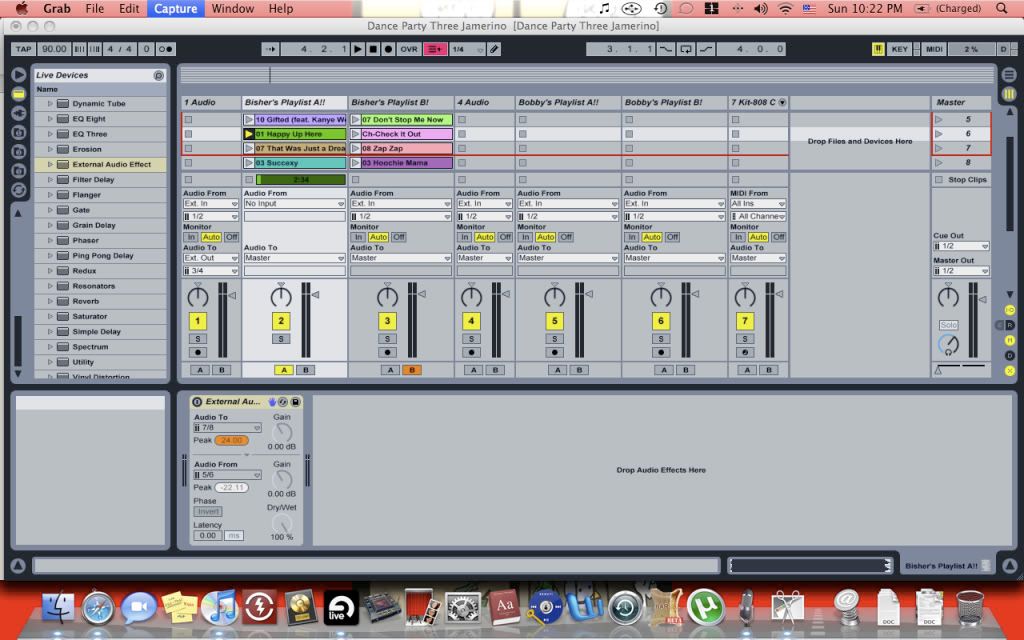
Here's what it looks like...
I can hear the samples from my sample bank coming from the KAOSS pad but I can't get the actual sound playing from ableton to go through the KP and back into the main mix... help help help...
-
Sunrunner
- Posts: 4
- Joined: Mon May 07, 2007 1:35 am
Post
by Sunrunner » Mon Jun 15, 2009 3:11 am
when you play with the kaoss pad, can you see the input channels light up on the ultralite? you've probably had it for a while and know about the weird channel numbers at times, so check that out.
i usually do this by creating a send effect that goes out to, say, motu 7-8. then i have a seperate audio channel that takes input from the channel the KP is feeding back to on the ultralite. on this channel it has to have monitor set to 'In'.
-
PeaceLover
- Posts: 29
- Joined: Tue Mar 31, 2009 1:38 am
Post
by PeaceLover » Mon Jun 15, 2009 4:59 am
look this, sorry im using paint, for me it work but i dont have a motu, i have try to set with your port, try and let me know:

-
Winterpark
- Posts: 1671
- Joined: Thu Apr 15, 2004 2:59 am
- Location: Melbourne, Australia
Post
by Winterpark » Mon Jun 15, 2009 5:03 am
...or...
do what i said.
-
freelobotomy
- Posts: 11
- Joined: Mon Sep 29, 2008 2:23 am
Post
by freelobotomy » Mon Jun 15, 2009 6:00 am
am wrote:...or...
do what i said.
am... I tried what you suggested and yet I cannot hear the audio coming back from the KP... check the screenshot I posted to see if everything is in order as to what you described.
-
Winterpark
- Posts: 1671
- Joined: Thu Apr 15, 2004 2:59 am
- Location: Melbourne, Australia
Post
by Winterpark » Mon Jun 15, 2009 6:23 am
sorry, i was at work before, and often don't get images posted.
i see what you've done now.
check these things:
1. ensure that all your audio ins are enabled in live's preferences.
2. in Motu's cue mix console, mute the audio coming in on 5/6
3. make sure that the external audio effect in active.
4. make sure the kaoss pad has the correct input selected.... 'line in' i believe will be the one you want.
if you've done all those things, then it should work.
-
geolove
- Posts: 2
- Joined: Tue Mar 16, 2010 12:49 pm
Post
by geolove » Tue Mar 16, 2010 1:10 pm
Ok.I have managed to get my input signal on ableton so i can hear it and record it as well with resampling.I tried all these on this subject and i finally managed to connect it.I am using a Focusrite Saphirre firewire with 10in / 10out, and ableton 8 on a mac book pro.What i yet have not managed to do is to get the signal normally as it should be, because now the right speaker outputs sounds louder than the left speaker.Do you think anyone can help me?
-
Winterpark
- Posts: 1671
- Joined: Thu Apr 15, 2004 2:59 am
- Location: Melbourne, Australia
Post
by Winterpark » Tue Mar 16, 2010 8:32 pm
geolove wrote:Ok.I have managed to get my input signal on ableton so i can hear it and record it as well with resampling.I tried all these on this subject and i finally managed to connect it.I am using a Focusrite Saphirre firewire with 10in / 10out, and ableton 8 on a mac book pro.What i yet have not managed to do is to get the signal normally as it should be, because now the right speaker outputs sounds louder than the left speaker.Do you think anyone can help me?
sounds like you don't have the input gains on you saphire matched. Check that.
-
geolove
- Posts: 2
- Joined: Tue Mar 16, 2010 12:49 pm
Post
by geolove » Wed Mar 17, 2010 12:48 pm
thank you!stupid me ,i thought there was something different like the set up of the saphire ,anyway it works fine thank you again !
-
joviwonder
- Posts: 6
- Joined: Mon Feb 22, 2010 6:27 am
Post
by joviwonder » Wed Mar 31, 2010 7:47 pm
Create an "External Audio Effect"
When you route the Kaoss Pad this way, it works great... thanks for the tip.
The only thing is, when I want to solo a track on the fly, my external track is muted. Is there a way around this? Could you disable the solo button somehow?