8-Band X-fader rack (djm2000 inspired)

Share your favorite Ableton Live tips, tricks, and techniques.
flippo
Posts: 486
Joined: Fri Feb 05, 2010 6:06 am
Location: Melbourne

8-Band X-fader rack (djm2000 inspired)

Post by flippo » Tue May 04, 2010 7:46 am

Someone on the forum asked if it was possible to emulate djm2000 style 'frequency mixing'


http://www.youtube.com/watch?v=fcdcWgDi9cE < here is a video of this function.

I watched the vid and thought it was pretty sweet so I had a crack. I think I've had reasonable success achieving this and thought some of you might be interested.

This one is 8 band so it's pretty smooth, can almost sound like a frequency sweep type effect if you want. You might like to modify the design to have less bands if you want - I think the djm2000 is 7 bands.

You will need 9 spare remote midi CCs to run it. They have to be remote control rather than 'script' control (APC normal mode etc) as it requires co-responding macros across your two x-fade channels to be controlled simultaneously. I guess otherwise you could sync them with MAX but I can't be fucked doing that myself at this point hehe.

Anyway here are the racks for download > http://www.sendspace.com/file/nvvdo9

It's basically an oppositely mapped pair of 8 transparent (relatively) filter x-overs for each track with various utilities devices to keep the gains in check during transitions. (I have used ethios4 sweepable crossover rack idea in this, thanks mate)). There is also a macro on each rack to assign to your regular X-fader so that you can use both regular X-fading and 8-band simultaneously

instructions:

- Put racks '8-band with Dry-Wet A' and '8-band with Dry-Wet B' respectively on the two tracks you wish to x-fade between. If you plan to x-fade between multiple tracks it might be easiest to bus them - up to you.

- Set the A and B x-fade switches for these tracks as you would normally.

- Midi-map your X-fade controller to the ableton X-fader as you would normally

- Midi-map your X-fade controller the macro 'X-fade control A' on the device '8-band with Dry-Wet A' - you must invert the range for this mapping.
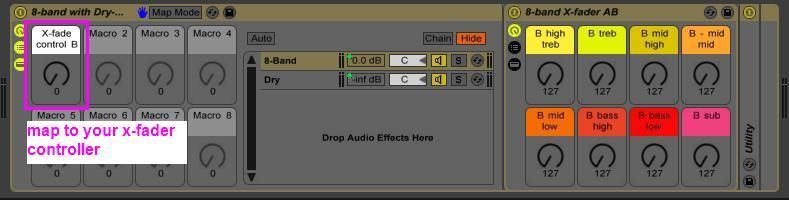
Image

- Midi-map your X-fade controller the macro 'X-fade control B' on the device '8-band with Dry-Wet B'- do not invert the range for this mapping.

- assign your chosen 8 frequency knobs/faders to the 8 macros on both devices. You do not need to invert the ranges for any of them as this is built into the macros already.
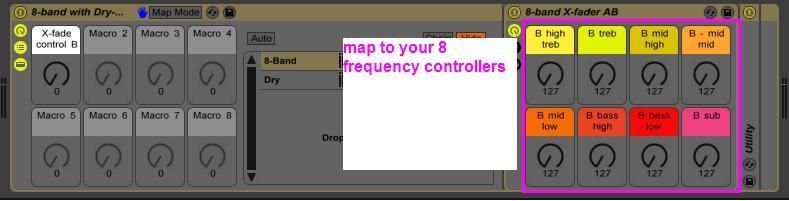
Image


How to use it.

When all your 8 frequency x-fade knobs are set to the middle values, the X-fader will behave like a regular X-fader.
While the X-fader is in the middle of it's range, the 9 frequency band x-faders are active. Turning them to 0 will result in all of track 100% A and 0% track B for that frequency band. Turning them to 128 will result in 0% track A and 100% track B.

The main X-fader control will always play 100% of track A or B at either extreme regardless of the current state of the 8 frequency bands - it over rides them.

Here are some quick diagrams that might make a bit more sense than that waffleing.

Blue and Red bars represent the gain for each of the 8 frequency bands on either track.
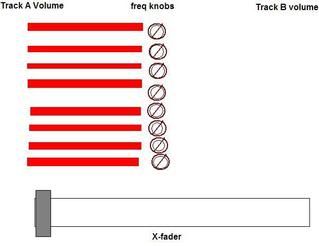
Image
^^^^frequency band knobs have no effect when X-fader is at either left or right extreme
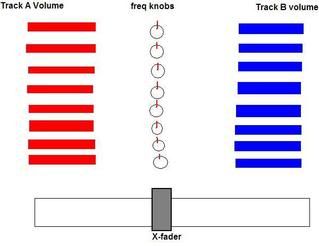
Image
^^^^ both X-fader and all frequency knobs are centered - x-fader behaves like a regular x-fader
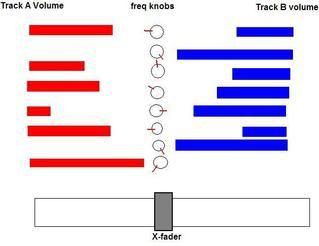
Image
^^^^ while x-fader is in center (approximately), 8 filter knobs can be used as individual x-faders.
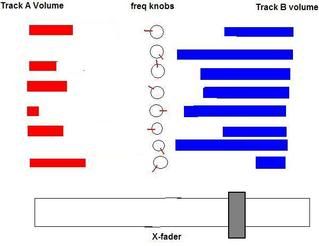
Image
^^^ as the x-fader moves from center to the far extreme, 8 frequency bands are mixed with the dry signal of the track,
their effect becomes less pronounced.
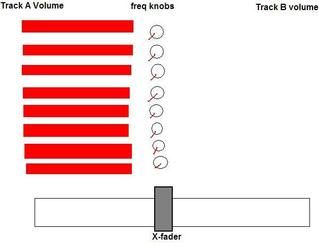
Image
^^^^ all frequency bands have been move to 100% on the left while x-fader is centered,
essentially same result as if the X-fader where 100% to the left.

Due to limitations in ableton's racks I couldn't quite iron out one the gain transitions. The problem occurs when you are fading between the situation in the last picture and the first picture, resulting in a breinf drop in gain. Once you get familiar with it to it its just a matter of quickly moving between the two and it is not noticeable. There would be no need for you to fade between these two slowly anyway as they are have the same result.

If anyone can dive into the rack and tweak the macros to prevent this from happening and provide an update, go nuts!

Also, I'm sure with MAX you could link the macros from the two racks. This would mean you could control them from regular control surface script device control, rather than hard wired remote mapping.

Tip* It might be a good idea to have a midi clip set to center the frequency knobs via IAC drivers or midi yoke, and assign the launching of this this to a button. That way its nice and easy for you to center the frequencies when you're done with your fade. Otherwise you could just map a button to turn both devices off and regular x-fadding will be functional as normal, by-passing your frequency settings.

Another tip* One cool thing I was doing was setting the frequency knobs in a pattern and then just fading across from left to right - the result is that some frequencies start to fade across early and some late. If you stagger them from high to low it sounds like nice smooth crossover sweep like effect.

flippo
Posts: 486
Joined: Fri Feb 05, 2010 6:06 am
Location: Melbourne

Re: 8-Band X-fader rack (djm2000 inspired)

Post by flippo » Tue May 04, 2010 10:15 am

frequency bands are

> 8khz
8k - 4.1khz
4.1k - 1.9khz
1.9k - 890Hz
890 - 400Hz
400 - 180 hz
180 - 80 hz
<80 Hz

I might have a go at using a different filter splitting method to get a sharper cut at some point.

flippo
Posts: 486
Joined: Fri Feb 05, 2010 6:06 am
Location: Melbourne

Re: 8-Band X-fader rack (djm2000 inspired)

Post by flippo » Tue May 04, 2010 2:35 pm

I tend to like my x-faders constant power, however I've noticed that even for my tastes the signal might be a little bit too hot in the middle of the fader on this one, I might refine it tomorrow evening. You might like to adjust some of the macro settings (utility gain min and max values, and/or chain volume values) to get a U shape which a lot of people tend to prefer. Might need to adjust ableton's native crossfader curves to match.

I guess it might be possible to have a macro that will adjust the middle gain a bit so that people can have a little control over the cross fader response? smells like a bit of headache atm, maybe after lots of coffee I'll have a go!

davepermen
Posts: 2198
Joined: Thu Mar 05, 2009 3:38 pm
Location: Switzerland
Contact:

Re: 8-Band X-fader rack (djm2000 inspired)

Post by davepermen » Tue May 04, 2010 5:46 pm

Inspired by you I took out Max4Live a bit again.. here's the result:

Image and the patch: http://davepermen.net/Random%20Stuff/Eq.amxd

i currently have my two decks both midimapped to my launchpad on user2 mode, so i can slide between them easily. it's quite nice, needs some getting used to, but nice is nice.

(nothing really about constant power or anything yet.. but at least it sorta works :))
http://davepermen.net my tiny webpage, including link to bandcamp.

flippo
Posts: 486
Joined: Fri Feb 05, 2010 6:06 am
Location: Melbourne

Re: 8-Band X-fader rack (djm2000 inspired)

Post by flippo » Tue May 04, 2010 10:02 pm

nice one mate. I thought it would be nice to use APC in slider mode to control the faders, but I realized that because there is an even number of squares it wouldn't be possible to set the sliders to 64 (dead center) without offseting. Do you have this problem with launchpad?

I thought instead I might use a padkontrol scene to toggle hard left/right pans on each of the 8 channels, combined with APC knobs for regular fading instead.

Another thing I thought might be cool is a knob or button to momentarily reverse the whole thing - could be a cool effect.

could do it with regular live racks by chaining two groups versions of them together, midi mapping one version in reverse, and blending or just toggling between the two chains.

Or you could do it in max - it might be just easier to do the whole thing in max once that kinda complexity is built in!

I'm still pretty slow with max though.


cool story bro

davepermen
Posts: 2198
Joined: Thu Mar 05, 2009 3:38 pm
Location: Switzerland
Contact:

Re: 8-Band X-fader rack (djm2000 inspired)

Post by davepermen » Tue May 04, 2010 10:31 pm

yeah, this is why i mapped it to 7 buttons only :) a 7x8 grid it is :)

but once i have reconnected my lemur, it's a non-issue :)

put my device to some fun uses in production by now, it's quite fun! :) thanks for the inspiration!
http://davepermen.net my tiny webpage, including link to bandcamp.

absynt
Posts: 5
Joined: Fri Dec 04, 2009 6:07 am

Re: 8-Band X-fader rack (djm2000 inspired)

Post by absynt » Wed May 05, 2010 12:58 am

You could pretty clone the 2000's touchscreen mixer doodaa with a few simple objects in the lemur.
This'd be easy to replicate.

i gotta get max4live.

flippo
Posts: 486
Joined: Fri Feb 05, 2010 6:06 am
Location: Melbourne

Re: 8-Band X-fader rack (djm2000 inspired)

Post by flippo » Wed May 05, 2010 1:15 am

davepermen wrote: put my device to some fun uses in production by now, it's quite fun!
yes I was thinking it might be useful for quickly EQ'ing two similar sounding elements with eachother for production purposes.
davepermen wrote: thanks for the inspiration!
well I was only copying Pioneer, you can thank them :)

speedjr
Posts: 14
Joined: Mon Feb 15, 2010 5:13 pm

Re: 8-Band X-fader rack (djm2000 inspired)

Post by speedjr » Wed May 05, 2010 2:42 am

I know this might be another task over this one already, but is it possible to get '' visualization '' (since you want to use the djm2000 eq picture ) would help to use ''the right eq zone'' from the song you want to blend...

I hope you understand my poor English..

davepermen
Posts: 2198
Joined: Thu Mar 05, 2009 3:38 pm
Location: Switzerland
Contact:

Re: 8-Band X-fader rack (djm2000 inspired)

Post by davepermen » Wed May 05, 2010 8:42 am

absynt wrote:You could pretty clone the 2000's touchscreen mixer doodaa with a few simple objects in the lemur.
This'd be easy to replicate.

i gotta get max4live.
indeed, which was what raised my interest :)
http://davepermen.net my tiny webpage, including link to bandcamp.

davepermen
Posts: 2198
Joined: Thu Mar 05, 2009 3:38 pm
Location: Switzerland
Contact:

Re: 8-Band X-fader rack (djm2000 inspired)

Post by davepermen » Wed May 05, 2010 8:45 am

flippo wrote:yes I was thinking it might be useful for quickly EQ'ing two similar sounding elements with eachother for production purposes.
currently, i use it for having effects just on some frequencies, and be able to automate those frequency bands. sort of a per-frequency dry/wet control. it's fun :)
flippo wrote:well I was only copying Pioneer, you can thank them :)
i don't thank them for creating such expensive stuff that i mostly had on traktor since years :) their mixer + cdj setup is sweet, but not worth the money (and i will never physically see one i guess :)).
http://davepermen.net my tiny webpage, including link to bandcamp.

docprosper
Posts: 1193
Joined: Sat Apr 24, 2010 11:20 am
Location: Fredericksburg, VA

Re: 8-Band X-fader rack (djm2000 inspired)

Post by docprosper » Thu Jun 10, 2010 2:35 pm

I've got a similar freq-fading solution going in M4L, although I'll need to clean it up a bit before I share. I've taken the CPfade device (on maxforlive.com) and modified it to have an A/B mode, such that it can fad in or out as the crossfader goes in a certain direction. I then pass my main audio tracks to dummy tracks, with a 3-band EQ on each track and the cutoffs set on each EQ such that each track is dedicated to a certain band. With the modified M4L device in each track, I then assign a hardware controller fader to each band, with the A/B modes set such that I can now crossfade each band seperately.

I then added in another six identical tracks, this time with each 'channel'... i.e. low-mid-high ch1, low-mid-high ch2... sent to a seperate effects send channel. My final result:

using a Faderfox LC2, which has six parallel faders, I can fade two channels of high, mid, and/or low between 'clean' and 'full effect'. Effect sends are seperate between channel 1 and 2, so I can use completely different effects with each song. By pushing a button on the LC2, I switch to another bank of six faders. In this bank, I can crossfade high, mid, or low between the two songs.

The trickiest part of this entire setup was getting working out the channels in Ableton such that I could cue individual channels post-effect. My resultant setup is convoluted, using M4L and 14+ channels to perform the above functions... but it works! :D I still need to modify the CPfade device further; in short the crossfade power levels need to be different depending on whether I am performing a fade between tracks or between effects on/off. At some point I will get this all finished & cleaned up to share, but for now I am off on vacation.
-Hamish
Funk N. Furter wrote:Post properly.
Ableton Live Suite | M4L | Powerbook | Launchpad | APC40 | Faderfox | 2x1200 | Xone:96 | ...
---> http://soundcloud.com/kilcraft

!STiTCH!
Posts: 150
Joined: Sat May 22, 2010 5:35 am

Re: 8-Band X-fader rack (djm2000 inspired)

Post by !STiTCH! » Wed Jun 23, 2010 4:49 pm

Using Ableton 8.1.0 and it says this file is broke.....any help?

flippo
Posts: 486
Joined: Fri Feb 05, 2010 6:06 am
Location: Melbourne

Re: 8-Band X-fader rack (djm2000 inspired)

Post by flippo » Wed Jun 23, 2010 10:51 pm

I'll look into it this afternoon. I should upload a better version anyway.

!STiTCH!
Posts: 150
Joined: Sat May 22, 2010 5:35 am

Re: 8-Band X-fader rack (djm2000 inspired)

Post by !STiTCH! » Thu Jun 24, 2010 5:44 pm

Thank you! In the mean time, I have created a rack with the EQEight and my KorgNano Kontrol. But I swear it sounds like this process has added some distortion. Is there a reason you used the filter vs the EQ?

Post Reply