Sonorasaurus Rex for iPad 2.0 arrives
http://the-palm-sound.blogspot.com/2010 ... rives.html
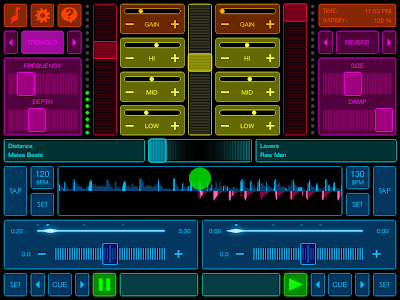
Sonorasaurus Rex 2.0 has arrived. Here's what's new:
Easy file transfer via iTunes File Sharing
3 Hot Cues and 1 Main Cue
Latency Priority Mode for maximum performance
Music library with playlists and sorting options
Batch/single waveform generation
Waveform scrubbing
BPM Tapping for easy BPM calculation
Beat-highlighted waveforms and pulsing orb to facilitate beatmatching
Two standalone decks for playing your uploaded or bundled songs
Dedicated effects module per deck
High quality Reverb, Flange, Distortion, Tremolo, Echo and Highpass effects
Tweakable parameters for all effects
Crossfader for mixing songs together to any degree you choose
Persistent Pitch Control for adjusting playback speed (Beatmatching)
Dynamic Jog Area for dramatically and temporarily affecting pitch
EQ and Gains for fine tuning the volume, low mid and high frequency ranges
Built in HTTP upload interface for adding songs to your mixing library (requires local WiFi network)
LED Level meters
Full MP3 format support including VBR and CBR (128 to 320 kbps)
AAC and WAV support
Bonus tracks, courtesy of Melee Beats and Service Sweden
Tutorial for newcomers
BONUS TRACKS:
Sonorasaurus Rex comes with featured songs from artists like Jackpot, Lake Heartbeat, Melee Beats and The Embassy, so you can start mixing as soon as you install the app!
NOTE:
To batch upload your own files, open iTunes, select your iPad and and look under Apps -> File Sharing. Alternatively, you can upload tracks through local Wi-Fi one by one.