
APC40 - Step Sequencer, Note Mode, 2nd Device Control, etc.
Re: Note Mode for the APC40 - Python Scripts
No Live 7 support
-
HeadrickProductions
- Posts: 612
- Joined: Fri Sep 11, 2009 7:41 pm
Re: Note Mode for the APC40 - Python Scripts
Request or suggestion how to get this to work.
Your in session in live setting
So let's say you have a beat made and going (battery 3 or whatever)
then you want to do another loop in time (Massive lead or anything for that matter).
You have already set the length of midi clip to the same length as the battery 3 loop
I want to be able to press the launch all clips of the apc for that row so that it re-triggers the drum loop while at the same time starting to record the massive loop recording so they are in perfect time.
I've found that when I press the launch all button on the apc for that row it re-triggers the drum loop and just plays the massive loop and does not record. I have to reach and press both buttons. Now when it is just two button that is not bad but you can imagine when you have many loops that it is a problem.
Any way to fix this or suggest any type of work around
If I'm not clear just let me know but I thought you'd be a good source to see if there is something that can be done.
Your in session in live setting
So let's say you have a beat made and going (battery 3 or whatever)
then you want to do another loop in time (Massive lead or anything for that matter).
You have already set the length of midi clip to the same length as the battery 3 loop
I want to be able to press the launch all clips of the apc for that row so that it re-triggers the drum loop while at the same time starting to record the massive loop recording so they are in perfect time.
I've found that when I press the launch all button on the apc for that row it re-triggers the drum loop and just plays the massive loop and does not record. I have to reach and press both buttons. Now when it is just two button that is not bad but you can imagine when you have many loops that it is a problem.
Any way to fix this or suggest any type of work around
If I'm not clear just let me know but I thought you'd be a good source to see if there is something that can be done.
In a K induced Haze (the old K kind not the special K kind ), but an Asian spizz can sometimes bring me out! If ya don't get it, ya never will.
Swing like your life depends on it
Swing like your life depends on it
-
Hanz_Petrov
- Posts: 119
- Joined: Sat Feb 06, 2010 2:39 pm
- Contact:
Re: Note Mode for the APC40 - Python Scripts
Not sure what to suggest. Might be easier to program a solution for this in M4L, however, if you could describe how you would imagine such a solution, I might be able to tell you how feasible it would be to implement as a python script.HeadrickProductions wrote:Request or suggestion how to get this to work.
Your in session in live setting
So let's say you have a beat made and going (battery 3 or whatever)
then you want to do another loop in time (Massive lead or anything for that matter).
You have already set the length of midi clip to the same length as the battery 3 loop
I want to be able to press the launch all clips of the apc for that row so that it re-triggers the drum loop while at the same time starting to record the massive loop recording so they are in perfect time.
I've found that when I press the launch all button on the apc for that row it re-triggers the drum loop and just plays the massive loop and does not record. I have to reach and press both buttons. Now when it is just two button that is not bad but you can imagine when you have many loops that it is a problem.
Any way to fix this or suggest any type of work around
If I'm not clear just let me know but I thought you'd be a good source to see if there is something that can be done.
Best,
Hanz
http://remotescripts.blogspot.com/ - an introduction to the Framework classes
-
Hanz_Petrov
- Posts: 119
- Joined: Sat Feb 06, 2010 2:39 pm
- Contact:
Re: Note Mode for the APC40 - Python Scripts
I've updated the APC40 Note Mode scripts so that all of the new features are now shifted controls (with the exception of Note Mode). This leaves the original APC40 assignments unchanged.
- Shift + Tap Tempo = Device Lock.
- Shift + Nudge- = Undo.
- Shift + Nudge+ = Redo.
- Shift + Cue Volume = Tempo Control.
- Shift + Arm = Slider Reassignment. 8 Modes are available (from left to right): Vol, Pan, Send A, Send B, Send C, User 1, User 2, User 3.
I've left Note Mode mapped to the Master button (as it is with the APC20), since Shift + Master is a bit awkward. I figure that if it's good enough for the APC20, then it's good enough for the APC40. ;)
Also, the lower left 4 x 4 section of the Note Mode grid will now follow the Drum Rack selection box (can't make it any bigger, however, since the LiveAPI limits pad translations to 16 notes).
The new files are available at my blog.
Enjoy.
Hanz
PS: Guess this thread should really be moved to the Tips & Tricks forum, since the new Board Index now states clearly: "Share your Ableton Live secrets here". ;)
- Shift + Tap Tempo = Device Lock.
- Shift + Nudge- = Undo.
- Shift + Nudge+ = Redo.
- Shift + Cue Volume = Tempo Control.
- Shift + Arm = Slider Reassignment. 8 Modes are available (from left to right): Vol, Pan, Send A, Send B, Send C, User 1, User 2, User 3.
I've left Note Mode mapped to the Master button (as it is with the APC20), since Shift + Master is a bit awkward. I figure that if it's good enough for the APC20, then it's good enough for the APC40. ;)
Also, the lower left 4 x 4 section of the Note Mode grid will now follow the Drum Rack selection box (can't make it any bigger, however, since the LiveAPI limits pad translations to 16 notes).
The new files are available at my blog.
Enjoy.
Hanz
PS: Guess this thread should really be moved to the Tips & Tricks forum, since the new Board Index now states clearly: "Share your Ableton Live secrets here". ;)
http://remotescripts.blogspot.com/ - an introduction to the Framework classes
Re: Note Mode for the APC40 - Python Scripts
WOW
I think Ableton need to hire you.
I think Ableton need to hire you.
ctrl + left/right = select transient
ctrl + shift + left/right = select between transients
ctrl + space = play selection
ctrl + shift + left/right = select between transients
ctrl + space = play selection
Re: Note Mode for the APC40 - Python Scripts
Just wondering....
any way to implement a "user" mode? Perhaps shift + master could get to it? (edit-just realised thats for master track)
Its easy to run out of clip buttons on one channel if you have more than 5 clips and you are improvising, for example.
Its not so practical to move the red box while improvising at speed, so it would be cool to stick all my drum clips in the user mode,
This would be good when triggering loads of drum clips (in my case) anyway, and would go some way to completing the incomplete feature set we were given before your wonderful hack....
Thank you again!
any way to implement a "user" mode? Perhaps shift + master could get to it? (edit-just realised thats for master track)
Its easy to run out of clip buttons on one channel if you have more than 5 clips and you are improvising, for example.
Its not so practical to move the red box while improvising at speed, so it would be cool to stick all my drum clips in the user mode,
This would be good when triggering loads of drum clips (in my case) anyway, and would go some way to completing the incomplete feature set we were given before your wonderful hack....
Thank you again!
Last edited by dna598 on Mon May 24, 2010 2:20 pm, edited 1 time in total.
ctrl + left/right = select transient
ctrl + shift + left/right = select between transients
ctrl + space = play selection
ctrl + shift + left/right = select between transients
ctrl + space = play selection
Re: Note Mode for the APC40 - Python Scripts
Hey Hanz, excellent work, any sign of notemode feedback available in the api? I tried the new files and encountered one bug, seems like the tap tempo is still on the shifted button, probably just left over from the first scripts you made. Device lock is also on the tap tempo button when shifted which is correct.Hanz_Petrov wrote:I've updated the APC40 Note Mode scripts so that all of the new features are now shifted controls (with the exception of Note Mode). This leaves the original APC40 assignments unchanged.
- Shift + Tap Tempo = Device Lock.
- Shift + Nudge- = Undo.
- Shift + Nudge+ = Redo.
- Shift + Cue Volume = Tempo Control.
- Shift + Arm = Slider Reassignment. 8 Modes are available (from left to right): Vol, Pan, Send A, Send B, Send C, User 1, User 2, User 3.
I've left Note Mode mapped to the Master button (as it is with the APC20), since Shift + Master is a bit awkward. I figure that if it's good enough for the APC20, then it's good enough for the APC40.
Also, the lower left 4 x 4 section of the Note Mode grid will now follow the Drum Rack selection box (can't make it any bigger, however, since the LiveAPI limits pad translations to 16 notes).
The new files are available at my blog.
Enjoy.
Hanz
PS: Guess this thread should really be moved to the Tips & Tricks forum, since the new Board Index now states clearly: "Share your Ableton Live secrets here".
-
Hanz_Petrov
- Posts: 119
- Joined: Sat Feb 06, 2010 2:39 pm
- Contact:
Re: Note Mode for the APC40 - Python Scripts
@dna598: Sounds like a good idea - it should be possible to have two User modes, like the LaunchPad does (one for notes, and one for custom mapping). I'll try to look into it when I have a chance.
@Markemark: Unfortunately, Note Mode feedback is not so simple. As you know, the APC40 grid uses identical notes on multiple channels, so feedback would need to do the same. My script actually uses note & channel translations to get around this, but it works for outbound data only. I'll let you know if I come up with anything clever.
Thanks also for finding the double-mapping on Shift + Tap Tempo - it's now been fixed.
Best,
Hanz
@Markemark: Unfortunately, Note Mode feedback is not so simple. As you know, the APC40 grid uses identical notes on multiple channels, so feedback would need to do the same. My script actually uses note & channel translations to get around this, but it works for outbound data only. I'll let you know if I come up with anything clever.
Thanks also for finding the double-mapping on Shift + Tap Tempo - it's now been fixed.
Best,
Hanz
http://remotescripts.blogspot.com/ - an introduction to the Framework classes
Re: Note Mode for the APC40 - Python Scripts
This is great! Personally though, I would only occasionally use the note mode whereas I'm constantly shifting between Master and Track for fx tweaking when I play live. Would love if Note Mode could be shift-activated too, leaving the Master button to it's original function. Keeps it all consistent too. 
Hanz_Petrov wrote:I've updated the APC40 Note Mode scripts so that all of the new features are now shifted controls (with the exception of Note Mode). This leaves the original APC40 assignments unchanged.
- Shift + Tap Tempo = Device Lock.
- Shift + Nudge- = Undo.
- Shift + Nudge+ = Redo.
- Shift + Cue Volume = Tempo Control.
- Shift + Arm = Slider Reassignment. 8 Modes are available (from left to right): Vol, Pan, Send A, Send B, Send C, User 1, User 2, User 3.
I've left Note Mode mapped to the Master button (as it is with the APC20), since Shift + Master is a bit awkward. I figure that if it's good enough for the APC20, then it's good enough for the APC40.
Also, the lower left 4 x 4 section of the Note Mode grid will now follow the Drum Rack selection box (can't make it any bigger, however, since the LiveAPI limits pad translations to 16 notes).
The new files are available at my blog.
Enjoy.
Hanz
PS: Guess this thread should really be moved to the Tips & Tricks forum, since the new Board Index now states clearly: "Share your Ableton Live secrets here".
-
Hanz_Petrov
- Posts: 119
- Joined: Sat Feb 06, 2010 2:39 pm
- Contact:
Re: Note Mode for the APC40 - Python Scripts
You guys are hard to please. ;)
I had done a version with Shift + Master for Note Mode, but found it inconvenient to use. Since you've asked, however, I've uploaded it as an alternate version.
Best,
Hanz
I had done a version with Shift + Master for Note Mode, but found it inconvenient to use. Since you've asked, however, I've uploaded it as an alternate version.
Best,
Hanz
http://remotescripts.blogspot.com/ - an introduction to the Framework classes
Re: Note Mode for the APC40 - Python Scripts
Aw man, I hope I didn't come across as ungrateful! You truly are the man and I'm happy for whatever extra functionality and tweaks you have the time to supply. Thank you so much for the alternate version! ;-D
Cheers,
/E
Cheers,
/E
Hanz_Petrov wrote:You guys are hard to please.
I had done a version with Shift + Master for Note Mode, but found it inconvenient to use. Since you've asked, however, I've uploaded it as an alternate version.
Best,
Hanz
Re: Note Mode for the APC40 - Python Scripts
Thanks, I agree, consistency with shift is key. Now how 'bout those available clip stop buttons!!!Hanz_Petrov wrote:You guys are hard to please.
I had done a version with Shift + Master for Note Mode, but found it inconvenient to use. Since you've asked, however, I've uploaded it as an alternate version.
Best,
Hanz

Re: Note Mode for the APC40 - Python Scripts
Hey Hanz in max4live I was able to remove "session overview" from the shift button yet still keep the shift working for the "device control" banks. In this way maybe you could implement the available 8 clip stop buttons like this:
Shift + clip stop button
1. Clip Launch
2. Session Overview
3. Note Mode
4. User Mode
5. ????
6. etc.......
This way "Master Track Select" is free to use how people choose again.
I know you mentioned earlier about maybe using the clip stop buttons for velocity or octave shifts in Note Mode, well this would still be possible once in Note Mode. Then once shift is pressed they are to switch modes again.
Shift + clip stop button
1. Clip Launch
2. Session Overview
3. Note Mode
4. User Mode
5. ????
6. etc.......
This way "Master Track Select" is free to use how people choose again.
I know you mentioned earlier about maybe using the clip stop buttons for velocity or octave shifts in Note Mode, well this would still be possible once in Note Mode. Then once shift is pressed they are to switch modes again.
-
Hanz_Petrov
- Posts: 119
- Joined: Sat Feb 06, 2010 2:39 pm
- Contact:
Re: Note Mode for the APC40 - Python Scripts
I've started to look at implementing a User Mode, but this will likely take some time - the APC scripts are not currently structured to use more than 2 modes, and so the required changes are relatively complex (plus, I never seem to have enough spare time as it is.. ;)
In the meantime, however, I've made the Note Mode buttons user-mappable. This means that any of the Note Mode buttons can be MIDI-mapped, and the rest will continue to send MIDI notes.
The updated files are available at my blog (shifted and non-shifted versions now together in one download).
Best,
Hanz
In the meantime, however, I've made the Note Mode buttons user-mappable. This means that any of the Note Mode buttons can be MIDI-mapped, and the rest will continue to send MIDI notes.
The updated files are available at my blog (shifted and non-shifted versions now together in one download).
Best,
Hanz
http://remotescripts.blogspot.com/ - an introduction to the Framework classes
Re: Note Mode for the APC40 - Python Scripts
rightio.
Python (and coding) noob here.
I'm trying to achieve a note grid that uses the full 8 columns, as apposed to two groups of 4.
like so
36 37 38 39 40 41 42 43
44 45 46 47 48 49 50 51
52 53 54 55 56 57 58 59
60 61 62 63 64 65 66 67
68 69 70 71 72 73 74 75
and, I also want the lights to look like this (the ones with white bars over them are flashing)
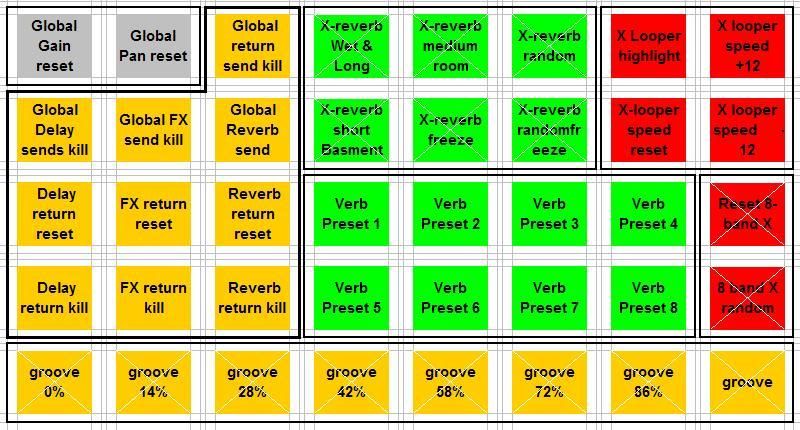
with my rudimentary coding skills I had a go and this is what I came up with. However, when I use this Live fails to connect with the APC40 at all.
I assumed, rightly or wrongly, from looking at the existing code that the top-most scene and the left-most track = 0, not 1?
I'm sure I've done some very basic coding error. I will do some more reading on python, but I thought in the meantime someone might be able to shortcut me
Python (and coding) noob here.
I'm trying to achieve a note grid that uses the full 8 columns, as apposed to two groups of 4.
like so
36 37 38 39 40 41 42 43
44 45 46 47 48 49 50 51
52 53 54 55 56 57 58 59
60 61 62 63 64 65 66 67
68 69 70 71 72 73 74 75
and, I also want the lights to look like this (the ones with white bars over them are flashing)
with my rudimentary coding skills I had a go and this is what I came up with. However, when I use this Live fails to connect with the APC40 at all.
Code: Select all
    def _on_note_mode_changed(self):
        if not self._master_button != None:
            raise AssertionError
        if self.is_enabled() and self._invert_assignment == self._toggle_pressed:
            if self._note_mode_active:
                self._master_button.turn_on()
                for scene_index in range(5):
                    #TODO: re-map scene_launch buttons to note velocity...
                    scene = self._session.scene(scene_index)
                    for track_index in range(8):
                        clip_slot = scene.clip_slot(track_index)
                        button = self._matrix.get_button(track_index, scene_index)
                        clip_slot.set_launch_button(None)
                        button.set_enabled(False)
                        button.set_channel(9) #remap all Note Mode notes to channel 10
                        if track_index < 8:
                            button.set_identifier(36 + (8 * scene_index)  + track_index))
                            if (scene_index = 4):
                                buton.send_value(6)
                            if ((scene_index < 4) and (scene_index > 0)) and (track_index < 3):
                                buton.send_value(5)
                            if (scene_index =  0 abd track_index= 2):
                                button.send_value(5)
                            if (scene_index < 1) and ((track_index = 3) or (track_index = 4) or (track_index = 5)):
                                button.send_value(2)
                            if (scene_index > 1 and scene_index < 4) and (track_index > 3 and track_index < 7):
                                button.send_value(1)
                            if (scene_index > 1 and track_index < 2):
                                button.send_value(3)
                            if (scene_index = 2 or scene_index = 3) and (track_index = 7):
                                button.send_value(4)
                            else:
                                button.send_value(0)
                self._rebuild_callback()
            else:
                self._master_button.turn_off()
        return None
I'm sure I've done some very basic coding error. I will do some more reading on python, but I thought in the meantime someone might be able to shortcut me
