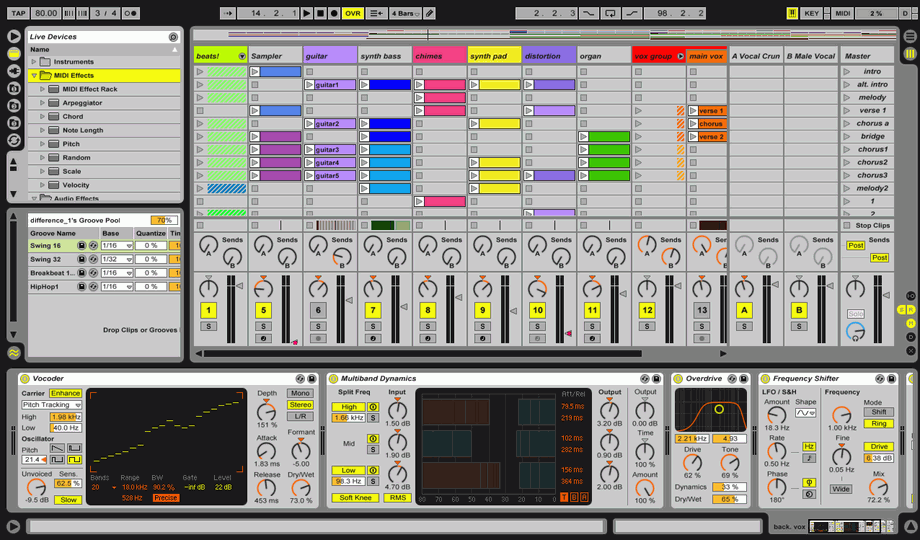
you seem REALLY confused about midi vs. audio, there shouldn't be original midi notes in ableton's instrument list, midi notes are what you would input from a keyboard to make an instrument play, you should have a track with an instrument on it, and on that instruments track, you can place midi notes, or midi files you have downloaded, and they will cause the instrument to play what notes you have put on it. there should not be midi files in the racks to the left of the sequencer.
ok, look at this picture:
http://www.nanofunk.net/wp-content/uplo ... ivemax.png
see in the upper left hand corner, when you click on that highlighted folder (the yellow folder thing between the plug icon and the triangular icon) there should be a list of instruments in there, depending on what version you have, it might have stuff like operator and analog, or if you have a more basic version it might just have simpler and impulse, as well as a dropdown called "instrument rack".
open instrument rack and there will be a bunch of different types of instruments, find one you want, and drag it into the empty area in the session view window (where it says "drop files and devices here" in that pic), it should then have the name at the top of the column, indicating that on that track, that instrument is loaded.
now, take one of your midi files, and put it in one of the slots below that instrument in the same vertical column
see this picture:
http://getthatprosound.com/wp-content/u ... enshot.png
each row has a line of same colored clips in it, yes? that is where you drop your midi clips. now, when you click on the little triangle on the midi clips that are below that loaded instrument, they should play back.