Help!!
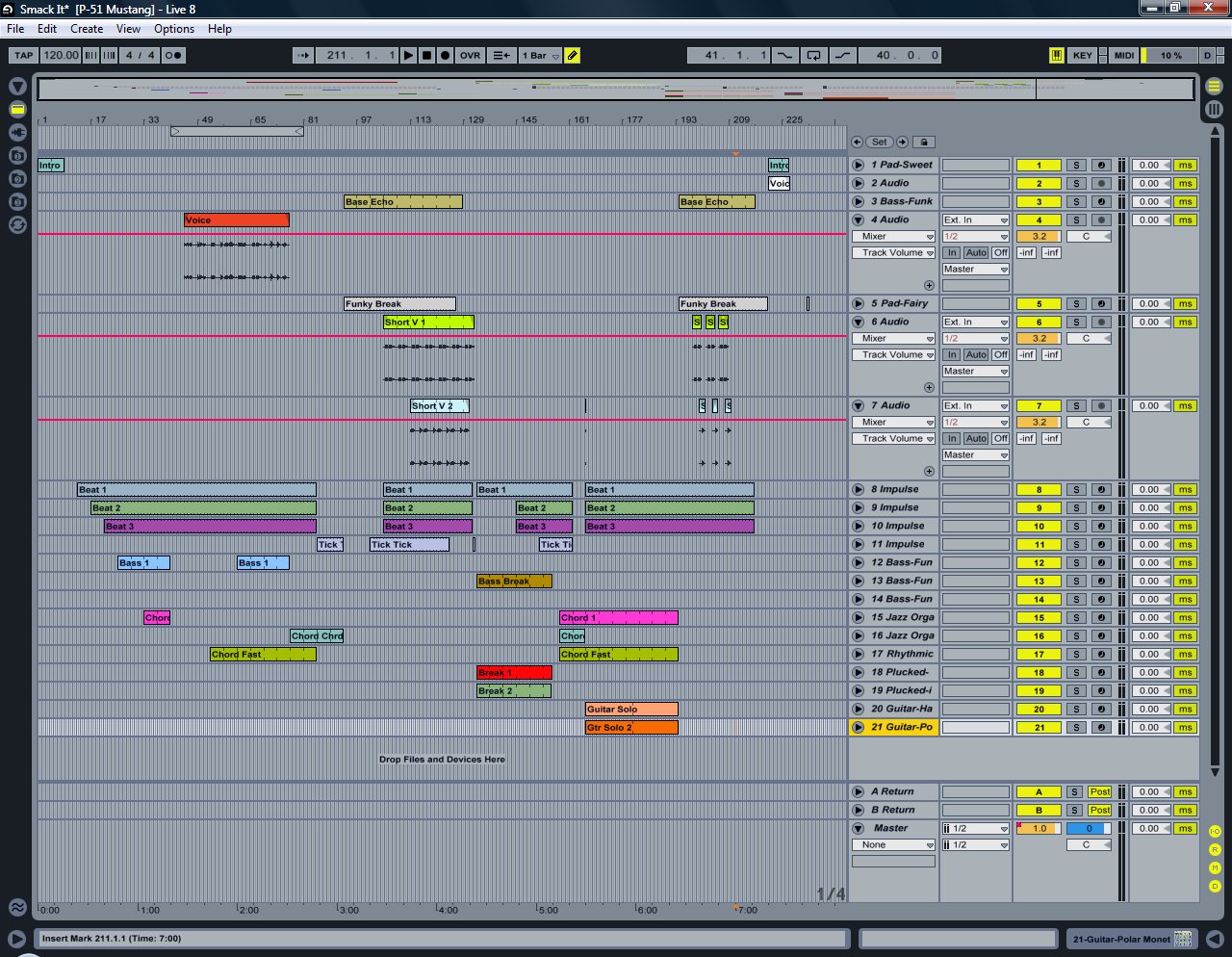
I have been using Ableton Live 8 since October of 2010. I used it to produce my first and second digital CDs. Now working on my third digital CD, I’m incorporating a couple songs with singing vocals. Here’s my problem. When I listen to the tracks on Ableton, everything sounds great. But after exporting the set to the .wav format, you can hear all the Ableton instruments but not the singing vocals parts. I’ve tried to figure it out but I can’t. Below is a link to an image of my current settings. I’m sure it’s something simple I’ve overlooked. Oh, when playing in Ableton the vocal parts don't bounce the sound meters in the mixer section but you can hear them great. Vocals tracks are 4, 6 and 7 listed as Voice, Short V1, Short V2 and are unfolded. The aster track is also unfolded. Please help!! Thank you very much!
Ed
http://www.siue.edu/~efrankl/Ableton/Ableton%201.jpg
Singing Vocals Don't Export to .Wav Format
Re: Singing Vocals Don't Export to .Wav Format
weird, humor me for a second and set it to "auto" not "off" like you have it right now. On your render, you're rendering form "Master" right?
Re: Singing Vocals Don't Export to .Wav Format
Thanks! But, I've tried that and 20 other settings. Even a couple suggested by the Ableton help line staff! Still no go! And, if I copy and paste the singing voices into another set, they work fine when exporting to .wav. It's just another sweet mystery of life I guess. I'm probably going to have to redo all the voice parts. Bummer!!ARDJ wrote:weird, humor me for a second and set it to "auto" not "off" like you have it right now. On your render, you're rendering form "Master" right?
Re: Singing Vocals Don't Export to .Wav Format
In that photo, you have the track monitor on tracks 4,6, and 7 set to "Off". Try setting them to "Auto".
"That which does not kill us makes us stronger..........."
-Friedrich Nietzsche-
-Friedrich Nietzsche-
Re: Singing Vocals Don't Export to .Wav Format
Nope! Still doesn't work. What else you got. LOL! Thanks you very much!kb420 wrote:In that photo, you have the track monitor on tracks 4,6, and 7 set to "Off". Try setting them to "Auto".
Re: Singing Vocals Don't Export to .Wav Format
It's strange that you can hear it fine when playing back but not when exporting.
My only thoughts would be to make sure the outs on all the tracks are set to Master like ARDJ said and make sure you're exporting Master.
Any possible phase cancellation issues?
Maybe try changing dithering settings? Export to .aif instead?
That's strange. Turn on/off normalize?
My only thoughts would be to make sure the outs on all the tracks are set to Master like ARDJ said and make sure you're exporting Master.
Any possible phase cancellation issues?
Maybe try changing dithering settings? Export to .aif instead?
That's strange. Turn on/off normalize?
Re: Singing Vocals Don't Export to .Wav Format
have you tried creating a new empty track in this set and copy/paste a recorded voice to it?badelf wrote:if I copy and paste the singing voices into another set, they work fine when exporting to .wav. It's just another sweet mystery of life I guess. I'm probably going to have to redo all the voice parts. Bummer!!
Re: Singing Vocals Don't Export to .Wav Format
Have you got any VSTs or anything on the vocals? I had a similar problem once where a VST I was using would play fine in live but wouldn't export any audio at all. I got around it by resampling the track and then exporting that.
Live 7.0.18 | Axiom 61 | Launchpad | Homous | Nanokontrol | Saffire 6 | Ibanez Jazzmaster Bass | Biscuits
Soundcloud (solo stuff) | One Gear Go (my band)
Soundcloud (solo stuff) | One Gear Go (my band)
Re: Singing Vocals Don't Export to .Wav Format
badelf wrote:Nope! Still doesn't work. What else you got. LOL! Thanks you very much!kb420 wrote:In that photo, you have the track monitor on tracks 4,6, and 7 set to "Off". Try setting them to "Auto".
The only other thing that looks suspect in that photo is the actual size of your waveforms. They seem to be ridiculously small. Maybe you need to turn the volume up a little on those tracks. Turn up the "Clip Gain" in the sample window on those tracks and then mix it down again.
I don't know. I'm just guessing.
"That which does not kill us makes us stronger..........."
-Friedrich Nietzsche-
-Friedrich Nietzsche-
Re: Singing Vocals Don't Export to .Wav Format
Thanks everyone for your help! I just don't know what the problem is. I copied and pasted all the vocals into another set and they worked fine and exported to .wav with no problem. In the original set none of the singing vocals are bouncing the meters even though I can hear them all plainly. My guess is that I've inadvertently hit some mystery button or command which has killed the exporting function on the vocals. I'm just going to stop wasteing time trying to fix it and just redo all of the vocals in this set. Or, I could just have 9 songs on my next CD, instead of 10! LOL! Thanks everybody for all your help and suggestions. I still love Ableton but I've obviously contracted a pesky gremlin on this song. LOL!!kb420 wrote:badelf wrote:Nope! Still doesn't work. What else you got. LOL! Thanks you very much!kb420 wrote:In that photo, you have the track monitor on tracks 4,6, and 7 set to "Off". Try setting them to "Auto".
The only other thing that looks suspect in that photo is the actual size of your waveforms. They seem to be ridiculously small. Maybe you need to turn the volume up a little on those tracks. Turn up the "Clip Gain" in the sample window on those tracks and then mix it down again.
I don't know. I'm just guessing.
Ed
-
RhinoInRio
- Posts: 118
- Joined: Wed Nov 14, 2007 1:48 am
- Location: DeutschLand
- Contact:
Re: Singing Vocals Don't Export to .Wav Format
Well it's probably too late now...
I would try consolidating the vocal tracks indepently. Or freeze 'em.
I would try consolidating the vocal tracks indepently. Or freeze 'em.
Re: Singing Vocals Don't Export to .Wav Format
I had the same problem.
Make sure the "audio to" for all the tacks is set to "master."
Fixed.
Make sure the "audio to" for all the tacks is set to "master."
Fixed.