So i found a little frustration with the way the control surfaces work last night, took forever to realise it.... Octop4d Lite and Octop4d 2 are programmed so that they currently work when the Launchpad is selected as the second control surface slot.... Sadly if you have nothing in the first control surface slot it seems to see the second one as the first one... Of course that means it doesn't even recognise the Launchpad is connected....
So last night my time was spent recoding each of the live observers so that you can have the launchpad in any of the control surface slots.... I managed to get a little time in to wire up the lighting and control for the second scene so i can now start working on the actions...
I'll try and do the same for the Lite version when i get time but if you have any problems getting the launchpad to be recognised then try setting up a control surface such as the APC40 in slot one with the Launchpad as slot 2....
Cheers
D
Oktopad FOUR - Video & Manual!
Re: Octop4d TWO & Octop4d TWO Lite (FREE) (Novation Launchpad)
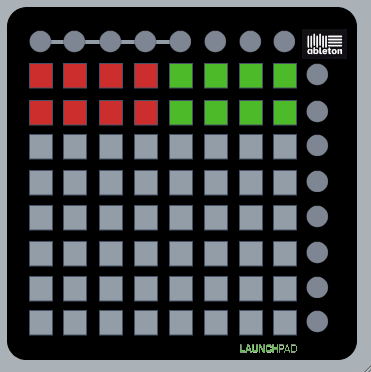
Scene Two finished and uploaded....
Again as with scene one the Learn button allows you to audition the effects before going live however this scene is more about playing it live than preparing anything, Side round buttons again react to the send levels in Live and switch the 8 tracks within the clip launch rectangle chosen to send audio to the device or directly to the master...
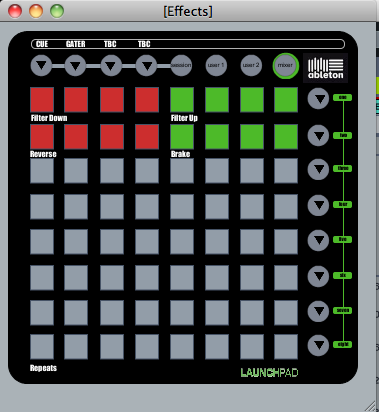
Top Row of buttons perform filters down (Red) and up (Green) at different rates from 1 beat (centre buttons) to 16 beats (outer buttons)
Second Row is different speeds of reverse (Red) and Turntable Brake (Green)
The bottom six rows (in grey above but they light in columns when pressed) are a 8 step beat repeat style affect allowing you to trigger a repeat of the last bar played at any point divisible by 8ths, the lowest size slice is 1/64th playable by pressing any of the buttons on the bottom row rising to the top row which triggers a half bar sized slice...
As with the first scene the top row of round buttons become a visual metronome that give you the indication of where to catch the audio you want repeated...
I'll do a video when i get time, more coding to do!!
Cheers
D
Re: Octop4d TWO & Octop4d TWO Lite (FREE) (Novation Launchpad)

Scene 5 finished (three and four i've skipped for now)
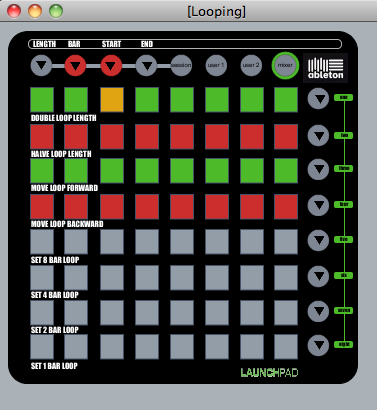
This gives you looping control over the 8 tracks within your clip launch rectangle...
You can set 1, 2, 4 or 8 Bar Loops....
Halve or double them by moving the loop start or end point
Move the loop forwards or backwards, by a bar at a time or by it's length...
And switch preset loops on and off with a led indicator as to where the playhead is in comparison to the loop, the side round buttons are lit Green before a loop has been reached, Orange when in the loop brace and finally Red when the playhead has passed the preset loop you've tried to switch on...
Cheers
D
Re: Octop4d TWO & Octop4d TWO Lite (FREE) (Novation Launchpad)
It's been a busy day, i've tidied up the GUI for each of the floating scene windows that act as heads up displays but also mini manuals on what controls what...
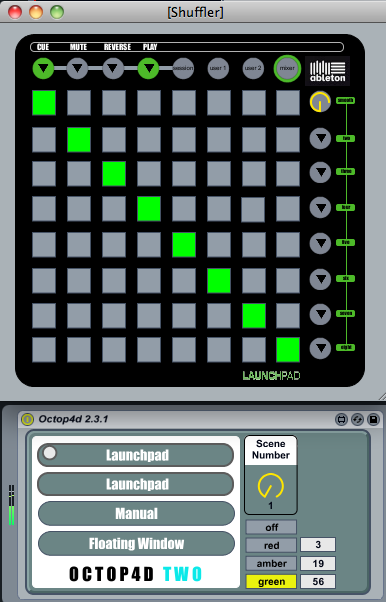
Ive also added in three number boxes on the main GUI, changing the values in these boxes changes the led feedback colours, this is specifically for anyone who is colour blind to enable them to use more preferable hues as there are 3 colours with numerous levels of brightness that can be chosen from...
Scene One Shuffler...
Scene Two Effects...
Now with the return of the synced Gater button
And Scene Five Looping...
Now for a break i think....
Cheers
D
Ive also added in three number boxes on the main GUI, changing the values in these boxes changes the led feedback colours, this is specifically for anyone who is colour blind to enable them to use more preferable hues as there are 3 colours with numerous levels of brightness that can be chosen from...
Scene One Shuffler...
Scene Two Effects...
Now with the return of the synced Gater button
And Scene Five Looping...
Now for a break i think....
Cheers
D
Re: Octop4d TWO & Octop4d TWO Lite (FREE) (Novation Launchpad)
Updating the Lite version of Octop4d at the weekend to include the developments to Scene 1, Shuffler, so that you can use the device with the Launchpad in any control surface slot...
In addition for the colour blind users you can also define the three LED states for the Launchpad (mine is a second so my oranges are nearly red)
And finally the Floating window GUI has been updated to those above to better represent the Launchpad, you open it by pressing and holding the User 2 button and do the same again to close so negating the need to use the mouse...
Cheers
D
In addition for the colour blind users you can also define the three LED states for the Launchpad (mine is a second so my oranges are nearly red)
And finally the Floating window GUI has been updated to those above to better represent the Launchpad, you open it by pressing and holding the User 2 button and do the same again to close so negating the need to use the mouse...
Cheers
D
Re: Octop4d TWO & Octop4d TWO Lite (FREE) (Novation Launchpad)
I know you're super smart and I bought this thing, but damn I am lost! More videos please. I'm not the brightest, need visuals. Whenever I hook this thing up I get so lost I just started drumming the launchpad. Sort of like driving a Mercedes on the autobahn doing 20 mph
Re: Octop4d TWO & Octop4d TWO Lite (FREE) (Novation Launchpad)
Have you read the in built manual? there's not really a lot to explain, User 2 button plus the side round buttons to pick one of three scenes so far? The GUI pop up window labels what all the buttons do?
I'll do a video later this weekend if i've got time, just got in from using it at a gig....
Cheers
D
I'll do a video later this weekend if i've got time, just got in from using it at a gig....
Cheers
D
Re: Octop4d TWO & Octop4d TWO Lite (FREE) (Novation Launchpad)
Hey Darren, I'm afraid I'm having a few problems here also.
First off, the manual that comes inside the device is not really accurate. The image it shows for set up is different from the way Octop4d actually looks (is it an image of a previous version?). It mentions pushing the button in the lower right hand corner when that button is now in the top left (v.2.3.1). The set-up explanation could be clearer and more comprehensive in general. The language used in the Shuffler page is a little unclear and the Stutter page seems to be addressed solely at previous users of Octop4d and means nothing to someone new to the device. You mention above that the GUI window labels what all the buttons do? I must be missing something because I can't see anything in the GUI that explains what the buttons do.
The PDF manual is also an old one. It shows images that are different to the way Octop4d currently looks. This is quite frustrating for someone like myself (and the user above) who is finding difficulty figuring it all out. I understand you're busy working on the coding side and maybe you might want to farm the manual writing out to someone else? (I write manuals for a living btw mostly on radio broadcasting but the work is the same. Explaining things in a clear and concise way)
Now, the main trouble I'm having is the feedback from the device. I'm using two launchpads and the one operating Octop4d is not receiving any visual feedback. I can see what I'm doing in the floating window but not on the launchpad itself. Any ideas?
I'm hoping to use Octop4d out live in the coming weeks so I'm putting aside some time to really figure it out this week. Any help on the above appreciated.
How did the gig go?
First off, the manual that comes inside the device is not really accurate. The image it shows for set up is different from the way Octop4d actually looks (is it an image of a previous version?). It mentions pushing the button in the lower right hand corner when that button is now in the top left (v.2.3.1). The set-up explanation could be clearer and more comprehensive in general. The language used in the Shuffler page is a little unclear and the Stutter page seems to be addressed solely at previous users of Octop4d and means nothing to someone new to the device. You mention above that the GUI window labels what all the buttons do? I must be missing something because I can't see anything in the GUI that explains what the buttons do.
The PDF manual is also an old one. It shows images that are different to the way Octop4d currently looks. This is quite frustrating for someone like myself (and the user above) who is finding difficulty figuring it all out. I understand you're busy working on the coding side and maybe you might want to farm the manual writing out to someone else? (I write manuals for a living btw
mostly on radio broadcasting but the work is the same. Explaining things in a clear and concise way)Now, the main trouble I'm having is the feedback from the device. I'm using two launchpads and the one operating Octop4d is not receiving any visual feedback. I can see what I'm doing in the floating window but not on the launchpad itself. Any ideas?
I'm hoping to use Octop4d out live in the coming weeks so I'm putting aside some time to really figure it out this week. Any help on the above appreciated.
How did the gig go?
Re: Octop4d TWO & Octop4d TWO Lite (FREE) (Novation Launchpad)
Good points well made, I hope you've been receiving the update emails which cover each update as well?
The Launchpad not lighting may well be the colour feature that came in the last update, you'll see on the main GUI that there's three number boxes, these need adjusting to your own personal taste for the lighting feedback, after an out of memory error last night I found it reset to zeros when I recovered the set so I'll add some code that initialises these at first start up...
I'll not be writing a seperate manualbut I will update the internal one today, obviously there are some similarities between this and the first device but as such the manual could be misleading, that said the button matrix has the same functionality as before, its the control mechanism that's changed...
As you can see the screen shots above are what I mean by the buttons are labelled, what other information is there that you'd like to see??
Cheers
D
The Launchpad not lighting may well be the colour feature that came in the last update, you'll see on the main GUI that there's three number boxes, these need adjusting to your own personal taste for the lighting feedback, after an out of memory error last night I found it reset to zeros when I recovered the set so I'll add some code that initialises these at first start up...
I'll not be writing a seperate manualbut I will update the internal one today, obviously there are some similarities between this and the first device but as such the manual could be misleading, that said the button matrix has the same functionality as before, its the control mechanism that's changed...
As you can see the screen shots above are what I mean by the buttons are labelled, what other information is there that you'd like to see??
Cheers
D
Re: Octop4d TWO & Octop4d TWO Lite (FREE) (Novation Launchpad)
You don't actually sleep do you? Thanks for the help. Got visual feedback sorted. Must babysit now so will get back to playing with it this afternoon. Cheers, as always, for the prompt reply.
Re: Octop4d TWO & Octop4d TWO Lite (FREE) (Novation Launchpad)
I'm not sure what sleep is....
I've just uploaded both the updated lite device and version 2.3.2, thanks for the feedback it was the kick i needed to revisit the manual which has been updated with the latest GUI of the main device and clear instructions on set up.

Simply drop the device into a return track and open up the manual for full details on all the features so far, i've also made it so it will give you my standard LED feedback colours when you first open it and allow you to change and store your own values when you save you live template...

As you can see there are five more scenes to go, next will be control over the sends and racks within your return tracks, this may need me to provide it as part of a template rather than a single device so i'll have to do some work on creating effects for the return tracks....
Now off to do some work on Isotonik!!
Cheers
D
I've just uploaded both the updated lite device and version 2.3.2, thanks for the feedback it was the kick i needed to revisit the manual which has been updated with the latest GUI of the main device and clear instructions on set up.
Simply drop the device into a return track and open up the manual for full details on all the features so far, i've also made it so it will give you my standard LED feedback colours when you first open it and allow you to change and store your own values when you save you live template...
As you can see there are five more scenes to go, next will be control over the sends and racks within your return tracks, this may need me to provide it as part of a template rather than a single device so i'll have to do some work on creating effects for the return tracks....
Now off to do some work on Isotonik!!
Cheers
D
Re: Octop4d TWO & Octop4d TWO Lite (FREE) (Novation Launchpad)
Fabulous work. Have you considered a "Buy me a beer" button? I'd have used it just then.
Re: Octop4d TWO & Octop4d TWO Lite (FREE) (Novation Launchpad)
Lol, no i haven't... I see it that people have already paid once so they should get all the updates when they're done and its the feedback that helps me improve on the devices, sometimes i have to take a step back before moving forwards so when i finished the third scene i returned to all the little niggles that had built up from when i'd been playing out with it....
If people enjoy using the devices it's brilliant if they tweet about them or send me links to them being used.... Looking at my belly i could do with less beer!
Cheers
D
If people enjoy using the devices it's brilliant if they tweet about them or send me links to them being used.... Looking at my belly i could do with less beer!
Cheers
D
Re: Octop4d TWO & Octop4d TWO Lite (FREE) (Novation Launchpad)
Just spent a couple of days re-wiring the device from scratch, in starting the fourth scene it became a nightmare with all the patch cables lying around so i returned to using send and receive objects that i eschewed about a year ago because of CPU issues with earlier versions of Max, pleased to say these have now gone and i'm experiencing a massive increase in speed when switching between scenes...
Looks like i'll have to start again with Isotonik as well lol....
Cheers
D
Looks like i'll have to start again with Isotonik as well lol....
Cheers
D
Re: Octop4d TWO & Octop4d TWO Lite (FREE) (Novation Launchpad)
2 days of rewiring has taken me from this....
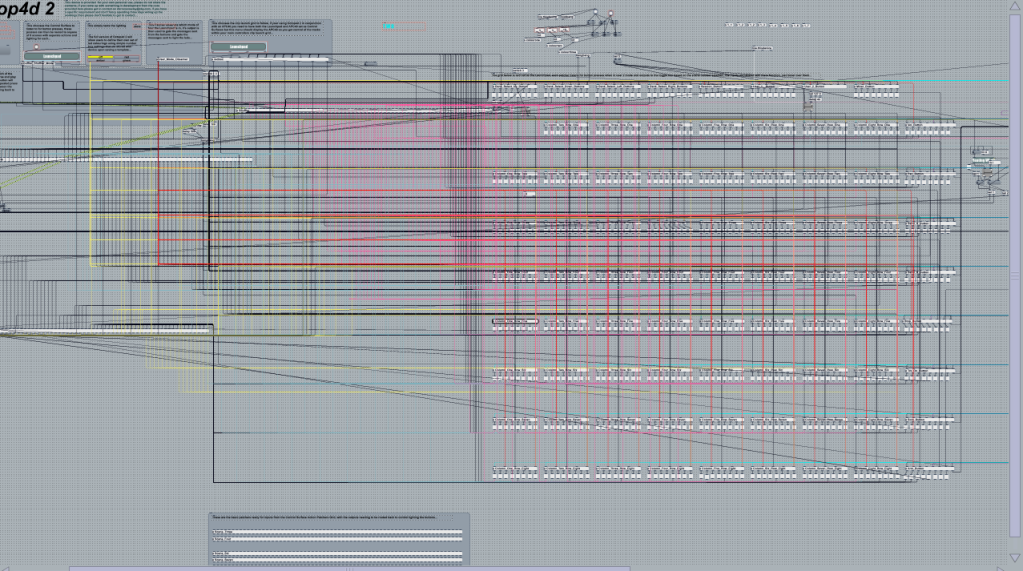
to this...
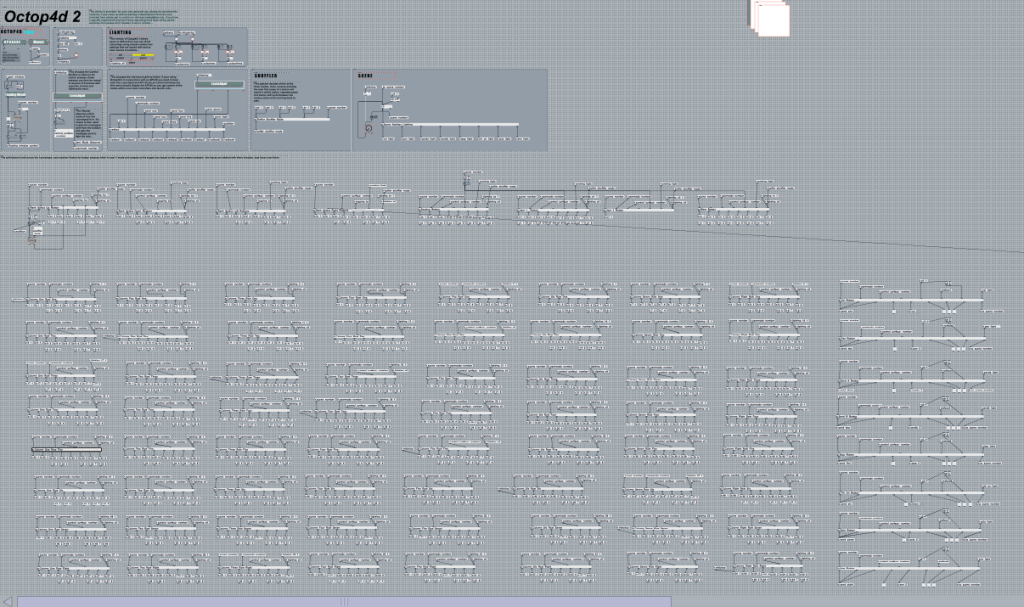
And why.... Well i couldn't make a start on the fourth scene because of all the patch cords all over the place, so i returned to using send and receive objects. I ditched these about a year ago due to cpu issues but i'm pleased to see an actual reduction in cpu at standstill and a massive improvement in speed when switching between the scenes.... Sadly this means that the stuff i've learnt building this second version of Octop4d will have to be transferred back into Isotonik with a new revision.... Got next week off....
Cheers
D
to this...
And why.... Well i couldn't make a start on the fourth scene because of all the patch cords all over the place, so i returned to using send and receive objects. I ditched these about a year ago due to cpu issues but i'm pleased to see an actual reduction in cpu at standstill and a massive improvement in speed when switching between the scenes.... Sadly this means that the stuff i've learnt building this second version of Octop4d will have to be transferred back into Isotonik with a new revision.... Got next week off....
Cheers
D