I'd love to hear and learn about complicated Live setups for live performances, and how it's going for everyone.
We use Live for stereo backing tracks, Analog and AU plugin softsynths played with a USB controller, click track for the drummer, and video. All In Arrange Mode since we're doing video. We used a Core i7 MacBook Air with an SSD, an Axiom Pro controller, an Apogee Duet 2 for the backing tracks (1/2) and the click track (3 out the headphones), and a VGA adaptor for video out.
Everyone once in awhile Live will choke a little and everything will glitch and slow down for a minute, and even more rarely we experience dropouts. I'd also like to do live vocal processing, by put I'm afraid this is already too much for one computer. Maybe we'll move video and vocal processing to a second computer and sync it via MIDI?
I usually have the buffer set to 256 or 512 to keep the controller playable, but I see some people keeping it as low as 64 for live use. That probably wouldn't work for us, which makes vocal processing latency hard.
Any ideas? What's your complicated setup like?
Complicated Performance Setups
-
Muzik 4 Machines
- Posts: 769
- Joined: Thu Oct 22, 2009 9:35 am
Re: Complicated Performance Setups
did you disable the wifi?
the automagic updates?
the automagic updates?

-
Pitch Black
- Posts: 6722
- Joined: Sat Dec 21, 2002 2:18 am
- Location: New Zealand
- Contact:
Re: Complicated Performance Setups
I would suggest try removing the video from Arrange Page. Does this clear up the problem? Asking any computer to do real-time audio and video streaming is quite a big ask, especially if you are using AU softsynths which will have varying and unpredictable degrees of CPU demand on your system.
Also, what size and codec are the movies you are using? This could make a huge difference - if you are using a heavily compressed codec like H.264 the CPU/GPU has to work much harder uncompressing and streaming it. A good codec for live AV work is Photo-JPEG, as it looks good and doesn't require such a heavy CPU hit. However, IMHO its best practice to use a separate laptop for audio and video.
Repost from this thread: viewtopic.php?f=1&t=186643&p=1454503
________________________________________________________________________________________________
If you want to carry a fully self-contained video show with you, IMHO you will need to use a proper VJ application, and most likely running on a second laptop. You can run video directly out of Live's arrange page, or from a Max4Live plugin, or something simple like a Quicktime Player in the backround on the same computer, but you had better be VERY careful about your CPU load when playing live, as video streaming + live audio streaming on the one machine will push your computer to the max.
I use a VJ app called Modul8 on a second laptop, which receives MIDI notes sent from Live on the audio laptop. Usually one MIDI note-per-Scene from Live: I trigger a Scene in Live, and that Scene has a MIDI clip that fires out a single MIDI note at it's head to Modul8. As long as the Scene keeps looping, the MIDI clip keeps looping and re-triggering that video clip until I move on to the next Scene.
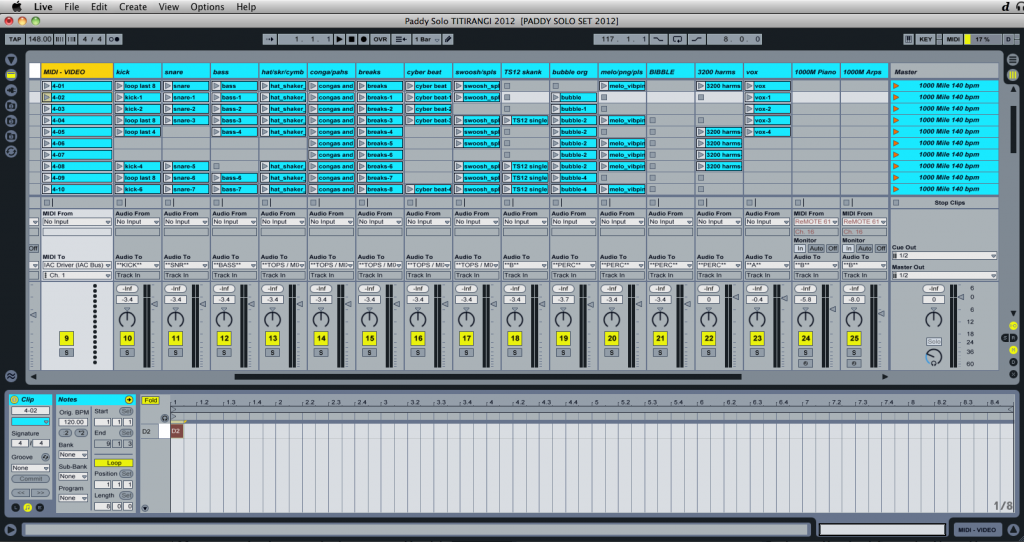
At home, for development, my computer (2010 MBP i5 dual 2.53gHz - 4MB RAM) can just handle running both Live and Modul8 on the same machine, but I get occasional glitches in my audio stream that would be unacceptable in a live show, but not a major problem at home. At home, I route Live's MIDI output to Modul8 via the IAC bus, and for shows MIDI goes out from my RME audio/MIDI interface into a USB MIDI interface on the video computer. By using 2 laptops, I keep to a known quantity of CPU load. If you're serious about doing video, I believe this to be "Best Practice".
________________________________________________________________________________________________
HTH
Also, what size and codec are the movies you are using? This could make a huge difference - if you are using a heavily compressed codec like H.264 the CPU/GPU has to work much harder uncompressing and streaming it. A good codec for live AV work is Photo-JPEG, as it looks good and doesn't require such a heavy CPU hit. However, IMHO its best practice to use a separate laptop for audio and video.
Repost from this thread: viewtopic.php?f=1&t=186643&p=1454503
________________________________________________________________________________________________
If you want to carry a fully self-contained video show with you, IMHO you will need to use a proper VJ application, and most likely running on a second laptop. You can run video directly out of Live's arrange page, or from a Max4Live plugin, or something simple like a Quicktime Player in the backround on the same computer, but you had better be VERY careful about your CPU load when playing live, as video streaming + live audio streaming on the one machine will push your computer to the max.
I use a VJ app called Modul8 on a second laptop, which receives MIDI notes sent from Live on the audio laptop. Usually one MIDI note-per-Scene from Live: I trigger a Scene in Live, and that Scene has a MIDI clip that fires out a single MIDI note at it's head to Modul8. As long as the Scene keeps looping, the MIDI clip keeps looping and re-triggering that video clip until I move on to the next Scene.
At home, for development, my computer (2010 MBP i5 dual 2.53gHz - 4MB RAM) can just handle running both Live and Modul8 on the same machine, but I get occasional glitches in my audio stream that would be unacceptable in a live show, but not a major problem at home. At home, I route Live's MIDI output to Modul8 via the IAC bus, and for shows MIDI goes out from my RME audio/MIDI interface into a USB MIDI interface on the video computer. By using 2 laptops, I keep to a known quantity of CPU load. If you're serious about doing video, I believe this to be "Best Practice".
________________________________________________________________________________________________
HTH
MBP M1Max | Sonoma 14.7 | Live 12.1 | Babyface Pro FS | Push 3T | clump of controllers
Soundcloud
Ableton Certified Trainer
Soundcloud
Ableton Certified Trainer
-
thebestdancers
- Posts: 14
- Joined: Thu Mar 04, 2010 4:54 am
Re: Complicated Performance Setups
Agreed. A second laptop for video would almost certainly halt your lagging/slowing issues. This would free up cpu for you to get more intricate and creative with your routing and effects. Aside from the video, is there a specific appeal for using arrangement view?