Is it disabled??? Finally? This is insane. I can't import audio with out Live 8 pooping all over it with algorithms? I'm trying to record projects for school (playing to pre-recorded backing tracks) and I need this thing to act like a D.A.W. De-couple pre-recorded audio from the tempo grid! How is this too much to ask???
And NO.. you still can't "turn off warping" in Live 8. I've read every thread on this going back to, like, 2006.
This shit is giving me an ulcer.
For the love of God - Warping in Live 9...
-
Pitch Black
- Posts: 6722
- Joined: Sat Dec 21, 2002 2:18 am
- Location: New Zealand
- Contact:
Re: For the love of God - Warping in Live 9...
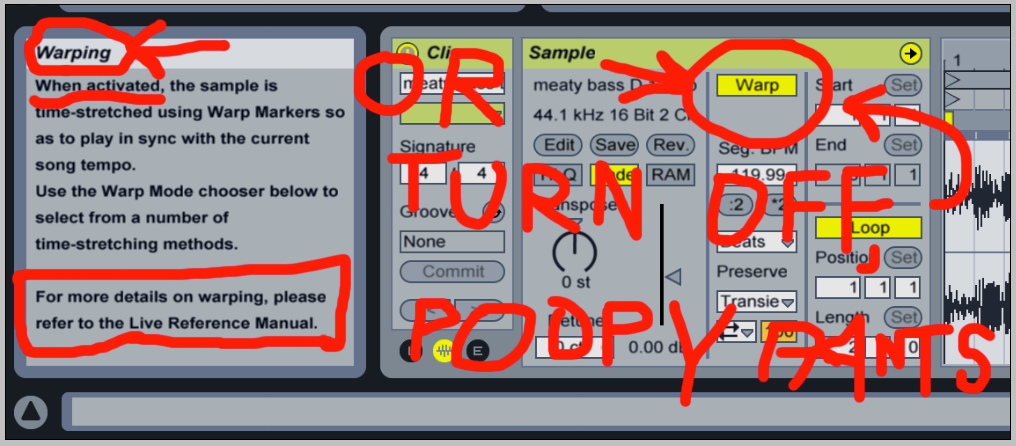
Yes you can turn off warping.
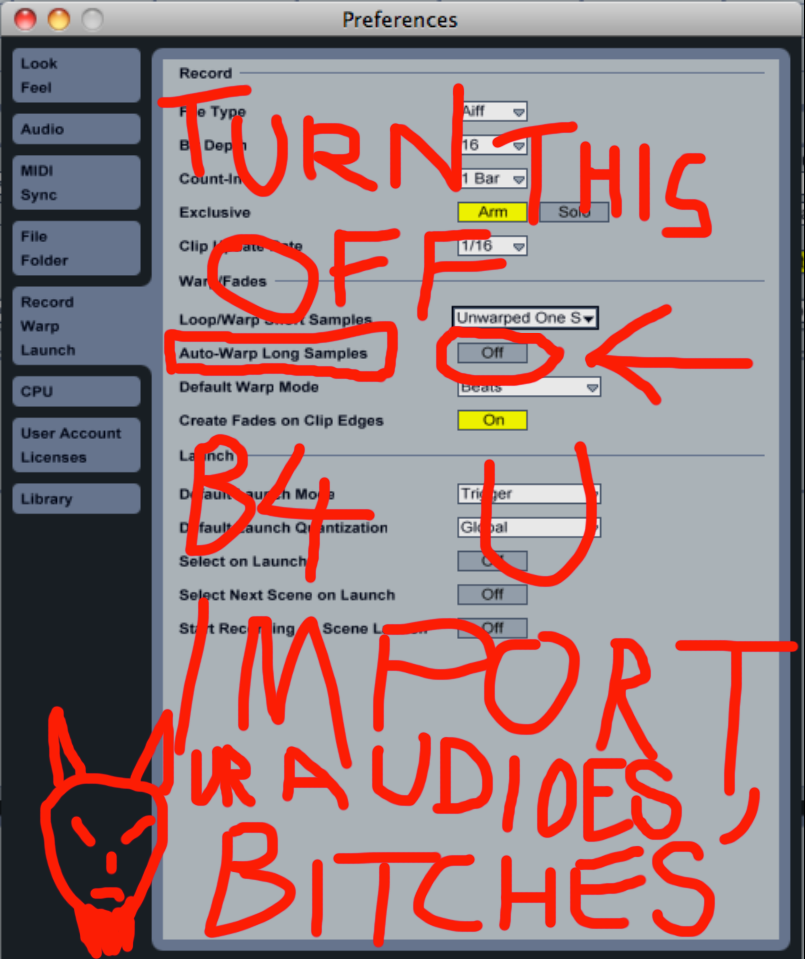
Turn OFF "Auto-warp long samples" in Preferences > Record/Warp/Launch before you drag any stems/audio samples into Live.
To fix the issues with the stems you currently have, delete them from Live's Arrange or Session View, go to the stems in Finder/Explorer and trash the .asd files, switch off auto-warp in prefs, and drag them in again.
Now the behaviour will be just like Logic/ProTools/Cubase/ etc... like any other non-warping DAW. "decoupled from the tempo grid" as you put it.
Does that fix it for you? Or have I misunderstood your problem? cheers
Turn OFF "Auto-warp long samples" in Preferences > Record/Warp/Launch before you drag any stems/audio samples into Live.
To fix the issues with the stems you currently have, delete them from Live's Arrange or Session View, go to the stems in Finder/Explorer and trash the .asd files, switch off auto-warp in prefs, and drag them in again.
Now the behaviour will be just like Logic/ProTools/Cubase/ etc... like any other non-warping DAW. "decoupled from the tempo grid" as you put it.
Does that fix it for you? Or have I misunderstood your problem? cheers
MBP M1Max | Sonoma 14.7 | Live 12.1 | Babyface Pro FS | Push 3T | clump of controllers
Soundcloud
Ableton Certified Trainer
Soundcloud
Ableton Certified Trainer
-
infernal.machine
- Posts: 1051
- Joined: Mon Oct 15, 2012 1:34 am
Re: For the love of God - Warping in Live 9...
Maybe, but did you read the MANUAL?ShredGnar wrote:I've read every thread on this going back to, like, 2006.
This shit is giving me an ulcer.
Re: For the love of God - Warping in Live 9...
Or at least go through all the menu's and read everything in preferences .infernal.machine wrote:Maybe, but did you read the MANUAL?ShredGnar wrote:I've read every thread on this going back to, like, 2006.
This shit is giving me an ulcer.
The Push / Novation Launch Pad / Novation Launch Pad Pro / Novation Launch Key
/ Launch Control XL / Machine MkII / Machine Studio / BeatStep / Livid OhmRGB / Livid Code V2 / Apc 40 MKII
no computers or synths
20 Copies of Ableton Live Lite.
/ Launch Control XL / Machine MkII / Machine Studio / BeatStep / Livid OhmRGB / Livid Code V2 / Apc 40 MKII
no computers or synths
20 Copies of Ableton Live Lite.
-
socialjusticeman
- Posts: 64
- Joined: Sat Nov 27, 2010 3:32 am
- Location: Melbourne, Australia
Re: For the love of God - Warping in Live 9...
Of course you can turn it off.
RTFM!
RTFM!
-
Pitch Black
- Posts: 6722
- Joined: Sat Dec 21, 2002 2:18 am
- Location: New Zealand
- Contact:
Re: For the love of God - Warping in Live 9...
let me rephrase that
Re: For the love of God - Warping in Live 9...
^^ dont get posters remorse and delete that lol
thats great!
thats great!
The Push / Novation Launch Pad / Novation Launch Pad Pro / Novation Launch Key
/ Launch Control XL / Machine MkII / Machine Studio / BeatStep / Livid OhmRGB / Livid Code V2 / Apc 40 MKII
no computers or synths
20 Copies of Ableton Live Lite.
/ Launch Control XL / Machine MkII / Machine Studio / BeatStep / Livid OhmRGB / Livid Code V2 / Apc 40 MKII
no computers or synths
20 Copies of Ableton Live Lite.
-
regretfullySaid
- Posts: 8913
- Joined: Thu Apr 22, 2010 5:50 pm


Re: For the love of God - Warping in Live 9...
turning off warp in the clip properties box makes the clip basically unusable, though. at that point basically all you can do is look at the waveform, but not touch it. useless.
my industrial music made with Ableton Live (as DEAD WHEN I FOUND HER): https://deadwhenifoundher.bandcamp.com/
my dark jazz / noir music made with Ableton Live: https://michaelarthurholloway.bandcamp. ... guilt-noir
my dark jazz / noir music made with Ableton Live: https://michaelarthurholloway.bandcamp. ... guilt-noir
-
Pitch Black
- Posts: 6722
- Joined: Sat Dec 21, 2002 2:18 am
- Location: New Zealand
- Contact:
Re: For the love of God - Warping in Live 9...
??? unusable ???mholloway wrote:turning off warp in the clip properties box makes the clip basically unusable, though. at that point basically all you can do is look at the waveform, but not touch it. useless.
far from it!
as the OP requested, you can trim/cut/copy/paste it... i.e. use it LIKE IN ANY OTHER DAW with none of that "useful" sh!t going on...
Re: For the love of God - Warping in Live 9...
Great instructions Pitch Black All manuals should look like the Sex Pistols made them. 
-
TomViolenz
- Posts: 6854
- Joined: Mon Dec 13, 2010 6:19 pm
Re: For the love of God - Warping in Live 9...
Wouldn't just putting it in re-pitch mode solve this?mholloway wrote:turning off warp in the clip properties box makes the clip basically unusable, though. at that point basically all you can do is look at the waveform, but not touch it. useless.
Basically just avoiding any warping artefacts but having all the tools to mangle your audio?
-
Machinesworking
- Posts: 11551
- Joined: Wed Jun 23, 2004 9:30 pm
- Location: Seattle
Re: For the love of God - Warping in Live 9...
The main stupid thing it does is make audio files incapable of looping. Not my favorite Live feature, but as long as you don't have some conflict with Live's estimate of the tempo of the clip, it shouldn't affect the audio to have it warped anyway.Pitch Black wrote:??? unusable ???mholloway wrote:turning off warp in the clip properties box makes the clip basically unusable, though. at that point basically all you can do is look at the waveform, but not touch it. useless.
far from it!
as the OP requested, you can trim/cut/copy/paste it... i.e. use it LIKE IN ANY OTHER DAW with none of that "useful" sh!t going on...
-
awesomesauce
- Posts: 31
- Joined: Thu Sep 13, 2012 1:23 am
Re: For the love of God - Warping in Live 9...
infernal.machine wrote:Maybe, but did you read the MANUAL?ShredGnar wrote:I've read every thread on this going back to, like, 2006.
This shit is giving me an ulcer.
+1000
Re: For the love of God - Warping in Live 9...
Best post ever.Pitch Black wrote:let me rephrase that