is CC Cloner a good way to defrag MBP?
is CC Cloner a good way to defrag MBP?
After moving Komplete 8 library from my internal to an external, I notice some sluggishness in my laptop. If I clone the mac with Carbon Copy Cloner to an external and then re-clone back, will this be a foolproof way to defrag the hard drive? Would backing up to a disc image be a better way than cloning (I've never messed with disc images before)?
Re: is CC Cloner a good way to defrag MBP?
no.
defrag with an app that's made for it (and that's not what ccc did when I last used it?)
I used to defrag with tech tool pro, but there's other alternatives too. ttp is essential anyhow, fixes most problems! (but do not defrag a ssd, ok?)
*edit* doh! it's too late right now.... I guess I understand what you meant now, but still, ccc doesn't defrag afaik.
clone internal drive to external
start up from external clone
defrag your internal drive
clone the newly defragged drive to external for back up
...something like that?
defrag with an app that's made for it (and that's not what ccc did when I last used it?)
I used to defrag with tech tool pro, but there's other alternatives too. ttp is essential anyhow, fixes most problems! (but do not defrag a ssd, ok?)
*edit* doh! it's too late right now....
I guess I understand what you meant now, but still, ccc doesn't defrag afaik.clone internal drive to external
start up from external clone
defrag your internal drive
clone the newly defragged drive to external for back up
...something like that?
Re: is CC Cloner a good way to defrag MBP?
I prefer to not buy a defragger but I will if it's best to. It seems to me that cloning and copying everything back should defragment the drive.
Re: is CC Cloner a good way to defrag MBP?
YES (unless you're doing a block level clone - but that can't happen if you clone from a mounted volume... - blocklevel would re-clone the fragmentation.)nowtime wrote:After moving Komplete 8 library from my internal to an external, I notice some sluggishness in my laptop. If I clone the mac with Carbon Copy Cloner to an external and then re-clone back, will this be a foolproof way to defrag the hard drive?
I do this re-cloning from time to time. But I always have at least another (physically separated) backup when doing this!!!
I'd NEVER erase & reclone with only one backup! If something goes wrong you loose everything.
NOWould backing up to a disc image be a better way than cloning (I've never messed with disc images before)?
The sluggishness might rather be caused by something else though...
Rahad Jackson wrote:My Awesome Mix Tape #6
Re: is CC Cloner a good way to defrag MBP?
As for the sluggishness:
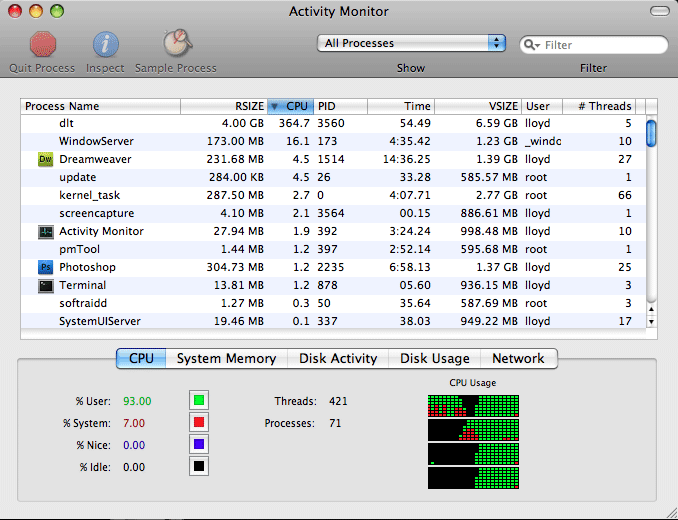
Open Activity Monitor (Applications/Utilities) - show "Active Processes" or "All Processes" - sort by CPU column.
Anything hogging CPU? (100% = one core)
Open Activity Monitor (Applications/Utilities) - show "Active Processes" or "All Processes" - sort by CPU column.
Anything hogging CPU? (100% = one core)
Rahad Jackson wrote:My Awesome Mix Tape #6
-
fishmonkey
- Posts: 4479
- Joined: Wed Oct 24, 2007 4:50 am
Re: is CC Cloner a good way to defrag MBP?
it doesn't make any sense that moving your Komplete library to an external would cause more fragmentation, or that the fragmentation would be what is slowing down your computer.
on the cloning front, a file-level clone does reduce fragmentation, however for the best defrag effect you need to use a proper tool for the job. the best Mac one is iDefrag.
on the cloning front, a file-level clone does reduce fragmentation, however for the best defrag effect you need to use a proper tool for the job. the best Mac one is iDefrag.
-
kenn michael
- Posts: 239
- Joined: Wed Jun 30, 2004 6:03 am
- Location: Los Angeles
- Contact:
Re: is CC Cloner a good way to defrag MBP?
Yepit doesn't make any sense that moving your Komplete library to an external would cause more fragmentation, or that the fragmentation would be what is slowing down your computer.
The re-cloning method IMO is perfectly fine: http://help.bombich.com/kb/usage-scenar ... hard-drive
I always exclude my clones from Spotlight (System Preferences -> Spotlight -> Privacy) - so do I with my erased internal HD after I wiped it.
After the re-cloning has finished, I delete the internal HD from Spotlight's Privacy panel and let Spotlight re-index it. This way cloning is faster, as Spotlight does not interfere.
Rahad Jackson wrote:My Awesome Mix Tape #6
Re: is CC Cloner a good way to defrag MBP?
+1 - or let's say often highly overratedkenn michael wrote:AFAIK defragging isn't necessary in OS X.
http://macs.about.com/od/faq1/f/defrag.htm
Don't fill up your drives too much...
Rahad Jackson wrote:My Awesome Mix Tape #6
-
fishmonkey
- Posts: 4479
- Joined: Wed Oct 24, 2007 4:50 am
Re: is CC Cloner a good way to defrag MBP?
defragging on a Mac these days is only really useful if you regularly work with large files, and you tend to run your drives close to capacity.
yes cloning does effectively defrag files, but if you are after the absolute best performance, then a good defrag tool will do a better job. for most people it is a waste of time (and a dangerous operation too).
yes cloning does effectively defrag files, but if you are after the absolute best performance, then a good defrag tool will do a better job. for most people it is a waste of time (and a dangerous operation too).
Re: is CC Cloner a good way to defrag MBP?
Rahad Jackson wrote:My Awesome Mix Tape #6
Re: is CC Cloner a good way to defrag MBP?
I do write and erase a lot of big files. The NI updates are really huge. Big Live sets. But perhaps its not a defrag that I need. Maybe I just need to upgrade from 10.7.4 to Mountain Lion. And reinstall Komplete apps. Thanks for the reminder about Activity Monitor.