Heat concern for my new MBP pro
Heat concern for my new MBP pro
I bought the RMBP (2.6 i7 8GB ram) with SSD a few months, Loving the speed. But I'm having concern about heat whenever I use Live. It never get so hot using other apps but since Live is the only pro app I use I wonder if it's just me or anyone having the same problem. Btw, I have my MBP connect to Duet2 external HDD and a MAX 49 which I doubt if any of the device I connected to would be the cause for the heat.
Re: Heat concern for my new MBP pro
Like billiejeanbeatit says, don´t worry about it, they are built to withstand the heat. But in my experience the heat, and by extension the fan noise, from macbook pros are often because of the GPU but not CPU, that is the discrete GPU the macbook switches to when asked not the integrated intel one. A lot of programs, Ableton Live included, switch the macbook from integrated to discrete graphics without it being necessary and that one gets much hotter than the integrated one. You could use something like gfxCardStatus (http://gfx.io/) to force the macbook to use integrated graphics (this will not work if you use an external monitor however). Should help keep the heat down.
Hope this helps!
Hope this helps!
-
hacktheplanet
- Posts: 2846
- Joined: Sat Sep 25, 2004 6:37 am
- Location: Chicago, IL
- Contact:
Re: Heat concern for my new MBP pro
MBPs get warm because they are made out aluminum, a great conductor of heat. Your computer is like a big heatsink for itself. 
The fact that it gets pretty warm is good, because that means that head is being directed away from where it can cause issues.
If you're concerned about it, just make sure there is adequate airflow. Like don't use Live on a blanket on your lap.
The fact that it gets pretty warm is good, because that means that head is being directed away from where it can cause issues.
If you're concerned about it, just make sure there is adequate airflow. Like don't use Live on a blanket on your lap.

-
pencilrocket
- Posts: 1718
- Joined: Tue Jun 15, 2010 10:46 am
Re: Heat concern for my new MBP pro
Laptop : Overheat
it's common sense. Use it under the cool temperature or equip external fan.
In my place Laptop can't keep safe temperature (for HD & M/B, CPU is usualy fine. tj.max is around 100 Celsius degree) in summer when stressed.
it's common sense. Use it under the cool temperature or equip external fan.
In my place Laptop can't keep safe temperature (for HD & M/B, CPU is usualy fine. tj.max is around 100 Celsius degree) in summer when stressed.
-
turnitto11
- Posts: 60
- Joined: Fri Jun 22, 2012 6:35 am
Re: Heat concern for my new MBP pro
Yup. It heats up so fast because it's letting off heat fast. Your traditional plastic laptop just holds all the heat in, except for the air intake/exhaust openings.hacktheplanet wrote:MBPs get warm because they are made out aluminum, a great conductor of heat. Your computer is like a big heatsink for itself.
The fact that it gets pretty warm is good, because that means that head is being directed away from where it can cause issues.
If you're concerned about it, just make sure there is adequate airflow. Like don't use Live on a blanket on your lap.
MacBook Pro (13", 2.7ghz i7, 16gb, 10.9), Suite 9
-
SuburbanThug
- Posts: 1480
- Joined: Wed Apr 03, 2013 9:22 am
- Contact:
Re: Heat concern for my new MBP pro
According to Apple, your new MBP is not a laptop. They can't advertise them as such because putting them on your lap or bed or any heat trapping surface can eventually cause damage. I had the same issue. It turned out my fan wasn't working so I suggest you look up how to do a system diagnostic to make sure it's working.
You can also get SMC Fan Control to check what temps your MBP is running at. You can also use it to overdrive the fan but I wouldn't necessarily recommend doing that. Just let the fan run at default settings unless you're feeling confidently adventurous. It will automatically shut itself down if it gets to dangerous temperatures but if you're like me you'll want to avoid it getting close to those temps. Keep the OS updated too. Mine seems more efficient after updating.
You can also get SMC Fan Control to check what temps your MBP is running at. You can also use it to overdrive the fan but I wouldn't necessarily recommend doing that. Just let the fan run at default settings unless you're feeling confidently adventurous. It will automatically shut itself down if it gets to dangerous temperatures but if you're like me you'll want to avoid it getting close to those temps. Keep the OS updated too. Mine seems more efficient after updating.
Re: Heat concern for my new MBP pro
Thanks for all the comments guys.. I'll look more into it. as for now I feel a little relief that other people have quite the same issue
-
mr.ergonomics
- Posts: 919
- Joined: Thu Nov 08, 2007 3:12 am
Re: Heat concern for my new MBP pro
I don't have a rMBP.... but have you guys tested a cooling pad (a laptop stand with an integrated fan... something like this http://de.thermaltake.com/products-mode ... _00001935n) for heavy production? Since the rMBP/MBP is out of metal I'm really curious if you could have a very silent and cool system even under heavy load with such a cooling pad.
experience anyone?
experience anyone?
Re: Heat concern for my new MBP pro
could there be any memory leaks with live 9? I noticed a temp increase with the new release. Live is not the only DAW I use but the only one which gets very hot and noticeable.
Re: Heat concern for my new MBP pro
I'd still be cautious, Ive actually seen several MBP's basically "blow up" due to heat issues. Using some mini laptop risers or a cooling pad may not be a bad idea for heavy use.
Soundcloud: https://soundcloud.com/donnie
Twitter: https://twitter.com/d0nniejacks0n
Facebook: https://facebook.com/d0nniejackson
Chew.tv: http://chew.tv/donnie
RTOK @ Chew.tv: http://chew.tv/rtokmusic
Twitter: https://twitter.com/d0nniejacks0n
Facebook: https://facebook.com/d0nniejackson
Chew.tv: http://chew.tv/donnie
RTOK @ Chew.tv: http://chew.tv/rtokmusic
Re: Heat concern for my new MBP pro
I dont understand why they don't have proper ventilation, aluminium does the job but it does it slowly, one heat sink would solve problems.
-
mr.ergonomics
- Posts: 919
- Joined: Thu Nov 08, 2007 3:12 am
Re: Heat concern for my new MBP pro
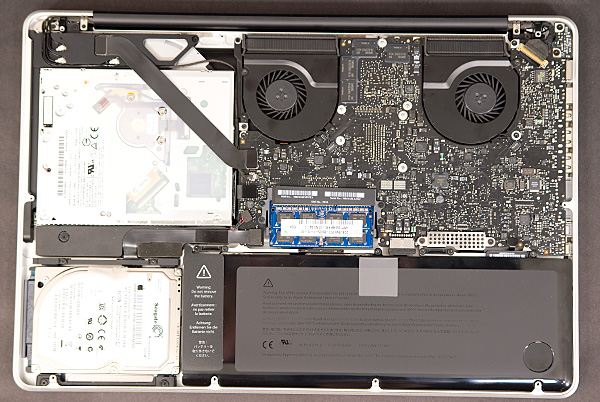
login, I'm more against apple so no fanyboyism here... the macbook has a really good cooling system, way better and more silent than my thinkpad. I can say from that experience... I would choose a hot but silent laptop anytime over a cool and loud one for working.
http://images.anandtech.com/reviews/mac ... SC8310.jpg
http://images.anandtech.com/reviews/mac ... SC8310.jpg
-
pencilrocket
- Posts: 1718
- Joined: Tue Jun 15, 2010 10:46 am
Re: Heat concern for my new MBP pro
I'm not Lenovo fanboy or apple's, this shows Lenovo is quieter when load.
http://www.notebookcheck.net/Review-Len ... 062.0.html
http://www.notebookcheck.net/Review-App ... 959.0.html
Note that CPU of Lenovo's is 20% faster model, GPU of Lenovo's is 25% faster and Quadro model in this comparison.
http://www.notebookcheck.net/Review-Len ... 062.0.html
http://www.notebookcheck.net/Review-App ... 959.0.html
Note that CPU of Lenovo's is 20% faster model, GPU of Lenovo's is 25% faster and Quadro model in this comparison.
Re: Heat concern for my new MBP pro
The have the 15" Retina 2.8 maxed out. I push it hard too, running Ableton with EastWest, Komplete, and Spectrasonics products along with VE Pro on the same system and using as much of the 16GB of ram as I can. Max temperature I've seen is 113C. Keep in mind this is while the macbook is running in clamshell mode feeding two external monitors, an audio interface, loaded 7-port usb hub, and a external 4bay thunderbolt SSD box (Pegasus J4). When I stop playback, the temp drops 10C in less that 30 seconds...which indicates the dissipation rate is adequate. I'm pleased with the performance.
Last edited by JBlongz on Fri May 24, 2013 2:50 pm, edited 1 time in total.
Re: Heat concern for my new MBP pro
I use iStat Menus to monitor my hardware