Hi All,
To stress I am a complete newbie and need walking through this like a child!
I drum in an electro-pop band and our keyboard/laptop guy is using Ableton 8. I need to be able to monitor the backing tracks through cans. Im currently doing this with a headphone amp / mini mixer where I'm getting a rough mix from the sound guys on the desk. I hate click tracks but am resigned to using one rather than playing over the drum tracks as it's not a very elegant way of doing it. We don't want to the split the signal from the laptop as it seems to weaken it . A friend advised me that we need an interface in Ableton with enough outputs to pan a backing track (left) and a click (right) to the phones through a mini mixer by my kit where I'll also get the vocals and guitar from the FOH mixing desk and be able to adjust the levels during the gig without affecting what the audience is hearing.
Can anyone explain very simply (with aid of or link to a good you tube tutorials would be ace!) how to set up a headphone mix and a click track with Ableton. Then how to send a master mix (without the click) to the stage box/FOH and the "drummers" mix with the click to my mixer/phones. I dont know which cables I need to connect the laptop to the mixer. A link to which leads to buy would also be ace! Im planning on getting a Behringer Xenyx mixer as my budget is small.
Although our guy is very proficient at music production We're not sure if the software he already has on Ableton will do this and he's not set up stuff like this before and we dont want to buy something unecessarily.
Thanks
David
Headphone Monitoring for Drummer live performance - NEWBIE
Re: Headphone Monitoring for Drummer live performance - NEWBIE
You really need an audio interface with multiple outs.
I have a Scarlett 8i6 by focusrite, it has four outputs which I group in pairs, 1&2 are the main mix 3&4 are the cue (click) Mix
using the audio interface's software I can set up a separate mix that goes out of the headphone jack on the unit which includes the click, the main mix (which I can set levels for independently) and I'm also going to start using a mic to talk directly to the drummer for cues.
The sound guy just gets the audio from outputs 1&2, the master ableton output.
I have a Scarlett 8i6 by focusrite, it has four outputs which I group in pairs, 1&2 are the main mix 3&4 are the cue (click) Mix
using the audio interface's software I can set up a separate mix that goes out of the headphone jack on the unit which includes the click, the main mix (which I can set levels for independently) and I'm also going to start using a mic to talk directly to the drummer for cues.
The sound guy just gets the audio from outputs 1&2, the master ableton output.
-
zenelectric
- Posts: 30
- Joined: Tue Aug 14, 2007 12:17 am
- Contact:
Re: Headphone Monitoring for Drummer live performance - NEWBIE
I use a novation Nio 2|4 for exactly the purpose you require.
I send the click track to channels 3&4 and everything else to channels 1&2.
Channels 3&4 go to the drummer, via the number 2 headphone output on the soundcard.
Nobody, except the drummer hears the click track.
simples.
I send the click track to channels 3&4 and everything else to channels 1&2.
Channels 3&4 go to the drummer, via the number 2 headphone output on the soundcard.
Nobody, except the drummer hears the click track.
simples.

Re: Headphone Monitoring for Drummer live performance - NEWBIE
Great stuff guys thanks. One thing..... can I get the vocals from the desk through these interfaces ?
-
zenelectric
- Posts: 30
- Joined: Tue Aug 14, 2007 12:17 am
- Contact:
Re: Headphone Monitoring for Drummer live performance - NEWBIE
Hmm, I suppose you could then also send the vocals from sound-desk to an auxiliary channel. Route this to the second input on your sound card and see if the soundcard will allow this input to then go out the channel for your headphones...Deej78 wrote:Great stuff guys thanks. One thing..... can I get the vocals from the desk through these interfaces ?
But you'd be introducing lots of cabling etc then.... and the desks (re: the sound techs) at different venues sometimes don't like extra stuff added on to their desk...
What I recommend doing is rehearsing lots, and make sure the vocals are routed to the drummer's on-stage monitor on the floor - that way some of it should come through - even with headhpones blocking sound out To be honest, your drummer should know the songs well enough to tell where you are in the track. In the past, we've used some simply hand signals behind the back to let the drummer know when the section changes are coming. This can help.
Re: Headphone Monitoring for Drummer live performance - NEWBIE
When you say that splitting the sound from the laptop weakens it, are you splitting the stereo signal into two separate stereo signals or taking the left and right signals?
The reason I ask is, if you don't need stereo backing tracks to go FOH, there's no reason why you can't route the left channel FOH and the right channel to your headphone amp.
The reason I ask is, if you don't need stereo backing tracks to go FOH, there's no reason why you can't route the left channel FOH and the right channel to your headphone amp.
Re: Headphone Monitoring for Drummer live performance - NEWBIE
OK, picked up a Novation Nio 2/4 on Ebay for £50 - without the drivers but our laptop guy can download them from Novations website.
So... will this set up work ?
Ableton 8 Laptop guy connects to the interface via USB and sends the master mix to outputs 1/2. The FOH sound guys plug in their gear to get the signal for the main mixer.
He sends same backing track but with a click to 3/4 - I monitor via phones - jack output no .2
Is extra cabling needed for this or will everything go through the USB and the 2 tracks are made in Ableton. This is the bit I'm still foxed on.
I'll then as suggested get a vocal/guitar mix from the wedge. I dont NEED the vocals I like to hear them so it should be enough.
So... will this set up work ?
Ableton 8 Laptop guy connects to the interface via USB and sends the master mix to outputs 1/2. The FOH sound guys plug in their gear to get the signal for the main mixer.
He sends same backing track but with a click to 3/4 - I monitor via phones - jack output no .2
Is extra cabling needed for this or will everything go through the USB and the 2 tracks are made in Ableton. This is the bit I'm still foxed on.
I'll then as suggested get a vocal/guitar mix from the wedge. I dont NEED the vocals I like to hear them so it should be enough.
-
savvygtrplyr
- Posts: 6
- Joined: Sat Apr 07, 2007 1:58 am
- Location: Portland, Or
- Contact:
Re: Headphone Monitoring for Drummer live performance - NEWBIE
Hey there,
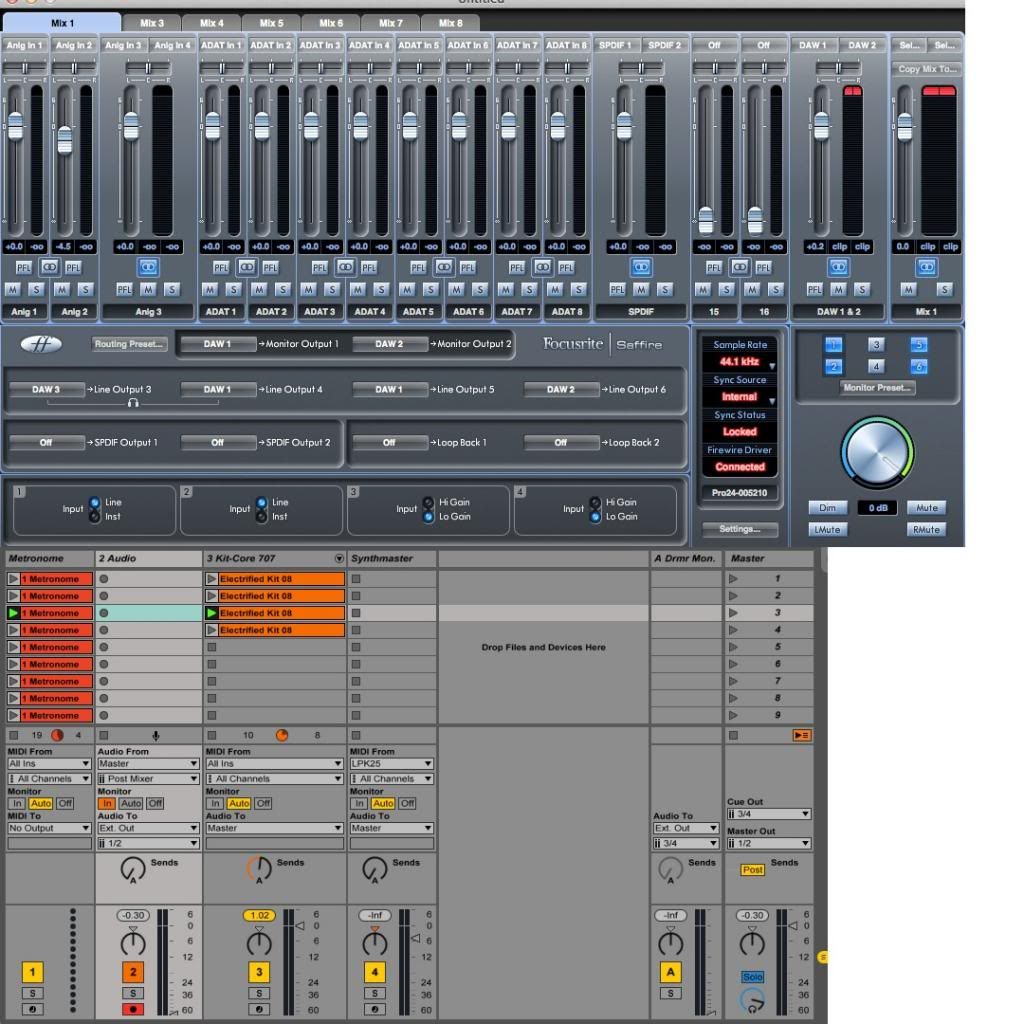
I'm in the same situation here using a Focusrite Saffire PRO 24. Following along, all is good, but the Saffire PRO only has 1 headphone out jack, and thus I only hear channels 1/2 through the headphones even though I've created a "drummer's mix" in 3/4: activated output channels 3/4, routed metronome/cue to 3/4 and created an extra audio track also routing master track to 3/4...but I just can't figure out how to hear the mix in 3/4!
It seems a 2nd headphone jack for 3/4 would make sense, but there must be a way to do this with the Saffire pro 24 w/ one headphone out, right? What am I missing? Thanks!
Miles
I'm in the same situation here using a Focusrite Saffire PRO 24. Following along, all is good, but the Saffire PRO only has 1 headphone out jack, and thus I only hear channels 1/2 through the headphones even though I've created a "drummer's mix" in 3/4: activated output channels 3/4, routed metronome/cue to 3/4 and created an extra audio track also routing master track to 3/4...but I just can't figure out how to hear the mix in 3/4!
It seems a 2nd headphone jack for 3/4 would make sense, but there must be a way to do this with the Saffire pro 24 w/ one headphone out, right? What am I missing? Thanks!
Miles
-
fishmonkey
- Posts: 4479
- Joined: Wed Oct 24, 2007 4:50 am
Re: Headphone Monitoring for Drummer live performance - NEWBIE
one option is to create a submix with MixControl, and route that to the headphones out...savvygtrplyr wrote: It seems a 2nd headphone jack for 3/4 would make sense, but there must be a way to do this with the Saffire pro 24 w/ one headphone out, right? What am I missing? Thanks!
Miles
Re: Headphone Monitoring for Drummer live performance - NEWBIE
Wrong. The headphones out is a hardwired copy of 3/4 (see the little phones symbol in MixControl's routing section).savvygtrplyr wrote:...thus I only hear channels 1/2 through the headphones
Post shots of both your main MixControl mixer page and your drum mix page including routing section. Maybe someone can spot the fault.even though I've created a "drummer's mix" in 3/4: activated output channels 3/4, routed metronome/cue to 3/4 and created an extra audio track also routing master track to 3/4...but I just can't figure out how to hear the mix in 3/4!
-
savvygtrplyr
- Posts: 6
- Joined: Sat Apr 07, 2007 1:58 am
- Location: Portland, Or
- Contact:
Re: Headphone Monitoring for Drummer live performance - NEWBIE
Thanks. Ok, I now have a headphone mix with metronome hard left and main mix hard right. This is adequate, but I'm really looking for more control over the mix. Do you know how I can get a stereo signal to the headphones along with the metronome?
-
savvygtrplyr
- Posts: 6
- Joined: Sat Apr 07, 2007 1:58 am
- Location: Portland, Or
- Contact:
Re: Headphone Monitoring for Drummer live performance - NEWBIE
I got it. I changed the headphone channels in the mix control back to 3/4, and in Ableton track 2 Audio I changed the Audio To to 3/4 and it worked. It didn't give audio at first, so I deleted the Audio track and created a new one and then it worked. Tested it in another live set and it works. Awesome! Thanks so much guys, I can get on with my life lol. I'm sure I'll be back with more questions, until then-
Miles
Miles
Re: Headphone Monitoring for Drummer live performance - NEWBIE
Hi Miles,
you haven't assigned an output to your mix! - You're not really hering this mix at all.
Read an earlier post I've written for someone with a screenshot very much like yours:
viewtopic.php?p=1534728#p1534728
You may get...
you haven't assigned an output to your mix! - You're not really hering this mix at all.
Read an earlier post I've written for someone with a screenshot very much like yours:
viewtopic.php?p=1534728#p1534728
You may get...
... and solve that along the way.savvygtrplyr wrote:... more control over the mix. Do you know how I can get a stereo signal to the headphones along with the metronome?