So, what do we want?
Most of us like Live's non skeuomorphic look. But many feel that it is time for a makeover.
What do we want to see? How must it look? How should it feel?
Live 10's GUI
-
crystalmsc
- Posts: 890
- Joined: Fri Feb 11, 2011 4:47 pm
- Contact:
Re: Live 10's GUI
Sometime I'm thinking about an alternative - super modern GUI, with an option to go back to the classic interface.
I always love the clean and colorful interface of Digital Performer, also how they implemented "theme".

Sometime I even feel like looking to the modernized version of Live. I think their design is the closest looking to the modernized Live GUI, compared to others like Cubase, Pro Tools, Logic, Sonar or Studio One.
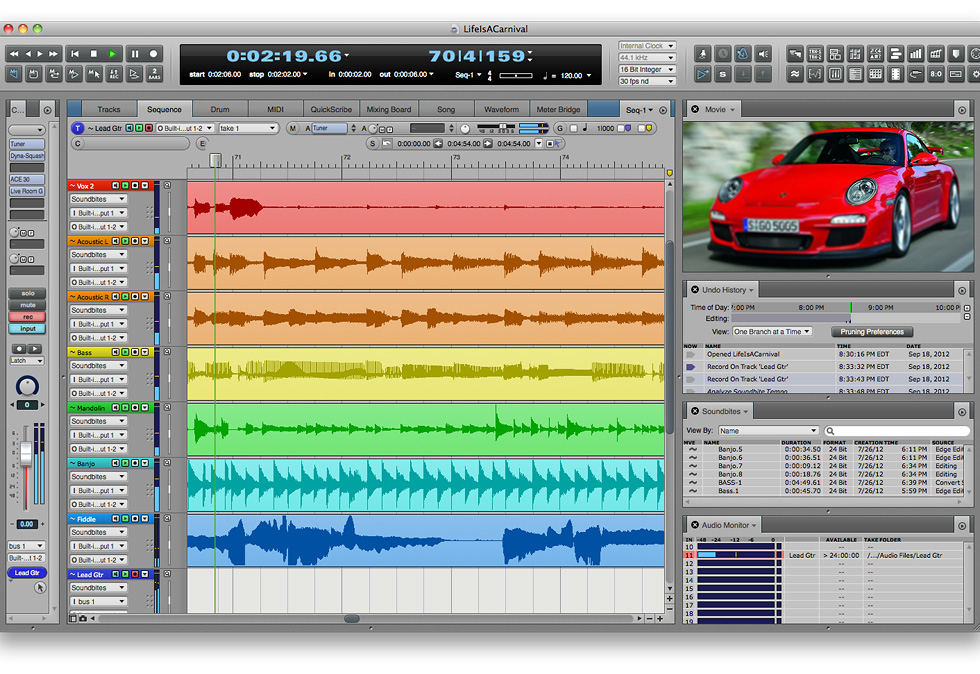
I'm going to be really excited to have an option for looking like that. Seems like the overall design going to look great for session view and the instrument/fx racks as well.

With a modern vibe out of a 12 years software with a very little GUI facelift. Live 10 going to be a great moment to update with something fresh to look at.
I always love the clean and colorful interface of Digital Performer, also how they implemented "theme".
Sometime I even feel like looking to the modernized version of Live. I think their design is the closest looking to the modernized Live GUI, compared to others like Cubase, Pro Tools, Logic, Sonar or Studio One.
I'm going to be really excited to have an option for looking like that. Seems like the overall design going to look great for session view and the instrument/fx racks as well.
With a modern vibe out of a 12 years software with a very little GUI facelift. Live 10 going to be a great moment to update with something fresh to look at.
Kaossilatron - Voicillator
Station: Ableton Live 10 Suite, Obscurium, Push 2, Ultranova, MS-20m, Wavedrums
Station: Ableton Live 10 Suite, Obscurium, Push 2, Ultranova, MS-20m, Wavedrums
Re: Live 10's GUI
I think the Ableton GUI is pretty darn good but could be improved in a few key places:
1. Arrange window waveforms - This is a complete joke. Waveforms are no sample accurate which causes a highly redundant workflow by having to go back and forth from detail view to the pretty places where you put the blocks together - aka arrange view.
2. Metering - Another place where the whole triangle cartoon look could go away. Metering is crucial information and with Live there's no telling what is actually going on.
3a. Ability to hide clips and show plugins. This is huge for mixing because currently in Live you can't add one plugin across many tracks.
3b. Also, when you want to mix you need the big faders showing you as much info as possible so you should be able to hide clips all together.
Also, just as a tip if you want to make it look more modern you can fake it by messing around with the saturation.
1. Arrange window waveforms - This is a complete joke. Waveforms are no sample accurate which causes a highly redundant workflow by having to go back and forth from detail view to the pretty places where you put the blocks together - aka arrange view.
2. Metering - Another place where the whole triangle cartoon look could go away. Metering is crucial information and with Live there's no telling what is actually going on.
3a. Ability to hide clips and show plugins. This is huge for mixing because currently in Live you can't add one plugin across many tracks.
3b. Also, when you want to mix you need the big faders showing you as much info as possible so you should be able to hide clips all together.
Also, just as a tip if you want to make it look more modern you can fake it by messing around with the saturation.
Re: Live 10's GUI
1. Bigger volume faders in the mixer.
2. The ability to make Live instrument and effect GUIs bigger (ala Spectrum).
3. RETINA
2. The ability to make Live instrument and effect GUIs bigger (ala Spectrum).
3. RETINA
tarekith
https://tarekith.com
https://tarekith.com
-
marcoskohler
- Posts: 333
- Joined: Fri Aug 04, 2006 3:13 am
Re: Live 10's GUI
Live's GUI is just too small for me. I don't use the ZOOM feature because it looks like crap (blurry).
Re: Live 10's GUI
I like the basic look. Live doesn't need that fancy-ass shinny 3D layout that other DAWs have. Thats what I like about Live, it's made for the sole purpose of making music efficiently and without all the unnecessary crap, like Reason's retarded instrument rack with "realistic cable setup". Keep shit simple and efficient please.
Re: Live 10's GUI
Tarekith wrote:
1. Bigger volume faders in the mixer.
2. The ability to make Live instrument and effect GUIs bigger (ala Spectrum).
please yes
i actually like lives look (really dont want it to turn into a reaper Skin making thingie)
but that said some small changes like above would be awesome
Subbase
Subbase-Recordings
https://subbase.bandcamp.com/
https://soundcloud.com/subbasednb
can also be found here
https://www.facebook.com/DnBSubbase
Subbase-Recordings
https://subbase.bandcamp.com/
https://soundcloud.com/subbasednb
can also be found here
https://www.facebook.com/DnBSubbase
Re: Live 10's GUI
I don't mind the style staying roughly the same, but I'd like the existing panes to be re-arrangable, and savable in screensets.
Oh, and a new browser
Oh, and a new browser

Re: Live 10's GUI
I like the simple GUI too.
But "with an option to go back to the classic interface", all changes are ok. Especially big faders.
But "with an option to go back to the classic interface", all changes are ok. Especially big faders.
Re: Live 10's GUI
i think is time for Live to get a "Performance Mode" interface option.
something in the lines of MAX, but for the whole Live. We should be able to select the most important devices, tracks, sends, etc, and arrange them in a perfomance friendly fashion, with multitouch support, and Lemur like objects for control and play.
my 2 cents
something in the lines of MAX, but for the whole Live. We should be able to select the most important devices, tracks, sends, etc, and arrange them in a perfomance friendly fashion, with multitouch support, and Lemur like objects for control and play.
my 2 cents
Re: Live 10's GUI
sounds almost like Usinegato.rui wrote:i think is time for Live to get a "Performance Mode" interface option.
something in the lines of MAX, but for the whole Live. We should be able to select the most important devices, tracks, sends, etc, and arrange them in a perfomance friendly fashion, with multitouch support, and Lemur like objects for control and play.
my 2 cents
Subbase
Subbase-Recordings
https://subbase.bandcamp.com/
https://soundcloud.com/subbasednb
can also be found here
https://www.facebook.com/DnBSubbase
Subbase-Recordings
https://subbase.bandcamp.com/
https://soundcloud.com/subbasednb
can also be found here
https://www.facebook.com/DnBSubbase
Re: Live 10's GUI
yes, something like Usine, with the Lemur objects, and native support for the Live devices, all wrapped up with multitouch support under windows 8 
Re: Live 10's GUI
Live 10 should have a "Modular Panels" and "GUI Memory Switches" for the followingre:dream wrote:So, what do we want?
Most of us like Live's non skeuomorphic look. But many feel that it is time for a makeover.
What do we want to see? How must it look? How should it feel?
a. Arrangement Mode
b. Mixer Mode
c. Clip Mode
d. Video Mode
Modular Panels or windows would have various preset templates such as "Classic", "Controller Performance", Mastering", "Foley" as well as Custom Nameable User Templates.
"Modular Panels" can be placed anywhere you want it to appear on your screen. For example, I might want my effects racks on my Right side of my screen in Arrangement Mode and at the Top of my Screen in Clip Mode.
A good example of programs that make good use of "Modular Window" modes are most Adobe Products. With one click or Macro control, you can go from Designer to Developer mode or Video Edit to Lighting Controls mode, etc.
"GUI Memory Switch" has "SHOW, HIDE, SHOW ONLY" buttons that allows you to toggle between different GUI setups that you set up. For example, I only want to view DRUM TRACKS. So I have a Memory Switch to SHOW, HIDE or DISPLAY ONLY drum tracks.
Ableton 10 should also have an improved library selection with the following enhancements.
a. Custom Columns labels for different file folders because certain columns are only relevant to certain folders. (Name, Size, Date Created, Date Modified, File Format, Genre, Type, Alt Text) File types can be sorted by
Genre(s)
-- Rock, Hip-Hop, Jazz, Funk, Techno, Trance, DnB, Jungle, Dub, Alternative, Blues, Swing, Dub-Step etc. Preset pack files will have this attribute, Pack developers and custom uploads will also fill in this attribute
Type(s)
-- Lead, Poly, Mono, Bass, Pad, String, Vox, etc.
Sub Type(s)
-- Drum: Snare, Drum: Kick, Drum: HH, Bass: Elec, Bass: Acoustic, Bass: Synth, String: Violin, String: Disco, String: Cello, VOX: Soprano, VOX, Vocoder, VOX: Alto, etc
b. SSD Cache Acceleration for faster index.db loading (my index.db file was over 2GB and took ableton over 20 minutes to open up, I had to do reinstall to lower it to 20mb and remove select sample libraries and do a hack to prevent certain library folders from being indexed)
c. Index bypass function for select folders (do not meta index specified folders), display files only on manual folder clicks.
d. CSV export of all file assets of project folders, including name, and file sizes, etc
e. Custom Window (Show and Hide function on menu) that displays all File Assets in current project. (Not to be confused with Library project folder, kind of like Pro Tools Regions list).
f. Opt-in only user rating system for Public Pack files. So users can sort pack presets by popularity.
g. Cloud Patch function. Where users can easily import new "Patches" that are based on Preset Packs/Instruments/Effects. Option to opt into putting your patch or folder on the "cloud" or keep it local only. Only requirement for cloud based patchs is that they fill out the custom dialog box with relevant info of: Author (patch creator), relevant copyright info, etc. Users may also opt into a Pay Pal exchange for premium patch packs. For example, if you want to sell your "Channel Strip Rack Presets for LaunchPad" with your unique controller values for $2 per download you should be able to set up that up.
h. SysEx controller functionality with marketplace presets for controller worthy midi products. (I've been wanting to use MC-505 as a controller since forever, but cant since buttons transmit SYSEX)
i. More GUI theme options. Have IMPORT theme function that grabs possible themes on the web. Kind of like Chrome THEME on Google. Theme would have a mini preview image and you can download as many as you'd like.
j. New Channel Type "DMX". This channel is dedicated to DMX lighting controllers.
k. Hardware Emulation templates. For example, template where Launchpad and Ableton functionality is similar to RM1x (Scene+Pattern+Mute+Control).
l. Mini Spectrum analyzer and/or Oscelloscope for all Audio and Midi Instrument channels: Fast Tracker II displayed an oscelloscope for all channels, it was awesome and handy.
m. Manufacturer template maps for MIDI devices: Roland, Korg, Yamaha, Nord containing NRPNS for each brand
n. Mute Memory Mode: Like RM1X mute memory.
o. Audio to Midi advanced functions: Instrument source type: Kick only, Bass Only, Snare Only, Auc Guitar etc. and Threshold : I hate converting kick tracks to midi and seeing snare and hh and toms have midi data when I need only kick transient data.
p. New Track Type: Video (enhanced). Multiple Video Tracks can be breated wheras your video output bus will designate the mix between each video feed.
q. New Instrument Rack: ROBO-VOX - a TI SPEAK n' SPELL and SIRI emulator. It reproduces audio based on phonetic input commands that can be assigned to push or launchpad. Its main knobs are Gender (Dath Vader to Chipmunk), Pitch (Bass to soprano), Accent, Envelope (vowel), Envelope (consonant), (pause) Gate (ms or tempo mode), (word) Gate, Manual (Each word is a midi Note or controller Message) and Liniar mode (outputs like a sample), Render Sample Rate, Render Bit Depth.
r. STEP velocity and CC values on editor. bility to STARCASE on defined STAIRCASE values on automation curves. This is useful fro drawing in tremolo, wah, vibrato ,and creative loop based curves.
s. Multiple Interface at different Sample Rates. One of my interfaces is 96k-24 bit, my other interface is 48k, 16 bit, I want to use both at the same time at their respective resolutions. For example, 48k 16 bit will have Ableton drives activated that auto quantizes the 48k-16bit signal into a 96k-24 bit signal with no loss to fidelity
t. Advanced Controller recognition mode USB. Usb designations when you plug in new devices into new ports. I hate saving an Ableton set where controllers are saved as 02--LaunchPad and 004--MIDISPORT 4x4, then when I open that live set in a new studio session, it says 03--LaunchPAD and 05-MIDISPORT 4x4. I have to reassign each channel manually! This sucks for doing live digs with multiple controllers and/or midi interfaces a controller recognition signature will fix this issue.
u. New Effect Rack Type: De-esser -- This Effect rack specialises in De-essing high frequency content only. Not to be confused with Multiband Compressor, which is not really that good at doing de-essing.
v. Always On Top toggle function for any panel unit (including vst)
w. New Ableton Hardware Product: Desk24 - A ableton controller with 24 faders, and 6 knobs for each fader channel and 3 toggle switches for each channe;. Comes with MIXER mode template designed for this unit. Also comes with Performance templates. Transport included. Great complement to the Ableton Push
x. Global Transpose Mode: Be able to designate each channel type as "Physthem" "Instrument (transposable" Default (not transposable), or Semi Transposable. This is great for doing live IMPORV with musicians MID jam.
y. Better METRONOME controlls: Choose from a variety of Metronome template sounds and grant metronome functionality
z. 5.1 Panning Control - Pan Parameter would be JOYSTICK like for 5.1 Projects.


Re: Live 10's GUI
I like Live GUI as it is. In fact, that's the main reason I choosed that DAW - immediatelly knew what's going on.
One thing I'm missing is the possibility to have open many VST windows from many different track at once. The same is true about effect chains, to easily compare two tracks for example.
One thing I'm missing is the possibility to have open many VST windows from many different track at once. The same is true about effect chains, to easily compare two tracks for example.
Trance producer, DJ, sound engineer, synth programmer
http://djwarmonger.wordpress.com/
https://open.spotify.com/playlist/1vgP3 ... zUR4MpD4Sm
https://soundcloud.com/djwarmonger/
http://www.mixcloud.com/Warmonger/
http://djwarmonger.wordpress.com/
https://open.spotify.com/playlist/1vgP3 ... zUR4MpD4Sm
https://soundcloud.com/djwarmonger/
http://www.mixcloud.com/Warmonger/