We've just released the first version of our Isotonik template for the AKAI PUSH.... OKTOPUSH
We’ve been working through updating each of our core products whilst having in mind the AKAI Push thats been in our basement for a while now gathering dust… so now we've just released the first version of our Isotonik template for the AKAI Push, we’ve called it Oktopush and we’re aiming to create 8 additional pages of functionality for this fantastic controller whilst leaving all of its factory functionality in place.
The first completed scene is our popular set of Isotonik Effects, each of the Encoders controls the rate of an effect with the Track Select Buttons acting as effect on and off controls…
The Track Select Buttons work on a momentary basis allowing you to punch in and out of effects, you can set a Toggle time however so that holding a button down for a certain time will change its behaviour to work on a Toggle basis…
We’ve used the display to show the effects that are assigned to each control so you can further move away from the laptop screen and concentrate on your performance!
We’ve included a Rewind effect, Turntable Brake, Low and High Pass Filter with Resonance and Overdrive control along with a Cutter effect that rhythmically gates the audio.... Our popular Smart Effects are also incorporated within the template.
The Button matrix has dual functionality dependent on whether the Shift Button is pressed, with it released the buttons control our Slicer effect allowing a quantised beat repeat type effect. You can re-trigger any 1/8th of the previous bars audio and control the rate it’ll repeat at down to 1/64ths and then combine this with other effects like the momentary control of the Low and High Pass filter assigned to the touch strip!
With Shift engaged the matrix will now work as a playable Buffer Shuffler effect with running light metronome and visual feedback of which order your slices are in and the direction in which each slice shall play…
To download a manual visit our website...
http://isotonikstudios.com/oktopush/
The template is currently at an introductory price which will increase with each new release so get in now and save!
Cheers
D
Isotonik Studios Presents OKTOPUSH - PUSH TEMPLATE
-
Jeffromusic
- Posts: 51
- Joined: Mon Apr 30, 2012 10:36 am
Re: Isotonik Studios Presents OKTOPUSH - PUSH TEMPLATE
Is there some kind of demo, or a video to watch? You just want us to pay for it without knowing what it is?
Re: Isotonik Studios Presents OKTOPUSH - PUSH TEMPLATE
Hey There,
There's a manual describing all of the current functionality...
http://isotonikstudios.com/Manuals/Okto ... 01.0.1.pdf
And now a walkthrough demo of the first scene here...
https://vimeo.com/109272309
Cheers
D
There's a manual describing all of the current functionality...
http://isotonikstudios.com/Manuals/Okto ... 01.0.1.pdf
And now a walkthrough demo of the first scene here...
https://vimeo.com/109272309
Cheers
D
-
Stromkraft
- Posts: 7033
- Joined: Wed Jun 25, 2014 11:34 am
Re: Isotonik Studios Presents OKTOPUSH - PUSH TEMPLATE
This is aimed at DJing then?S4racen wrote:We've just released the first version of our Isotonik template for the AKAI PUSH.... OKTOPUSH
Make some music!
Re: Isotonik Studios Presents OKTOPUSH - PUSH TEMPLATE
The first scene is primarily for performing with, the others will have a lot of user configurability allowing easy mapping and feedback on the displays for example...
I wouldn't say it was aimed solely at DJing on that basis no....
Cheers
D
I wouldn't say it was aimed solely at DJing on that basis no....
Cheers
D
-
TomViolenz
- Posts: 6854
- Joined: Mon Dec 13, 2010 6:19 pm
Re: Isotonik Studios Presents OKTOPUSH - PUSH TEMPLATE
How does it work? Does it take over the User mode?!
Re: Isotonik Studios Presents OKTOPUSH - PUSH TEMPLATE
No it laves user mode intact as well, it takes over when you hold shift and the session button, then we've created 8 pages effectively which are switched between using shift and the track select buttons...
This is just the first scene!
Cheers
D
This is just the first scene!
Cheers
D
-
irrelevance
- Posts: 463
- Joined: Tue May 20, 2008 7:31 pm
Re: Isotonik Studios Presents OKTOPUSH - PUSH TEMPLATE
Thx Sarecen I'm already on board and had a quick cursory look over the project template. It seems well thought out but I have yet to have a play with it. Have to say was a bit confused as to how to install it as it gave the option to install folder anywhere I initially made my Live Pack folder the install folder but then didn't realise it was a project/template+M4L device and projects in the Live Pack folder cannot be seen in Live's browser.
Re: Isotonik Studios Presents OKTOPUSH - PUSH TEMPLATE
Cool man!
At the mall Kent it's just a live set, you should install it again her ever you point your "places" to in live s browser...
Cheers
D
At the mall Kent it's just a live set, you should install it again her ever you point your "places" to in live s browser...
Cheers
D
Re: Isotonik Studios Presents OKTOPUSH - PUSH TEMPLATE
Just on vacation, more updates when. Return in a week or so...
Cheers
D
Cheers
D
Re: Isotonik Studios Presents OKTOPUSH - PUSH TEMPLATE
The next version of OKTOPUSH has now been released...
Within it we've added two scenes of Editor functionality for the Button Matrix...
This allows you to map the Button Matrix to any parameter within Live, or importantly leave a button to it's default behaviour of launching clips...
For Example...
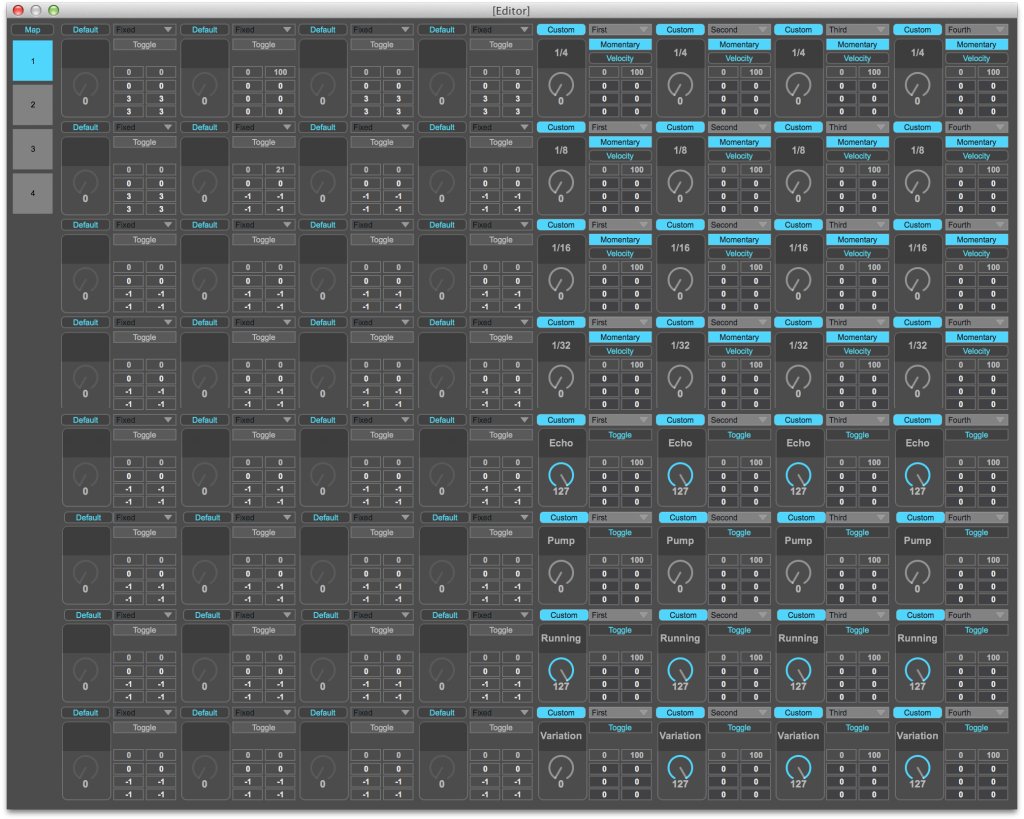
Half of the grid is given over to controlling the beat repeat effects on the first four tracks, this mapping moves dynamically with the Red Box...
Or Secondly....
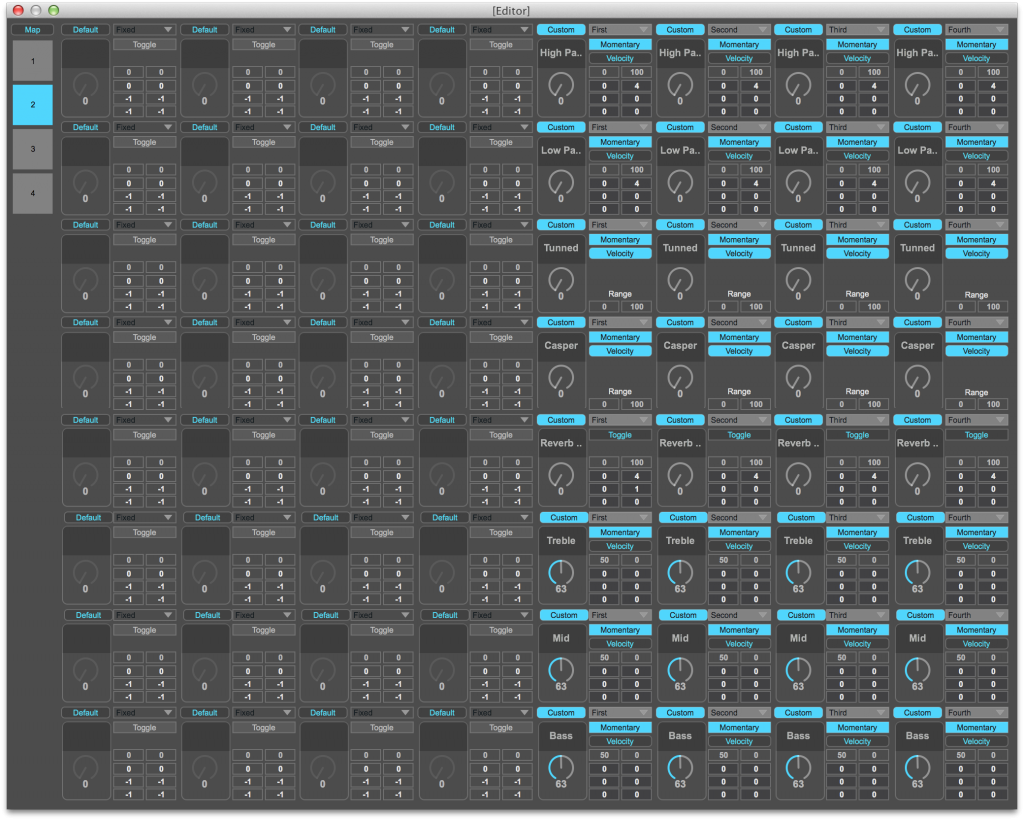
With effects that work on a Glide or Velocity basis with both Toggle and Momentary behaviour... The bottom three rows given over to EQ kills....
Subscribe through our website www.isotonikstudios.com
Cheers
D
Within it we've added two scenes of Editor functionality for the Button Matrix...
This allows you to map the Button Matrix to any parameter within Live, or importantly leave a button to it's default behaviour of launching clips...
For Example...

Half of the grid is given over to controlling the beat repeat effects on the first four tracks, this mapping moves dynamically with the Red Box...
Or Secondly....

With effects that work on a Glide or Velocity basis with both Toggle and Momentary behaviour... The bottom three rows given over to EQ kills....
Subscribe through our website www.isotonikstudios.com
Cheers
D
-
nightscope
- Posts: 107
- Joined: Wed Dec 26, 2012 6:20 pm
Re: Isotonik Studios Presents OKTOPUSH - PUSH TEMPLATE
This simply does not work. I tried three times to open the .als and got three perfect crashes. I have yet to see anything related to this software in Live as it fails every time, all the time. Congratulations, by the way. This device is the only one I have bought that has borked an otherwise monstrously stable Live system. Just about the first real crash with v9.
A lesson well learned. Don't buy anything from anyone who doesn't provide a demo.
A lesson well learned. Don't buy anything from anyone who doesn't provide a demo.
Re: Isotonik Studios Presents OKTOPUSH - PUSH TEMPLATE
Well, it worked for me....But lots of weird behaviour with the LEDS etc.
The max patch it working fine, Love the button edit feature for triggering sends...
The max patch it working fine, Love the button edit feature for triggering sends...
Re: Isotonik Studios Presents OKTOPUSH - PUSH TEMPLATE
Maybe if you'd contacted us to share your experience we could have done something about it?nightscope wrote:This simply does not work. I tried three times to open the .als and got three perfect crashes. I have yet to see anything related to this software in Live as it fails every time, all the time. Congratulations, by the way. This device is the only one I have bought that has borked an otherwise monstrously stable Live system. Just about the first real crash with v9.
A lesson well learned. Don't buy anything from anyone who doesn't provide a demo.
We've had nothing but positive feedback about the template! And as its described on the website it's being developed all the time, we specifically asked for subscribers to get involved at this stage (at a reduced price) so that we could improve the template through feedback.
Please contact us via email, you will find it within every download message you've been sent.
Cheers
D
Re: Isotonik Studios Presents OKTOPUSH - PUSH TEMPLATE
Yo D, can you send us a list of the lED behaviour, I experienced one last night which is what appears to be scene three coming through on scene one when you first access it, but it fixes itself if you press and release shift.... I'll get that fixed for the nex release though....Dchild wrote:Well, it worked for me....But lots of weird behaviour with the LEDS etc.
The max patch it working fine, Love the button edit feature for triggering sends...
Cheers
D
EDIT: Fixed with new update sent out!
Last edited by S4racen on Mon Nov 03, 2014 2:24 pm, edited 1 time in total.