Share your favorite Ableton Live tips, tricks, and techniques.
-
zebebop
- Posts: 44
- Joined: Mon Sep 25, 2006 10:45 am
Post
by zebebop » Mon Nov 10, 2014 2:40 pm
Hi,
perhaps i'm stupide... but is there a "simple" solution to do the same effect (stereo phasing L/R on exact
SAMPLE) in live (with automation control) ?
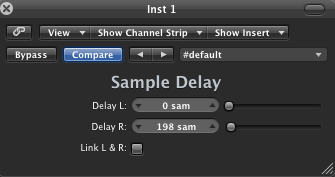
zeb
-
doghouse
- Posts: 1502
- Joined: Fri Aug 29, 2008 5:30 pm
Post
by doghouse » Tue Nov 11, 2014 12:04 am
No "simple" solution, but plenty of possible solutions

Why do you want to do this?
-
zebebop
- Posts: 44
- Joined: Mon Sep 25, 2006 10:45 am
Post
by zebebop » Tue Nov 11, 2014 2:26 pm
Thx for your answer doghouse.
I just want to do a simple phasing stereo effect with
sample accurate. Actually there is only (Sync/..%) or (Time/..ms) options. i see nothing about
sample accurate settings for delaying on L/R channels.
look at the video :
https://www.youtube.com/watch?v=4Enqd39ExfU
-
Tarekith
- Posts: 19140
- Joined: Fri Jan 07, 2005 11:46 pm
-
Contact:
Post
by Tarekith » Tue Nov 11, 2014 3:14 pm
You could copy the audio to two tracks, pan one left, and one right, and then use the track offset parameters to do the same thing.
-
zebebop
- Posts: 44
- Joined: Mon Sep 25, 2006 10:45 am
Post
by zebebop » Tue Nov 11, 2014 7:53 pm
Thx Tarekith,
But, no simple solution in fact (two tracks every time...). And there's no M4L plugin like the Logic one ?!
-
Tarekith
- Posts: 19140
- Joined: Fri Jan 07, 2005 11:46 pm
-
Contact:
Post
by Tarekith » Tue Nov 11, 2014 8:22 pm
I'm not sure what's out there for M4L, there might be.
-
zebebop
- Posts: 44
- Joined: Mon Sep 25, 2006 10:45 am
Post
by zebebop » Tue Nov 11, 2014 8:47 pm
I try your tips, it's working. But no automation on track offset
