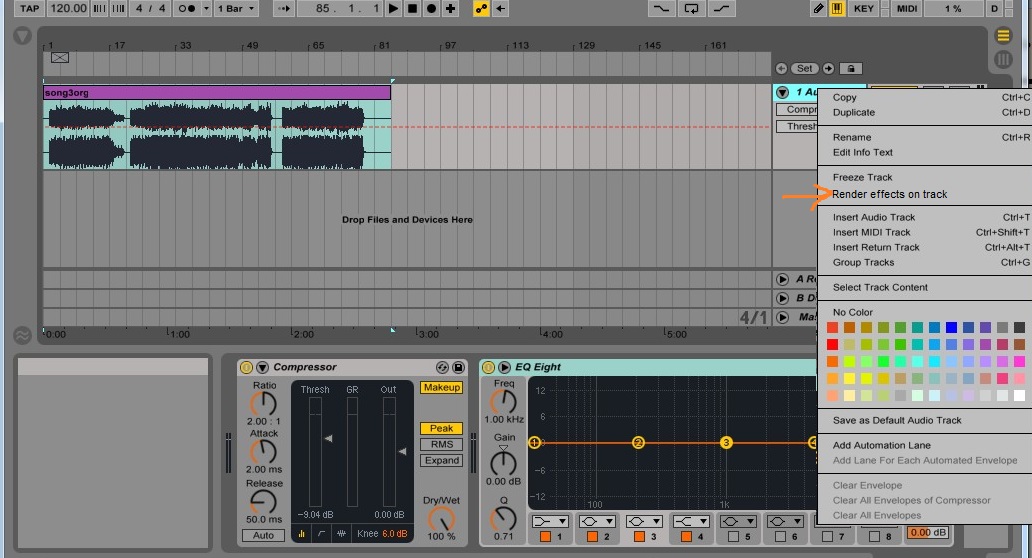
Render/Apply FX on the track

Discuss music production with Ableton Live.
Post Reply
nc2010
Posts: 326
Joined: Fri Jul 02, 2010 9:34 am

Render/Apply FX on the track

Post by nc2010 » Fri Nov 28, 2014 2:22 pm

Do you think this feature will come soon? :) Most DAWs have this feature!
The effects would be applied/rendered on the current track (exported as new .wav), and the FX rack would then be empty again.


Image

Of course, we can already do this in order to get the same result : 1) Freeze track, 2) Create new track, 3) Drag&Drop frozen track to new track ... But having a real command for that would be great !

clement.m
Posts: 39
Joined: Mon Mar 11, 2013 8:40 am
Location: Brussels

Re: Render/Apply FX on the track

Post by clement.m » Fri Nov 28, 2014 4:46 pm

A fast way is to "Freeze" the track, then "Erase" (I don't know the exact term as I'm not using Ableton in English).
MacMini i7 2,3GHz 16GB RAM - 10.10.5 - Suite 9.6 - http://clementmarion.be

JoshG567
Posts: 353
Joined: Fri Mar 07, 2014 7:42 pm

Re: Render/Apply FX on the track

Post by JoshG567 » Fri Nov 28, 2014 6:45 pm

Once a track is frozen it can be flattened, which describes exactly the state you desire. Unfortunately one must go through two steps instead of one.

nc2010
Posts: 326
Joined: Fri Jul 02, 2010 9:34 am

Re: Render/Apply FX on the track

Post by nc2010 » Fri Nov 28, 2014 9:23 pm

yes @clement.m @JoshG567, that's why I mentioned :
Of course, we can already do this in order to get the same result : 1) Freeze track, 2) Create new track, 3) Drag&Drop frozen track to new track ... But having a real command for that would be great !
or is there a faster solution? What do you mean by Flatten ?

JoshG567
Posts: 353
Joined: Fri Mar 07, 2014 7:42 pm

Re: Render/Apply FX on the track

Post by JoshG567 » Sat Nov 29, 2014 7:58 am

There's an option to Flatten a frozen track but it won't show up otherwise. Right click a frozen track to flatten and Live will turn it into audio and erase any devices you had placed on the track.

nc2010
Posts: 326
Joined: Fri Jul 02, 2010 9:34 am

Re: Render/Apply FX on the track

Post by nc2010 » Sun Nov 30, 2014 11:17 pm

Is it possible to create a keyboard shortcut like

* CTRL+ALT+SHIFT+F = Freeze

* CTRL+ALT+SHIFT+G = Flatten


So this could be done very quickly in two shortcuts... :)

mholloway
Posts: 1579
Joined: Sat Nov 29, 2008 7:24 pm
Location: Portland, Oregon, USA

Re: Render/Apply FX on the track

Post by mholloway » Mon Dec 01, 2014 2:01 am

JoshG567 wrote:Once a track is frozen it can be flattened, which describes exactly the state you desire. Unfortunately one must go through two steps instead of one.

hardly an acceptable workaround, when you consider that it freezes - everything - on the track. What if you want to render just one clip / one sequence in the channel? You end up rendering the whole damn thing instead, or having to create new channels, copy/past stuff into them, etc etc. it sucks.

BOUNCE IN PLACE, ABLETON. GET IT. :P :P :P
my industrial music made with Ableton Live (as DEAD WHEN I FOUND HER): https://deadwhenifoundher.bandcamp.com/
my dark jazz / noir music made with Ableton Live: https://michaelarthurholloway.bandcamp. ... guilt-noir

JoshG567
Posts: 353
Joined: Fri Mar 07, 2014 7:42 pm

Re: Render/Apply FX on the track

Post by JoshG567 » Mon Dec 01, 2014 2:13 am

2 more options you won't like because they're way too circuitous:

Set the arrangement loop boundaries to that region and CTRL SHIFT R to render just that track offline. Then drag the WAV from the library to your arrangement.

Create a new audio track with the other as it's input and print to that one. Then drag the clip to where it belongs if not there.

P.S. going back to your example and applying the imaginary command to just a region would erase the devices for the other regions you don't apply it to, unless you'd still want those in which case Live would have to automate the effects off for the region you bounced if they were to remain for the others instead of deleting the devices. Seems like there's some inconsistency to the way you're imagining this functionality between your successive posts.

mholloway
Posts: 1579
Joined: Sat Nov 29, 2008 7:24 pm
Location: Portland, Oregon, USA

Re: Render/Apply FX on the track

Post by mholloway » Mon Dec 01, 2014 3:08 am

JoshG567 wrote:2 more options you won't like because they're way too circuitous:

P.S. going back to your example and applying the imaginary command to just a region would erase the devices for the other regions you don't apply it to, unless you'd still want those in which case Live would have to automate the effects off for the region you bounced if they were to remain for the others instead of deleting the devices. Seems like there's some inconsistency to the way you're imagining this functionality between your successive posts.

Uh, no. Just look at how Logic does it. Or how Bitwig does it. Or how StudioOne does it. In most cases, it simply drops the rendered section onto a new audio track beneath the original track, and automatically mutes the rendered section in the original. In the case of Bitwig, you can actually do it 'in place' for real, as it allows both audio and MIDI on the same track. Though in that case, yes, you'd have the rendered effects running through the track fx, redundantly; which is why I prefer the Logic and S1 approaches, which work perfectly for my needs.

Any of those would do, though, as they are all better than Live's freeze+flatten or real-time recording options. I'm not 'imagining' anything -- most DAW's have figured this out by now.

-M
my industrial music made with Ableton Live (as DEAD WHEN I FOUND HER): https://deadwhenifoundher.bandcamp.com/
my dark jazz / noir music made with Ableton Live: https://michaelarthurholloway.bandcamp. ... guilt-noir

JoshG567
Posts: 353
Joined: Fri Mar 07, 2014 7:42 pm

Re: Render/Apply FX on the track

Post by JoshG567 » Mon Dec 01, 2014 7:58 am

Oh, ok.

Thx for enlightening me.

Is this the Feature Request forum?

nc2010
Posts: 326
Joined: Fri Jul 02, 2010 9:34 am

Re: Render/Apply FX on the track

Post by nc2010 » Mon Dec 01, 2014 1:05 pm

Oh yes, you're right. There's a feature request forum.

Can a moderator move this topic to the feature request forum?

Post Reply