Hey, I'm having a lot of trouble with sampling in Ableton. I understand the gist of it, but when it comes to saving folders and cropped samples and presets I'm kinda going crazy.
This is my problem:
-I open a sound file in Arrangement View. I mark off the part I want to sample and drag it into Simpler.
-In simpler, I crop the sample off more precisely with start and end points.
Issue 1:
I then want to save the sample as it now is. It's not working. It's saving the uncropped "original" sample but with my changes as a "preset" .adv file. I don't need it as a preset, I want the whole altered sample file saved. I don't need the original sloppy file but that's what Ableton is choosing to keep as my "sample." I can't figure a way around this.
Issue 2:
Whichever file I decide to keep as my sample (or to my dismay, preset), I can't figure out which folders to keep them in. Some of them seem to default to the Simpler folder, others default to the Cropped folder; it's confusing. Ideally I want only .aif files, and I want them all in subfolders by sound, in a main folder. i.e. User Library > Samples > Drums > 808Kick.aif. Why isn't this working? Why are there so many different folders and how do I bypass this?
Issue 3:
When I TRY to bypass this, like dragging a file from one folder to another in the browser, it won't let me scroll. My highlighted stuff, while being dragged, just hovers at the top of the screen and is not advancing to let me see the other folders. Why is this happening?
Please help with any of these problems if you can, thanks!
Confusion about sample / Simpler files
-
Shift Gorden
- Posts: 852
- Joined: Wed Mar 25, 2015 8:45 pm
- Location: Oklahoma City
- Contact:
Re: Confusion about sample / Simpler files
Yeah - I know how frustrating that is, mate!Eighth_Wave wrote:Hey, I'm having a lot of trouble with sampling in Ableton. I understand the gist of it, but when it comes to saving folders and cropped samples and presets I'm kinda going crazy.
This is my problem:
-I open a sound file in Arrangement View. I mark off the part I want to sample and drag it into Simpler.
-In simpler, I crop the sample off more precisely with start and end points.
Issue 1:
I then want to save the sample as it now is. It's not working. It's saving the uncropped "original" sample but with my changes as a "preset" .adv file. I don't need it as a preset, I want the whole altered sample file saved. I don't need the original sloppy file but that's what Ableton is choosing to keep as my "sample." I can't figure a way around this.
Issue 2:
Whichever file I decide to keep as my sample (or to my dismay, preset), I can't figure out which folders to keep them in. Some of them seem to default to the Simpler folder, others default to the Cropped folder; it's confusing. Ideally I want only .aif files, and I want them all in subfolders by sound, in a main folder. i.e. User Library > Samples > Drums > 808Kick.aif. Why isn't this working? Why are there so many different folders and how do I bypass this?
Issue 3:
When I TRY to bypass this, like dragging a file from one folder to another in the browser, it won't let me scroll. My highlighted stuff, while being dragged, just hovers at the top of the screen and is not advancing to let me see the other folders. Why is this happening?
Please help with any of these problems if you can, thanks!
I think I have a workaround for you...I just tried it and it worked.
1. Don't use simpler/sampler.
2. Drag your audio file to a track in the arrangement view.
3 Click on the audio file in the arrangement and edit it accordingly in the window at the bottom of the screen. These edits will be reflected in the arrangement window too.
4. Right click your edited arrangement and select Consolidate Time As A New Scene.
5. Flip on over to Session View (hit Tab) - you should see a sample there.
6. Drag that file out of Live and into the folder in which you want to save it.
Boom.
Let me grab some screenshots.
-
Shift Gorden
- Posts: 852
- Joined: Wed Mar 25, 2015 8:45 pm
- Location: Oklahoma City
- Contact:
Re: Confusion about sample / Simpler files
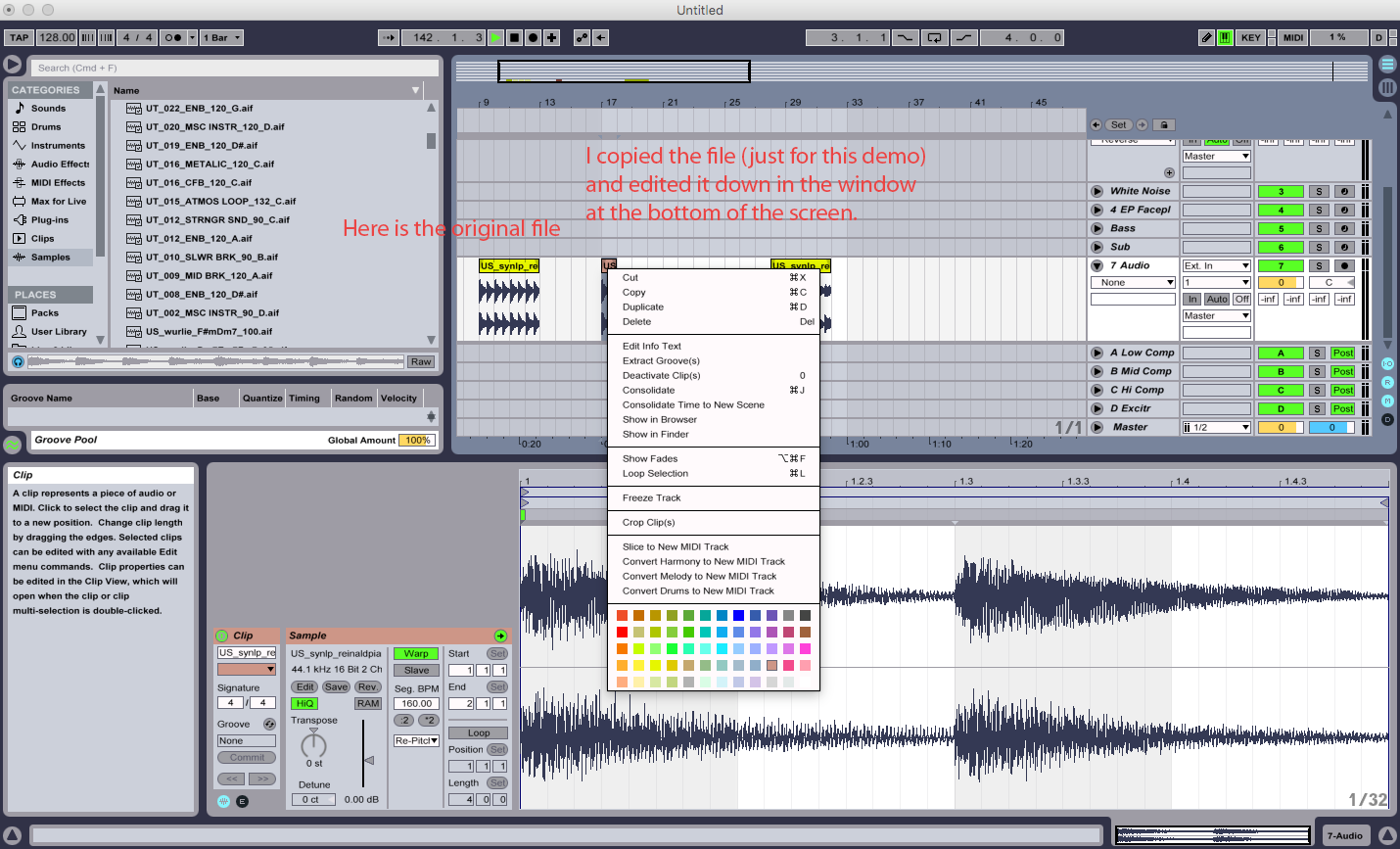
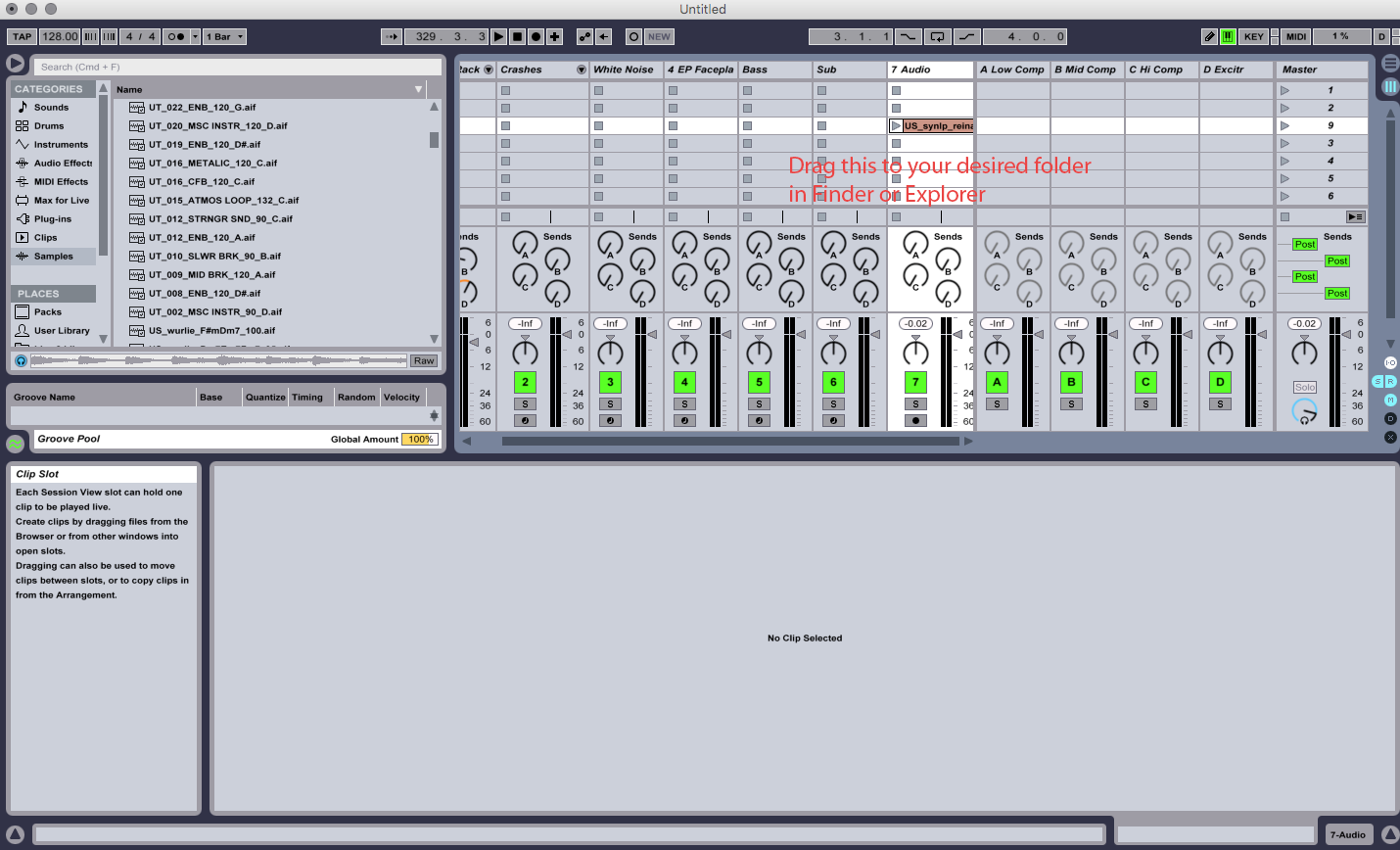
Sorry this is so terrible - gotta run to a meeting!
-
Eighth_Wave
- Posts: 13
- Joined: Wed Sep 10, 2014 9:32 pm
Re: Confusion about sample / Simpler files
This is great, thanks! I'm still having trouble with some things. I don't understand why in arrangement view, if I have a long piece of music that I recorded, and I highlight like 1/20th of the song and click "crop clip" or "crop sample" on the bottom or main screen, it doesn't crop anything. Like, is there no option to delete everything but the highlighted part?
I'm trying to highlight only the tiny bit I need, then isolate it by deleting the rest, then editing the highlighted part to my specifications. How do I do this?
I'm trying to highlight only the tiny bit I need, then isolate it by deleting the rest, then editing the highlighted part to my specifications. How do I do this?
-
Eighth_Wave
- Posts: 13
- Joined: Wed Sep 10, 2014 9:32 pm
Re: Confusion about sample / Simpler files
I tried the command + E to insert a break or whatever, then I dragged that to a MIDI track. So far so good. I now have a section of the original file on a MIDI track. When I crop THAT, it works. Except it seems like the information it SAVES from then on, is just a preset. A preset relating to the giant original long song / audio file telling it only to play that section. How do I save my altered little clip as the new sample, not a preset, and use it to replace the original giant file? I want to save my new small, perfect sample as an .aif or .wav but it still saves it as an .adv and gets its info from the original huge file.
-
Shift Gorden
- Posts: 852
- Joined: Wed Mar 25, 2015 8:45 pm
- Location: Oklahoma City
- Contact:
Re: Confusion about sample / Simpler files
So, for the cropping part - highlighting with the mouse doesn't work, mate (although it feels like it should!). Use the little region markers at the top of the sample edit window, place them at the start and end of what you want and then hit crop. Boom.
As for it still saving as an adv file - I see what you're doing and why it's saving as an adv file. Did the example I gave you not work, mate? The problem is you're still saving within Ableton instead of exporting your edited clip.
As for it still saving as an adv file - I see what you're doing and why it's saving as an adv file. Did the example I gave you not work, mate? The problem is you're still saving within Ableton instead of exporting your edited clip.
-
Eighth_Wave
- Posts: 13
- Joined: Wed Sep 10, 2014 9:32 pm
Re: Confusion about sample / Simpler files
I understand what you're saying and I'm gonna try that. I think I figured out another way around it too, which makes sense now and seems simple although at the time I didn't think about it-
After cropping the file it makes a sound file in the "current project" folder, which I didn't realize. I thought I could just drag the visualized cropped sample into my main samples folder. But it DOES seem to work if I drag the new cropped audio file from current project into my main sample folder. Bam!
I love Ableton and I don't want to be mad at it!
After cropping the file it makes a sound file in the "current project" folder, which I didn't realize. I thought I could just drag the visualized cropped sample into my main samples folder. But it DOES seem to work if I drag the new cropped audio file from current project into my main sample folder. Bam!
I love Ableton and I don't want to be mad at it!
-
Shift Gorden
- Posts: 852
- Joined: Wed Mar 25, 2015 8:45 pm
- Location: Oklahoma City
- Contact:
Re: Confusion about sample / Simpler files
Ha! Awesome, mate. I'll have to try that, too!Eighth_Wave wrote:I understand what you're saying and I'm gonna try that. I think I figured out another way around it too, which makes sense now and seems simple although at the time I didn't think about it-
After cropping the file it makes a sound file in the "current project" folder, which I didn't realize. I thought I could just drag the visualized cropped sample into my main samples folder. But it DOES seem to work if I drag the new cropped audio file from current project into my main sample folder. Bam!
I love Ableton and I don't want to be mad at it!