thx

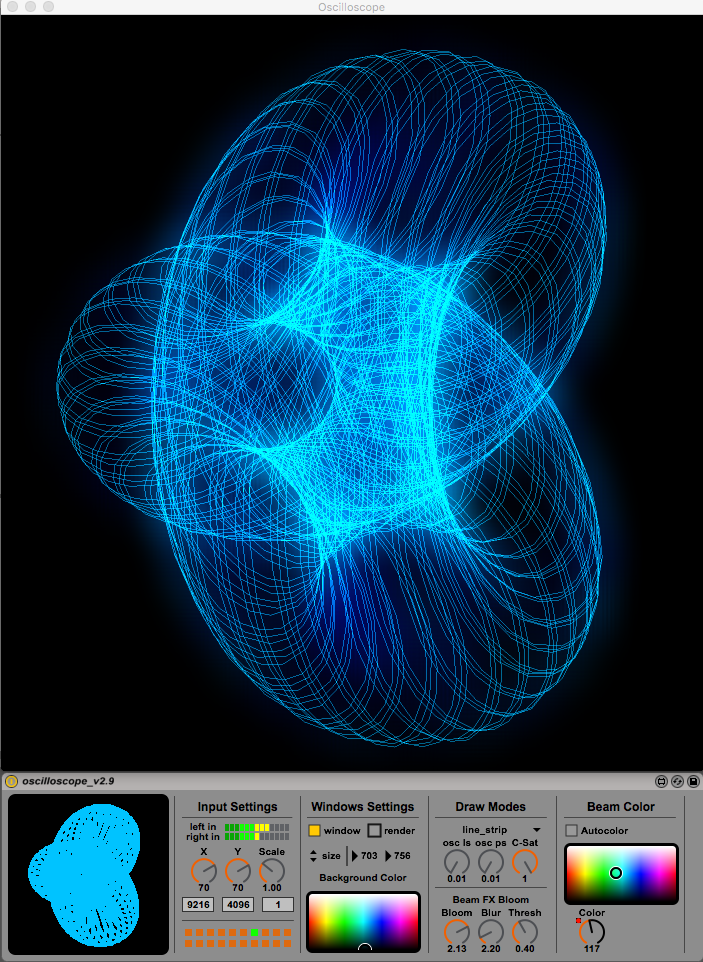
i got some emails with questions how to use the m4l oscilloscope.
here is one:
Hey - really like the M4L Oscilloscope! I cannot seem to get anywhere close to the cool patterns shown on the sample images page. Is there a help or tutorial somewhere that covers the various combinations of settings?
answer:
Hello,
thx, you mean the „Lissajous Figures“, right?
i made it with an vst/au plugin synth: called Sylenth1 (popular easy to use Synth with easy to use panning, volume etc. for each Oscillator)
you could made such waveforms with any synths (plugins or hardware) or tone/waveform generator.
info and steps to get there:
Oscilloscope = Oscilloscope
Oscillator = Oscillator (Osc)
some basic of synthesis (how to use a synth)
you must know that you need a stereo signal - Left = X and Right = Y Axis*
volume of both = the size
example: make a circle in ableton
1.) use a synthesizer for this (like sylenth1, operator, massive… any synth with min. 3 oscillators will do the job)
2.) put the m4l oscilloscope after the synth/rack or master channel. (if use audio fx after the synth)
Synth settings: init/reset preset
3.) Osc1 on the left channel use a sine wave panned full to left
4.) Osc2 on the right channel use a sine wave with 90° phase shift panned full to right (phase depends on your synth, example: in ableton operator 25%)
5.) play a note (example C2) - now you have a circle showing up in the oscilloscope
make more advanced figures:
6.) play 2 notes at the same time (example C2 and C3) - now you have more circles/figures showing up in the oscilloscope
7.) mess around with the oscilloscope settings (color, draw modes (points and lines, lines_strip work great)
8.) try other waveforms on your synth to get other figures
9.) try other note combinations (use only 2 at the same time for the beginning)
* to make a „Z“ axis (to draw 3D on Figures a 2D Oscilloscope) for example use a 3rd sine wave
example:
on the synth:
X Axis - Oscillator 1: sine wave panned full to left
Y Axis - Oscillator 2: sine wave with 90° phase shift panned full to right
Z Axis - Oscillator 3: sine wave to center (mono)
now you have something like a 3 channel audio signal: (a stereo channel in real)
1. X = Left
2. Y = right
3. Z = center
10.) moving effects - use modulation for this (example: modulate the panning of the Z Axis - Oscillator 3)
11.) try to modulate what you want till you find something interesting, you may use lfo for this...
there is much, much more you will discover if you play around with the synth.
(try other pitches/tunings/detunes/unison of the used Oscillators etc. of the synth…)
please excuse my bad english

hope this helps
greetings
you would have a look on this:
Draw Mushrooms on a Oscilloscope
https://www.youtube.com/watch?v=rtR63-ecUNo
how it works:
http://www.jerobeamfenderson.net/post/1 ... w-it-works
Lissajous Figures
http://en.wikipedia.org/wiki/Lissajous_curve|MacPro|RME FireFace 800|Ableton Live Suite 9.x|Push|APC40|MPK61|Launchpad|Access Virus TI2|