iPad

Discuss anything related to audio or music production.
H20nly
Posts: 16113
Joined: Sat Oct 27, 2007 9:15 pm
Location: The Wild West

Re: iPad

Post by H20nly » Wed Jul 20, 2016 1:33 am

:lol:

well, thanks for checking on us... your input is appreciated... at least by me :wink:

H20nly
Posts: 16113
Joined: Sat Oct 27, 2007 9:15 pm
Location: The Wild West

Re: iPad

Post by H20nly » Wed Jul 20, 2016 1:38 am

new problem :x

i can't drag and drop from finder on this new MacBook. WTF?

i was almost not able to install Firefox. got lucky and got it to drag the one time, after trying about 45 times. now, i'm trying to make a shortcut in the dock from Finder and i can't drag the app to the dock to get it done. :x

steko
Posts: 3411
Joined: Thu Jan 22, 2009 8:29 pm

Re: iPad

Post by steko » Wed Jul 20, 2016 1:55 am

Aaaaand off to the lake... :roll:
Rahad Jackson wrote:My Awesome Mix Tape #6

steko
Posts: 3411
Joined: Thu Jan 22, 2009 8:29 pm

Re: iPad

Post by steko » Wed Jul 20, 2016 2:06 am

Rahad Jackson wrote:My Awesome Mix Tape #6

H20nly
Posts: 16113
Joined: Sat Oct 27, 2007 9:15 pm
Location: The Wild West

Re: iPad

Post by H20nly » Wed Jul 20, 2016 7:32 am

:lol:

no.

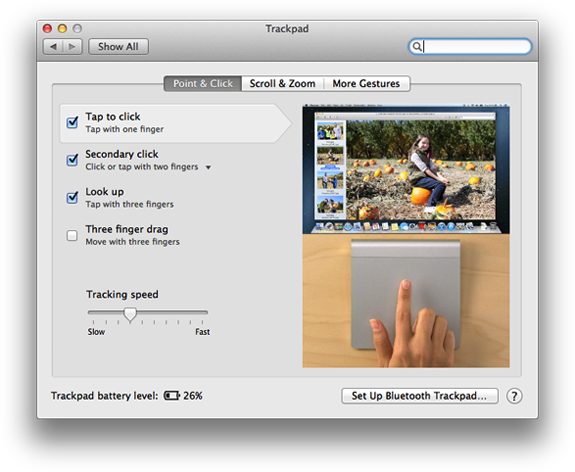
trackpad settings seem fine.

the problem is weird. i can move finder, or a small window like Safari when it is not maximized, around the screen just fine.

imagine you are installing a new application... when you click on the .dmg to run the installer, it normally opens a popup that allows you to drag the application into the Applications folder.

on this MacBook, the dragging motions from left to right of the program seems *almost* impossible before the click context menu kicks in or the application is "released" from the click+hold you would use on most laptops... but I have managed to move it, somewhat... so it can be done.


edit; it's working now... i tried it while i was installing Live. at first it did not work but i gradually started to be able to pick up the Live logo and move closer and closer with it to the Applications folder. eventually, i was able to move it in and then continued to go through he motions again until finally i was releasing it... rather than installing it, so i could try again. it got easier over time.

weird shit :?

:x

beats me
Posts: 23319
Joined: Fri Mar 30, 2007 6:39 pm

Re: iPad

Post by beats me » Wed Jul 20, 2016 1:48 pm

Maybe post a video of the issue. Probably won’t be able to solve the problem but it will qualify to be used on Apple’s Shot on iPhone advertising campaign. :x


Hopefully its just some new computer warming up system check horse shit. Congrats on the new MBP just the same. I think my next major Apple purchase (iPhones don't count) will be a 12.9" iPad. Waiting to see if they announce a new one in September and then I might pull the trigger regardless.

Tarekith
Posts: 19140
Joined: Fri Jan 07, 2005 11:46 pm
Contact:

Re: iPad

Post by Tarekith » Wed Jul 20, 2016 3:11 pm

Usually the first day or so of a new OS install or brand new computer means there likely some caching and indexing happening. Just leave the laptop on and open overnight, should all be done by morning at the very latest.

Tarekith
Posts: 19140
Joined: Fri Jan 07, 2005 11:46 pm
Contact:

Re: iPad

Post by Tarekith » Wed Jul 20, 2016 3:11 pm

Though your symptoms still sound a little fishy given the hardware you're using.

beats me
Posts: 23319
Joined: Fri Mar 30, 2007 6:39 pm

Re: iPad

Post by beats me » Wed Jul 20, 2016 3:38 pm


I don’t get how they have “Don’t Buy” on all the Macs (except the Mac Pro), iPad Mini, and iPod Touch but “Caution” on the iPhone when it’s an absolute certainty the next iPhone will come September. All their Don’t Buys are just speculation and certainly won’t be updated before the iPhone. :x

beats me
Posts: 23319
Joined: Fri Mar 30, 2007 6:39 pm

Re: iPad

Post by beats me » Wed Jul 20, 2016 7:48 pm

Now rumored Apple bought Neil Young’s Pono licensing company. Couple that with the rumored bid for Tidal. Also Apple is working on a new industry royalty payment standard that would simplify things but also cost music streaming service providers more money. This is all bad news for Spoti-can’t-pay-our-bills-ify which is bad news for the “the world owes me free streaming music on demand” whiners.

I’m sure I’m biased because it’s Apple behind this, but it’s about time somebody attempts to put an end to this failed “everything you ever want on demand for free” experiment. Its financial idiocy for companies providing the service and brings the provided content value down to near zero. The free ride is over, bitches.

H20nly
Posts: 16113
Joined: Sat Oct 27, 2007 9:15 pm
Location: The Wild West

Re: iPad

Post by H20nly » Wed Jul 20, 2016 8:37 pm

Tarekith wrote:Though your symptoms still sound a little fishy given the hardware you're using.
agreed. it's odd. i'll have to wait until i try to install something again as that seems the best way to recreate the issue.

it's probably something to do with this Gas Pedal Trackpad or whateverthefuck they called it.


beats me wrote:The free ride is over, bitches
that may be true, but the expectations will linger for years

beats me
Posts: 23319
Joined: Fri Mar 30, 2007 6:39 pm

Re: iPad

Post by beats me » Wed Jul 20, 2016 9:10 pm

H20nly wrote:
beats me wrote:The free ride is over, bitches
that may be true, but the expectations will linger for years

It’s funny because Apple was probably the biggest factor in saving the music purchase (non-concert or merchandise) side of the music industry with iTunes. Then they quickly got accused by the entertainment industry of being greedy and ruining it. Now streaming music services are eroding it further and once again Apple is trying to give it a return to value. Now you have too many people sucking off the free tit for way too long whining.

As far as I’m concerned free ad supported access to everything you want on demand might as well be piracy and you need to give yourself a good hard punch in the face if you’re outraged at the prospect of paying anything at all for that kind of access. Shit, I even pay for YouTube now. But even if I didn’t I wouldn’t be throwing a fit if that free service was threatened. I’d be taking a good hard look at my sense of self entitlement….and of course other options.

H20nly
Posts: 16113
Joined: Sat Oct 27, 2007 9:15 pm
Location: The Wild West

Re: iPad

Post by H20nly » Wed Jul 20, 2016 11:07 pm

ok... i just installed the Brave web browser. during that installation the issue only happened the first time i tried to move Brave to the Applications folder. after that, it worked as expected...

:?

there is a second click option on this trackpad, which is a little different than anything i'm used to. i'm guessing that and this;
Tarekith wrote:Usually the first day or so of a new OS install or brand new computer means there likely some caching and indexing happening. Just leave the laptop on and open overnight, should all be done by morning at the very latest.
... are in the same vein of the laptop "settling in". :x

either that or FileVault hates installers and me and it's all somehow related to encryption.

*shurgs*

thanks for all the replies guys.

H20nly
Posts: 16113
Joined: Sat Oct 27, 2007 9:15 pm
Location: The Wild West

Re: iPad

Post by H20nly » Wed Jul 20, 2016 11:10 pm

beats me wrote:
H20nly wrote:
beats me wrote:The free ride is over, bitches
that may be true, but the expectations will linger for years

It’s funny because Apple was probably the biggest factor in saving the music purchase (non-concert or merchandise) side of the music industry with iTunes. Then they quickly got accused by the entertainment industry of being greedy and ruining it. Now streaming music services are eroding it further and once again Apple is trying to give it a return to value. Now you have too many people sucking off the free tit for way too long whining.

As far as I’m concerned free ad supported access to everything you want on demand might as well be piracy and you need to give yourself a good hard punch in the face if you’re outraged at the prospect of paying anything at all for that kind of access. Shit, I even pay for YouTube now. But even if I didn’t I wouldn’t be throwing a fit if that free service was threatened. I’d be taking a good hard look at my sense of self entitlement….and of course other options.
agreed... and of course other options.

steko
Posts: 3411
Joined: Thu Jan 22, 2009 8:29 pm

Re: iPad

Post by steko » Thu Jul 21, 2016 1:50 am

First thing to do, if your Mac seems slow, or acts strangely:

Fire up Activity Monitor - choose "All Processes" or "Active Processes" in the View menu - click CPU pane - sort by “% CPU”.

Use Activity Monitor on your Mac - Apple Support
Rahad Jackson wrote:My Awesome Mix Tape #6

Post Reply