I can’t seem to get the mapping sorted out for the Roland Cloud 909 etc in an Ableton drum rack.
Has anyone done this previously? Pretty sure I’m missing something obvious here.
Thx,
Patrick.
Tips on mapping Roland Cloud 808/909 to a Drum Rack
-
jestermgee
- Posts: 4500
- Joined: Mon Apr 26, 2010 6:38 am
Re: Tips on mapping Roland Cloud 808/909 to a Drum Rack
This is a long winded video on how to setup a VST (battery) to a drum rack, colour the pads for Push and create dedicated multi-IO channels if the VST supports that
https://www.youtube.com/watch?v=C74ty7w26jY
Might have the info you need.
In short, when you add a VST drum device you need to make sure it receives ALL midi notes
https://www.youtube.com/watch?v=C74ty7w26jY
Might have the info you need.
In short, when you add a VST drum device you need to make sure it receives ALL midi notes
Re: Tips on mapping Roland Cloud 808/909 to a Drum Rack
Thank you! Will give that a watch!
jestermgee wrote:This is a long winded video on how to setup a VST (battery) to a drum rack, colour the pads for Push and create dedicated multi-IO channels if the VST supports that
https://www.youtube.com/watch?v=C74ty7w26jY
Might have the info you need.
In short, when you add a VST drum device you need to make sure it receives ALL midi notes
Re: Tips on mapping Roland Cloud 808/909 to a Drum Rack
This is not possible. The drum machines are not recognised as multi timbral (multi midi input) instruments. You cannot route Ableton's external instrument to the cloud drum machines. Only the sub channels (audio) are recognised, not midi. Strange limitations. It sounds great but is crippled by an unnecessary level of authenticity. Unlike the TR-8S, which is the same technology, you cannot tune the claps and hihats or change the 'color' of the toms a.o.
Re: Tips on mapping Roland Cloud 808/909 to a Drum Rack
Ok there is a workaround.
Insert the drum machine in a drum rack. Set receive notes to "all".
Create separate audio tracks for all the sub outputs
For each pad (e.g. c1 to c2), insert a compressor device, set the side chain input to the outputs of the audio tracks you created, set audition to on (blue headphone icon). Now the compressor works as an "audio receiver".
The downside is you have to use the layout of the drum machine. E.g. this means you have two pads for snares, two for hats e.g.
There is a workaround for this layout too though. I won't go into details but you can reroute the midi notes with a M4L midi sender and receiver, pitch device and a midi rack to filter the note input.
This even enables you to create a drum rack with 2 808's and reroute pads to the extra sounds (conga, claves, maracas)
In short this means you recreate the workings of an 'external instrument' manually.
Insert the drum machine in a drum rack. Set receive notes to "all".
Create separate audio tracks for all the sub outputs
For each pad (e.g. c1 to c2), insert a compressor device, set the side chain input to the outputs of the audio tracks you created, set audition to on (blue headphone icon). Now the compressor works as an "audio receiver".
The downside is you have to use the layout of the drum machine. E.g. this means you have two pads for snares, two for hats e.g.
There is a workaround for this layout too though. I won't go into details but you can reroute the midi notes with a M4L midi sender and receiver, pitch device and a midi rack to filter the note input.
This even enables you to create a drum rack with 2 808's and reroute pads to the extra sounds (conga, claves, maracas)
In short this means you recreate the workings of an 'external instrument' manually.
Re: Tips on mapping Roland Cloud 808/909 to a Drum Rack
@ Proxy-M
Hi would you be able to help me achieve the mapping for the extra sounds (conga, clavs, maracas) please.... i have no idea how to do that - and it would be useful,
Thanks
Hi would you be able to help me achieve the mapping for the extra sounds (conga, clavs, maracas) please.... i have no idea how to do that - and it would be useful,
Thanks
Re: Tips on mapping Roland Cloud 808/909 to a Drum Rack
This is actually possible (at least now, in May 2020).
First add the TR-909 to a MIDI track. Then open it up and click the option button. Choose 'Sub Output...', you can then enable the outputs you like. Now create an audio track and choose the TR-909 MIDI track as an input (Top Audio From dropdown chooser), then choose the desired output from the TR-909 (bottom Audio From dropdown chooser). Output 1/2 is the stereo out, the other pairs are the individual instruments.
See also here:
https://help.ableton.com/hc/en-us/artic ... AU-plug-in
options menu:
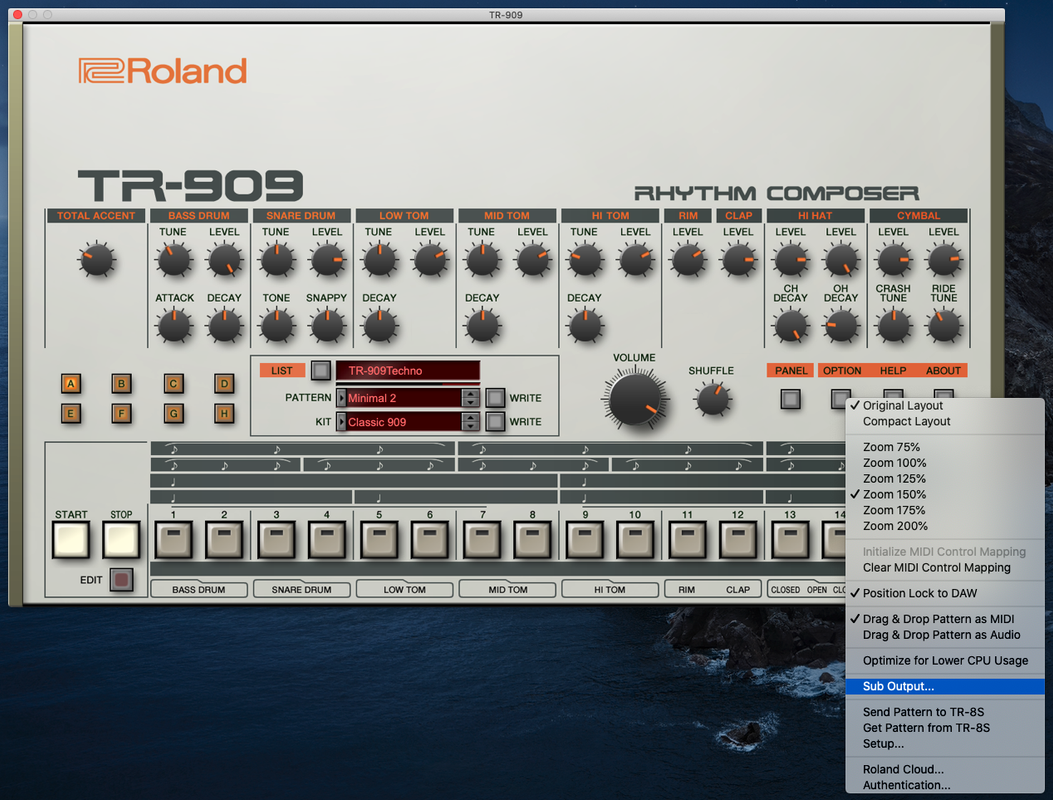
output chooser:

First add the TR-909 to a MIDI track. Then open it up and click the option button. Choose 'Sub Output...', you can then enable the outputs you like. Now create an audio track and choose the TR-909 MIDI track as an input (Top Audio From dropdown chooser), then choose the desired output from the TR-909 (bottom Audio From dropdown chooser). Output 1/2 is the stereo out, the other pairs are the individual instruments.
See also here:
https://help.ableton.com/hc/en-us/artic ... AU-plug-in
options menu:
output chooser: