Hi All -
I am trying to make edits in Arrangement View, but whenever I change the Mixer or add plug-ins, a red automation line appears and I have to turn it off over and over, or I will accidentally adjust parameters.
Is there a way to prevent automation from automatically inserting itself into a track?
Many Thanks!
Disable Automatic Automation In Arrangement View?
-
baskervils
- Posts: 35
- Joined: Thu Apr 22, 2004 2:31 pm
- Location: New York
-
chapelier fou
- Posts: 6355
- Joined: Mon May 15, 2006 12:15 pm
Re: Disable Automatic Automation In Arrangement View?
It doesn’t. Unless you’re recording with the automation rec enabled.
MacBook Pro 13" Retina i7 2.8 GHz OS 10.13, L10.0.1, M4L.
MacStudio M1Max 32Go OS 12.3.1
MacStudio M1Max 32Go OS 12.3.1
-
baskervils
- Posts: 35
- Joined: Thu Apr 22, 2004 2:31 pm
- Location: New York
Re: Disable Automatic Automation In Arrangement View?
Thank you for replying.
This is popping up when I am editing, not recording. For example, if I change the volume for a track on the mixer, suddenly an automation line appears in my track.
Is there a way to prevent this from happening?
This is popping up when I am editing, not recording. For example, if I change the volume for a track on the mixer, suddenly an automation line appears in my track.
Is there a way to prevent this from happening?
-
chapelier fou
- Posts: 6355
- Joined: Mon May 15, 2006 12:15 pm
Re: Disable Automatic Automation In Arrangement View?
That’s just a convenient way to select the last touched parameter as a potential automation to edit. It doesn’t write any automation. I don’t get what’s bothering you.
MacBook Pro 13" Retina i7 2.8 GHz OS 10.13, L10.0.1, M4L.
MacStudio M1Max 32Go OS 12.3.1
MacStudio M1Max 32Go OS 12.3.1
-
baskervils
- Posts: 35
- Joined: Thu Apr 22, 2004 2:31 pm
- Location: New York
Re: Disable Automatic Automation In Arrangement View?
Right, so as I am editing tracks, chopping up bits... I keep accidentally selecting the red automation line and have to disable it over and over again.
-
jestermgee
- Posts: 4500
- Joined: Mon Apr 26, 2010 6:38 am
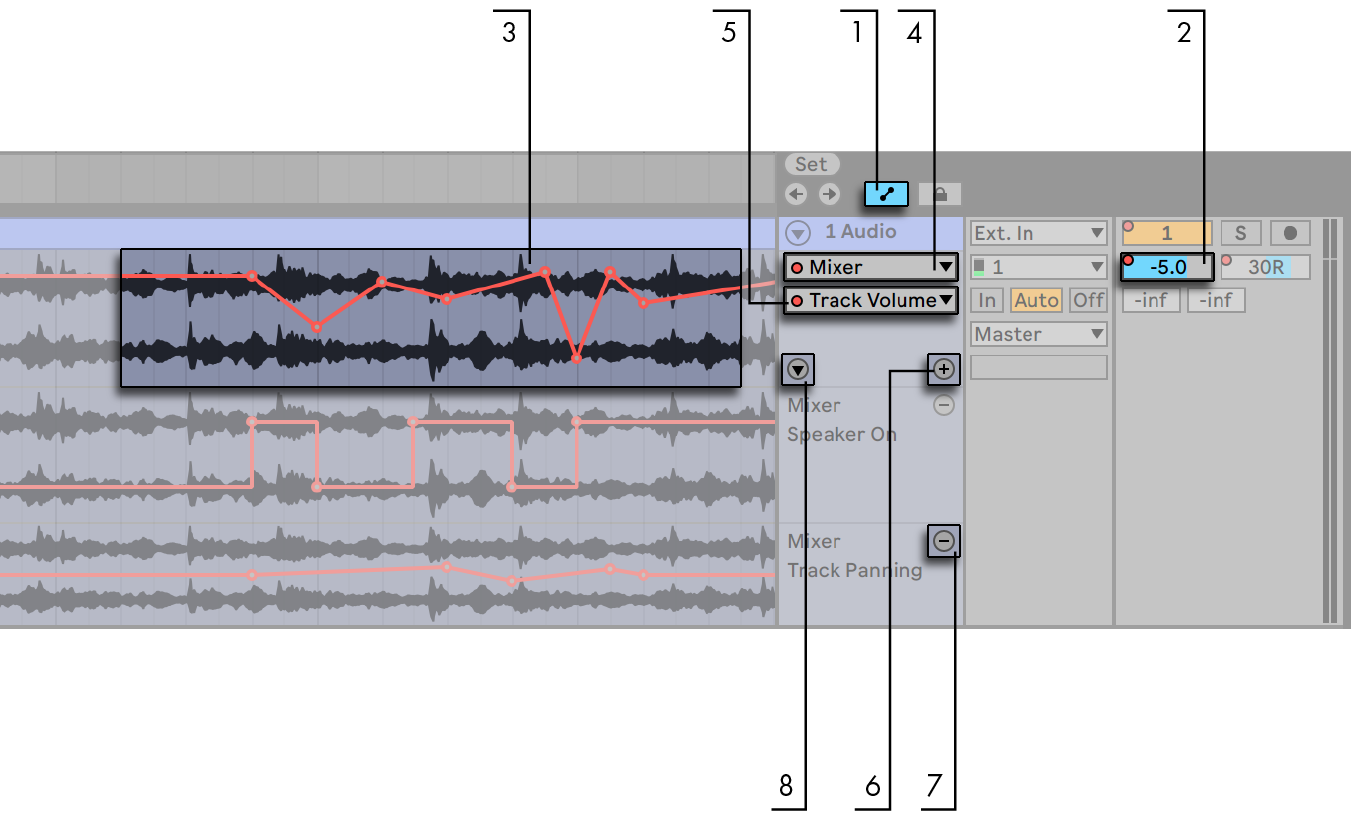
-
chapelier fou
- Posts: 6355
- Joined: Mon May 15, 2006 12:15 pm
Re: Disable Automatic Automation In Arrangement View?
Yes, of course, hit A
MacBook Pro 13" Retina i7 2.8 GHz OS 10.13, L10.0.1, M4L.
MacStudio M1Max 32Go OS 12.3.1
MacStudio M1Max 32Go OS 12.3.1
-
baskervils
- Posts: 35
- Joined: Thu Apr 22, 2004 2:31 pm
- Location: New York
Re: Disable Automatic Automation In Arrangement View?
Yes! That was it. I had #1 engaged. Thank you for your help, jestermgee.jestermgee wrote: ↑Sat Jun 06, 2020 1:03 amYou probably have this engaged (1):
https://www.ableton.com/en/manual/autom ... envelopes/
-
jestermgee
- Posts: 4500
- Joined: Mon Apr 26, 2010 6:38 am
Re: Disable Automatic Automation In Arrangement View?
No need to thank me, Thank ableton for making a manual that has such info easily available and so clearly explained. Worth a read when you get the chance 
-
baskervils
- Posts: 35
- Joined: Thu Apr 22, 2004 2:31 pm
- Location: New York
Re: Disable Automatic Automation In Arrangement View?
Indeed. I should have gone back to that tome (Zee Manual). This is my 12th? year of steady Ableton Live use and I still get flummoxed every now and then.jestermgee wrote: ↑Thu Jun 11, 2020 11:56 pmNo need to thank me, Thank ableton for making a manual that has such info easily available and so clearly explained. Worth a read when you get the chance
Most of the time, Ye Olde Google search is useful for these things, but it did NOT work this time.
You get the award from problem solver of the moment. Sheila, Take A Bow.