effects meters clipping
effects meters clipping
Im recording a dj mix from session to arrangement and I am using auto filter and various other effects on the clip. I noticed that the meters on the effects are clipping. But I dont understand how to reduce the signal. I tried pushing the faders down which makes no difference and I tried pushing the faders down in RME totalmix which also makes no difference. What am I not understanding here? what do I need to reduce to lower the meteres in the effects?
DAW - Ableton 10. System - Windows 10. Interface - Fireface UC
Re: effects meters clipping
Faders are post effects. TotalMix is post Ableton, so even further down the audio line. You need to go the other way, towards the source of the problem.
If the problem is before your effects chain, you can do two things.
1. Turn down the gain of your audio clips in the Clip Window of each clip. You can select all you clips with Shift and turn the gain down for all clips at once if you wish.
Manual: 8.2.3 Clip Pitch and Gain
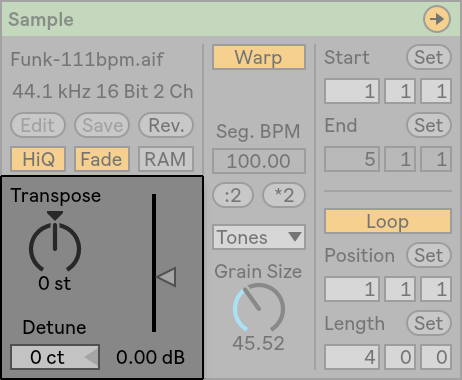
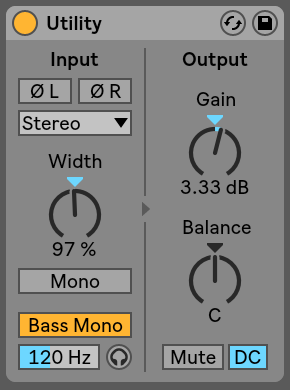
2. Or you can place a Utility effect as your first effect on the track and manage the input gain for the effects chain that follows with that.
Manual: 22.36 Utility
If the problem is before your effects chain, you can do two things.
1. Turn down the gain of your audio clips in the Clip Window of each clip. You can select all you clips with Shift and turn the gain down for all clips at once if you wish.
Manual: 8.2.3 Clip Pitch and Gain
2. Or you can place a Utility effect as your first effect on the track and manage the input gain for the effects chain that follows with that.
Manual: 22.36 Utility
Re: effects meters clipping
Ok thank you for this information. I did put a utility but wasnt sure if it was right thing to do so you have confirmed it is.Da hand wrote: ↑Fri Oct 02, 2020 8:15 amFaders are post effects. TotalMix is post Ableton, so even further down the audio line. You need to go the other way, towards the source of the problem.
If the problem is before your effects chain, you can do two things.
1. Turn down the gain of your audio clips in the Clip Window of each clip. You can select all you clips with Shift and turn the gain down for all clips at once if you wish.
Manual: 8.2.3 Clip Pitch and Gain
2. Or you can place a Utility effect as your first effect on the track and manage the input gain for the effects chain that follows with that.
Manual: 22.36 Utility
DAW - Ableton 10. System - Windows 10. Interface - Fireface UC