I use a Windows 10 computer in live performance. I am using ableton live 10 standard. My primary keyboard is a Korg Kronos which is Midi enabled. I am using ableton live 10 primarily in arrangement view.
I have several questions about Program Change DATA.
When i use the “split” feature to edit a track, live 10 seems to lose track of the program changes on other midi tracks and will substitute seemingly random program changes unrelated to the track I am editing . But when I play the arrangement back from bar 1 to the edit point, the random program change is no longer there.
For example, when I edit an audio track of guitar and split that audio track into regions to pocket the guitar, the midi bass drum track and midi snare drum track play a baritone sax patch when i try to review the audio track at or near the edit point.
I have found two work arounds. If I solo the audio track while I edit it it has no effect on the other tracks and I can un-solo and replay the full arrangement at or near the edit point without Midi patch change problems. The other solution is to play the sequence back from bar one every time I make an edit (which is not practical).
My questions are:
1. Why does the split feature affect midi program change data on other tracks? Is it something I am doing incorrectly?
2. where is the program change data stored on the midi track?
I know how to enter program change commands into live 10 to call up the internal patches on the Korg Kronos.
But where is that Program Change Data stored in Live 10?
3. Is There a way to edit recorded program change data on the track?
because there is no midi event editor I cannot find and remove or modify program change data.
I can see the Rogue program change happened on the display of my Korg keyboard. When I
delete the section of the track Where the rogue program change appears to occur, it does not remove the rogue program
change. The wrong patch continues to play each time I play the arrangement at or near the edit point. I have to play the
sequence from bar one to resolve the program change issue
4. how do I locate and remove program change data?
Without an event editor I cannot see where the random program change is located. if I cannot see it or find its location, how
can I remove it.
Where Is Midi Program Change Data Stored
-
Pitch Black
- Posts: 6722
- Joined: Sat Dec 21, 2002 2:18 am
- Location: New Zealand
- Contact:
Re: Where Is Midi Program Change Data Stored
MIDI program changes are stored inside individual MIDI Clips. See the Bank, Sub-Bank and Program drop-down menus in the bottom left of the pic:
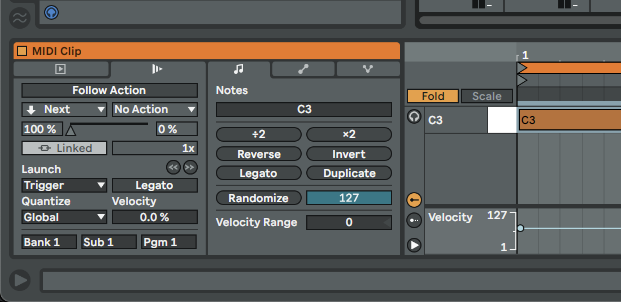
The program change is sent when the clip is launched and starts playing - it's a kinda unique and quirky setup compared to other DAWs and not always the most useful implementation, but that's how Live does it. To stop program changes being sent at clip launch set each field to "-" (empty).
Does that solve your problem?
The program change is sent when the clip is launched and starts playing - it's a kinda unique and quirky setup compared to other DAWs and not always the most useful implementation, but that's how Live does it. To stop program changes being sent at clip launch set each field to "-" (empty).
Does that solve your problem?
MBP M1Max | Sonoma 14.7 | Live 12.1 | Babyface Pro FS | Push 3T | clump of controllers
Soundcloud
Ableton Certified Trainer
Soundcloud
Ableton Certified Trainer
Re: Where Is Midi Program Change Data Stored
thank you for taking the time to reply. Unfortunately your response does not answer my questions.
I do know how to enter the program change data for each midi track or clip. I enter the program change data just as you describe. What I am trying to find out is (1) where the program change resides in ableton live 10 after it is entered and (2) whether that data can be modified or deleted after it is entered.
I do know how to enter the program change data for each midi track or clip. I enter the program change data just as you describe. What I am trying to find out is (1) where the program change resides in ableton live 10 after it is entered and (2) whether that data can be modified or deleted after it is entered.
-
Pitch Black
- Posts: 6722
- Joined: Sat Dec 21, 2002 2:18 am
- Location: New Zealand
- Contact:
Re: Where Is Midi Program Change Data Stored
Hmm… I thought I did answer (1) the program change is stored at the head of the clip, and (2) it can be modified/edited, or deleted by setting it to - - -.
Apologies if I don’t understand your questions. But that’s about all you can do with program changes in Live. As I said it’s… quirky there’s no way to see or edit program changes.
You can split the MIDI clip and enter a different program change in each clip in the Arrange View but there’s no event list or similar.
Or you could have two MIDI tracks routed to your Kronos. One track contains just the note information and the other has empty clips with Program Changes entered into them. In the pic below I'm send MIDI to my Korg Wavestate on two tracks. The upper track has just the notes and the lower track has the empty clips that have program changes entered via the boxes in Clip View. I've moved the lower clips to the left on the timeline because the Wavestate takes a scond to change patches.

Hope this helps!
Apologies if I don’t understand your questions. But that’s about all you can do with program changes in Live. As I said it’s… quirky
 there’s no way to see or edit program changes.
 You can split the MIDI clip and enter a different program change in each clip in the Arrange View but there’s no event list or similar.
Or you could have two MIDI tracks routed to your Kronos. One track contains just the note information and the other has empty clips with Program Changes entered into them. In the pic below I'm send MIDI to my Korg Wavestate on two tracks. The upper track has just the notes and the lower track has the empty clips that have program changes entered via the boxes in Clip View. I've moved the lower clips to the left on the timeline because the Wavestate takes a scond to change patches.
Hope this helps!
MBP M1Max | Sonoma 14.7 | Live 12.1 | Babyface Pro FS | Push 3T | clump of controllers
Soundcloud
Ableton Certified Trainer
Soundcloud
Ableton Certified Trainer
-
MichaelAbletonForum
- Posts: 54
- Joined: Sat Nov 20, 2021 7:53 pm
Re: Where Is Midi Program Change Data Stored
Tipp:
If you want to work with program change like a controller you can do that with a MAX4Live Device. I use a MIDI Note to Program Change and CC to Program change device. With that it is also possible to send it more then once. (Eg for resetting after manual change on the Synth)
Warning VST3:
If you work a lot with program change like me in live situations, Ableton Live don’t support Program Change with VST3. I made forum entries and feature request about that, would be nice to support that with a vote.
If you want to work with program change like a controller you can do that with a MAX4Live Device. I use a MIDI Note to Program Change and CC to Program change device. With that it is also possible to send it more then once. (Eg for resetting after manual change on the Synth)
Warning VST3:
If you work a lot with program change like me in live situations, Ableton Live don’t support Program Change with VST3. I made forum entries and feature request about that, would be nice to support that with a vote.
Re: Where Is Midi Program Change Data Stored
I didn't know that! I wonder if it's a I've issue or a VST3 one.MichaelAbletonForum wrote: ↑Wed Feb 16, 2022 8:11 amWarning VST3:
If you work a lot with program change like me in live situations, Ableton Live don’t support Program Change with VST3. I made forum entries and feature request about that, would be nice to support that with a vote.
Ableton Forum Moderator
-
MichaelAbletonForum
- Posts: 54
- Joined: Sat Nov 20, 2021 7:53 pm
Re: Where Is Midi Program Change Data Stored
That is a Live "issue". The implementation of "Program Change" is changed in VST3 and not adopted by Live. VST3 uses a VSTParameter for program Change not the midi message. I've gotten the answer from Support that its "logged".[jur] wrote: ↑Wed Feb 16, 2022 1:41 pmI didn't know that! I wonder if it's a I've issue or a VST3 one.MichaelAbletonForum wrote: ↑Wed Feb 16, 2022 8:11 amWarning VST3:
If you work a lot with program change like me in live situations, Ableton Live don’t support Program Change with VST3. I made forum entries and feature request about that, would be nice to support that with a vote.
Re: Where Is Midi Program Change Data Stored
Hi Michael, did you have any luck fixing this issue? I'm having the same problem with WaveState Native in Live 11.3.11. A MIDI monitor placed before WaveState sees the PC message, but it somehow doesn't make it to WaveState (and removing the MIDI monitor doesn't help). Unfortunately, WaveState Native doesn't have an automatable GUI control for programs in a set list.