Hello all
I'm on a Macbook Pro Mid 2014 Retina running OSX 10.14 Mojave. Recently upgraded to Ableton 11. Now it won't open MOVs. In the past I have edited the audio of my MOVs in Ableton 10 and produced soundtracks etc.
When I drop the MOV on an audio track it says "[filename] could not be read. It may be corrupt or unlicensed."
I've tried a few different MOVs from different drives but get the same result for all of them.
Any ideas?
Thanks
Ableton 11 won't open MOV files
-
Hungry_Man
- Posts: 50
- Joined: Sun Jul 20, 2008 6:46 pm
- Location: London
- Contact:
-
Pitch Black
- Posts: 6722
- Joined: Sat Dec 21, 2002 2:18 am
- Location: New Zealand
- Contact:
Re: Ableton 11 won't open MOV files
What codec are the movies you're wnating to use? If you open them in Quicktime and hit Command-I (get info) what does say under Codec or Video Format?
MBP M1Max | Sonoma 14.7 | Live 12.1 | Babyface Pro FS | Push 3T | clump of controllers
Soundcloud
Ableton Certified Trainer
Soundcloud
Ableton Certified Trainer
-
Hungry_Man
- Posts: 50
- Joined: Sun Jul 20, 2008 6:46 pm
- Location: London
- Contact:
Re: Ableton 11 won't open MOV files
Hello,
under codec it says Timecode, H.264, AAC
I exported it from Final Cut Pro.
Thanks
under codec it says Timecode, H.264, AAC
I exported it from Final Cut Pro.
Thanks
-
Pitch Black
- Posts: 6722
- Joined: Sat Dec 21, 2002 2:18 am
- Location: New Zealand
- Contact:
Re: Ableton 11 won't open MOV files
Hi,
I just did a test on my system and had no issues:
2015 Retina MacBook Pro
Mojave 10.14.6
Final Cut Pro 10.4.10
Live 10.1.5
Live 11.1.1
Which Share option are you choosing in FCP? Below are the settings that worked for me (sorry for the huge pics)
Only other thing I can suggest is try the Reset Live procedure? It clears Live's preferences and a few other things. Might help if it's a permissions issue, maybe... https://help.ableton.com/hc/en-us/artic ... eset-Live-
Sorry, thats about all I got.
Hope this helps!
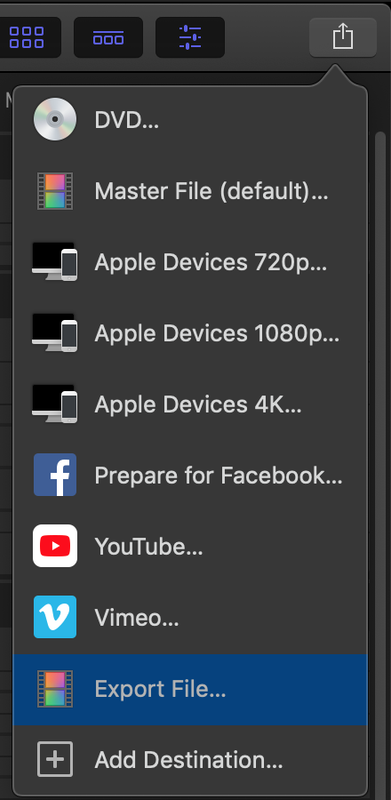
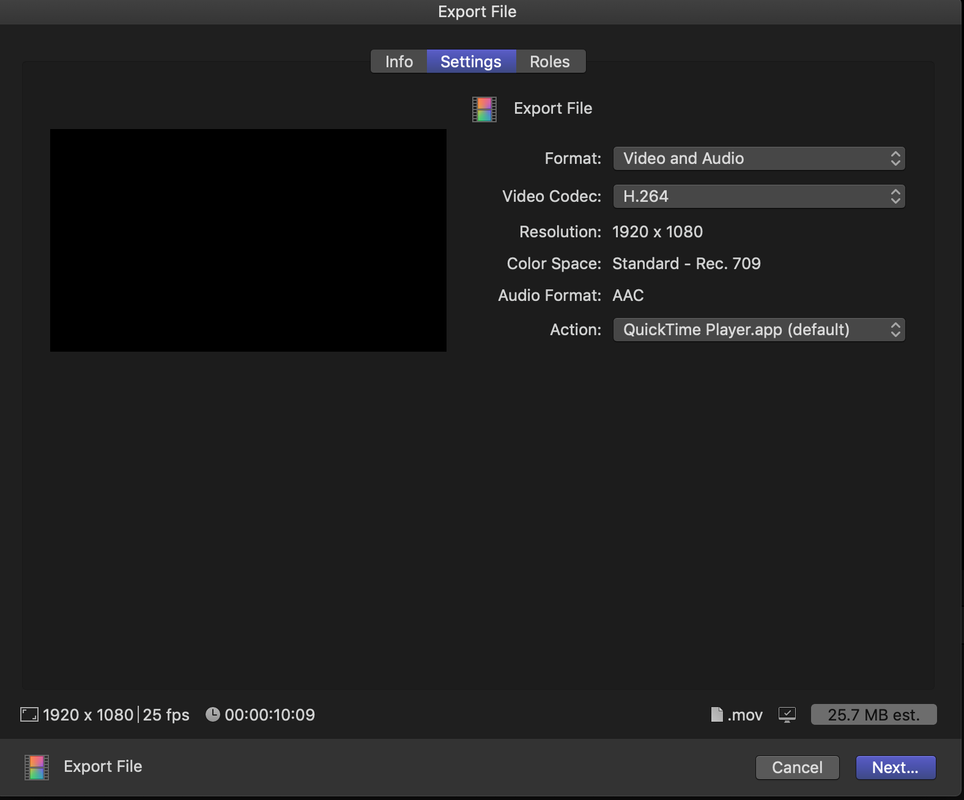
I just did a test on my system and had no issues:
2015 Retina MacBook Pro
Mojave 10.14.6
Final Cut Pro 10.4.10
Live 10.1.5
Live 11.1.1
Which Share option are you choosing in FCP? Below are the settings that worked for me (sorry for the huge pics)
Only other thing I can suggest is try the Reset Live procedure? It clears Live's preferences and a few other things. Might help if it's a permissions issue, maybe... https://help.ableton.com/hc/en-us/artic ... eset-Live-
Sorry, thats about all I got.
Hope this helps!
MBP M1Max | Sonoma 14.7 | Live 12.1 | Babyface Pro FS | Push 3T | clump of controllers
Soundcloud
Ableton Certified Trainer
Soundcloud
Ableton Certified Trainer
-
Hungry_Man
- Posts: 50
- Joined: Sun Jul 20, 2008 6:46 pm
- Location: London
- Contact:
Re: Ableton 11 won't open MOV files
Hi thanks for taking the time to respond to my post.
I tried resetting preferences and it did not help. I then was going to try a fresh install and I realised I had installed the Universal version when I have an Intel chip so I installed the intel version. Now the video files are loading fine but I get an error when I try to save an effect preset - a dialog box that says
The file"...Compressor.adv" could not be opened.
https://drive.google.com/open?id=1-kY9e ... =drive_fs
It's the same error for all effects preset. Any ideas on that one? Thanks
I tried resetting preferences and it did not help. I then was going to try a fresh install and I realised I had installed the Universal version when I have an Intel chip so I installed the intel version. Now the video files are loading fine but I get an error when I try to save an effect preset - a dialog box that says
The file"...Compressor.adv" could not be opened.
https://drive.google.com/open?id=1-kY9e ... =drive_fs
It's the same error for all effects preset. Any ideas on that one? Thanks