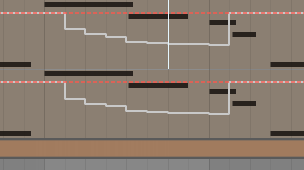
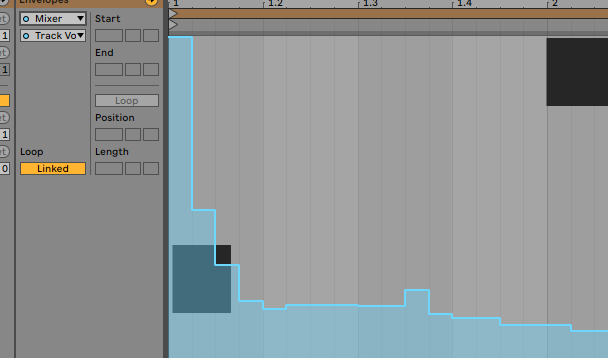
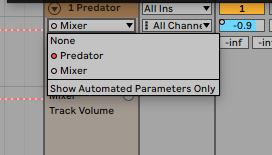
Recorded Automation is not being displayed properly in session clip envelopes and Arrangement view. The recorded clips are there in the clip but cannot be seen or edited using the device chooser. When trying to select the automation in the clip the device chooser just flips back to the mixer leaving no time to allow for editing.(See photo attach.) Also when using draw mode it draws a white line of automation which doesn't work at all.(See desktop photo). I have removed all AU plugins and turned off use of VST folders in preferences to test and it still persists. Recorded synth parameters also render white line(see photo 3). This is also happening in Ableton Live 9 on my other hard drive as well. Older system yes I know but it was working properly. Really annoying using hardware synth is even more of a difficulty.
https://i.postimg.cc/qMNbNzKb/Screen-Sh ... -54-PM.png
https://i.postimg.cc/mrrt2KX7/Screen-Sh ... -23-PM.png
https://i.postimg.cc/nzV03VhN/Screen-Sh ... -42-PM.png
https://i.postimg.cc/GpGxkD3K/Screen-Sh ... -28-PM.png
Live 10.1.43 build2022-0616
Apple Mac Pro
2x2.8 Ghz Quad core Intel Xeon
16GB 667 Mhz DDR2 FB-DIMM
ATI Radeon HD 2600 XT 256 MB
Focusrite Saffire Pro 40 audio interface
Automation/Lanes not displaying automation properly
Automation/Lanes not displaying automation properly

Last edited by Gothboy on Fri Oct 28, 2022 5:22 pm, edited 1 time in total.
Mac Pro Quad Core Intel Xeon 2.8 GHz. 16 GB RAM
Mountain Lion 10.8.5/El Capitan 10.11.6
Live Suite 9.1.7 and 10.1.9
Mountain Lion 10.8.5/El Capitan 10.11.6
Live Suite 9.1.7 and 10.1.9
-
maximejerryfraisse
- Posts: 111
- Joined: Thu Apr 28, 2022 5:24 pm
- Contact:
Re: Automation/Lanes not displaying automation properly
Hi @Gothboy,
Does the same thing happen in a new empty set ?
Does the same thing happen in a new empty set ?
MJF / what I do = […] / MBA 2020 M1 / macOS 15.1.1 / Ableton 12.1.5
Re: Automation/Lanes not displaying automation properly
We're not seeing any of your screenshot!
Ableton Forum Moderator
Re: Automation/Lanes not displaying automation properly
A white automation line means something else adjusted the automated control. Click the re-enable automation button in the transport bar on top of Live's window. If the automation line turns white again, find out what is controlling this parameter. Maybe some modulation. Could also be a defect in the hardware (controller).
Maybe the same thing also prevents you from selecting a certain control in the device chooser.
When it flips back to Mixer, what parameter is selected in the control chooser?
Hard to offer further assistance without the images.
You can use this site for uploading images and paste the created link here.
Maybe the same thing also prevents you from selecting a certain control in the device chooser.
When it flips back to Mixer, what parameter is selected in the control chooser?
Hard to offer further assistance without the images.
You can use this site for uploading images and paste the created link here.
Re: Automation/Lanes not displaying automation properly
Screenshot links up in original post
Thanks!
Mac Pro Quad Core Intel Xeon 2.8 GHz. 16 GB RAM
Mountain Lion 10.8.5/El Capitan 10.11.6
Live Suite 9.1.7 and 10.1.9
Mountain Lion 10.8.5/El Capitan 10.11.6
Live Suite 9.1.7 and 10.1.9
Re: Automation/Lanes not displaying automation properly
Yes when I open a new set adding a simpler to a midi track then dragging in a sample and making a clip the envelope device selector keeps toggling back to Mixer. Won't let me edit or draw in Midi control.maximejerryfraisse wrote: ↑Fri Oct 28, 2022 6:44 amHi @Gothboy,
Does the same thing happen in a new empty set ?
Mac Pro Quad Core Intel Xeon 2.8 GHz. 16 GB RAM
Mountain Lion 10.8.5/El Capitan 10.11.6
Live Suite 9.1.7 and 10.1.9
Mountain Lion 10.8.5/El Capitan 10.11.6
Live Suite 9.1.7 and 10.1.9
-
maximejerryfraisse
- Posts: 111
- Joined: Thu Apr 28, 2022 5:24 pm
- Contact:
Re: Automation/Lanes not displaying automation properly
Ok. One more question : do you have a Control Surface connected to your Ableton ? Or any other midi controller ?
MJF / what I do = […] / MBA 2020 M1 / macOS 15.1.1 / Ableton 12.1.5
Re: Automation/Lanes not displaying automation properly
Ok thx. Then Rivanni got you covered.
Check what appears in the Undo and let us know. This usually comes from a not-well optimised M4L device or a 3rd party plugin.
Ableton Forum Moderator
Re: Automation/Lanes not displaying automation properly
Seems my control surface MIDI list needed a refresh. I removed every controller listed...there were some I haven't even used for a while as I have more than a few. Then added only what I need at the moment and it's corrected things. Think I have it sorted.
https://i.postimg.cc/76Sc3N6v/Screen-Sh ... -32-PM.png
Thank you all for giving me a hand you are all awesome thank U!
https://i.postimg.cc/76Sc3N6v/Screen-Sh ... -32-PM.png
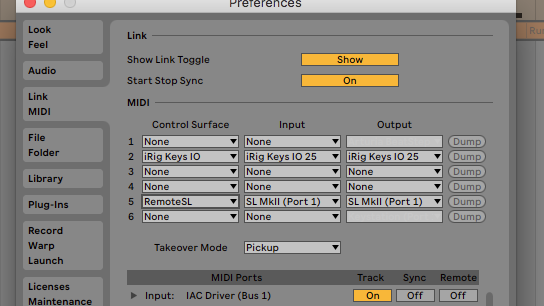
Thank you all for giving me a hand you are all awesome thank U!
Mac Pro Quad Core Intel Xeon 2.8 GHz. 16 GB RAM
Mountain Lion 10.8.5/El Capitan 10.11.6
Live Suite 9.1.7 and 10.1.9
Mountain Lion 10.8.5/El Capitan 10.11.6
Live Suite 9.1.7 and 10.1.9
Re: Automation/Lanes not displaying automation properly
Which Control Surface was it?
Ableton Forum Moderator