Hello All,
Am new to Ableton and trying to find my way around - so far so good, but I'm also trying to change my presets in the Neural DSP Quad Cortex (QC) Guitar modeler (which I also use as an audio interface for my Computer/Ableton) via MIDI from Ableton.
In the QC manual it says:
"Example 1:
If you want to load the Quad Cortex Preset 129 (17A) in Setlist 5,
then you would send the following PC message to the unit:
• CC#0 value 1, CC#32 value 5, Program #1"
But where to put these values exactly in Ableton - anybody has done this?
Need your help please
Kind regards
Matt
Changing Presets via Midi in Quad Cortex from Ableton
-
DesertMatt
- Posts: 4
- Joined: Wed Jan 18, 2023 1:07 pm
Changing Presets via Midi in Quad Cortex from Ableton
Kind regards
Matt
Matt
Re: Changing Presets via Midi in Quad Cortex from Ableton
These are handled in midi Clip Properties.
It’s a bit to explain, but if you have midi clips, you can double click to dive in, and in the clip view there are options for Program Change, MSB and LSB.
You can only do one program change per clip. So you’ll need to make a new clip for every change of preset. And it does take a bit of trial and error to get used to programming it and transmitting it to your device. So you’ll have to be patient. I’d also search the manual for any details I might have missed.
It’s a bit to explain, but if you have midi clips, you can double click to dive in, and in the clip view there are options for Program Change, MSB and LSB.
You can only do one program change per clip. So you’ll need to make a new clip for every change of preset. And it does take a bit of trial and error to get used to programming it and transmitting it to your device. So you’ll have to be patient. I’d also search the manual for any details I might have missed.
-
Greenapples2019
- Posts: 283
- Joined: Wed Apr 10, 2019 6:43 pm
Re: Changing Presets via Midi in Quad Cortex from Ableton
+1 for what yur2die4 said.
Have a look on YouTube for dummy clips (which can be audio or MIDI), there's a few different examples out there. Set up a MIDI track just for controlling the QC and set the MIDI Out to whichever MIDI channel the QC receives MIDI on. Then set up your MIDI clips, one for each preset. Once they're working you can save them as .alc files which enables you to just drag them into sets and projects. We use MIDI clips to control the presets on Roland, Yamaha and Strymon gear; works a treat, the guitarist still thinks it's witchcraft. As well as the presets you may be able to change other elements on the QC using the clips eg on a Strymon Timeline you can automate the looping and change all the parameters like bypass, mix, time division etc. over time.
It takes a bit to get your head round it and set up but once you do there's so many possibilities.
Have a look on YouTube for dummy clips (which can be audio or MIDI), there's a few different examples out there. Set up a MIDI track just for controlling the QC and set the MIDI Out to whichever MIDI channel the QC receives MIDI on. Then set up your MIDI clips, one for each preset. Once they're working you can save them as .alc files which enables you to just drag them into sets and projects. We use MIDI clips to control the presets on Roland, Yamaha and Strymon gear; works a treat, the guitarist still thinks it's witchcraft. As well as the presets you may be able to change other elements on the QC using the clips eg on a Strymon Timeline you can automate the looping and change all the parameters like bypass, mix, time division etc. over time.
It takes a bit to get your head round it and set up but once you do there's so many possibilities.
-
DesertMatt
- Posts: 4
- Joined: Wed Jan 18, 2023 1:07 pm
Re: Changing Presets via Midi in Quad Cortex from Ableton
Thank you both of you for your feedback!
I'll have to dive deeper into the dummy clip videos on Youtube - seems to have some very interesting stuff there!
However, one thing I can't get my head around are the exact commands I'll have to send to QC to be able to select a specific preset in one of their Setlists:
If you look at my initial post you'll see these commands and I tried to do this in a dummy clip in Ableton,
"If you want to load the Quad Cortex Preset 129 (17A) in Setlist 5,
then you would send the following PC message to the unit:
CC#0 value 1, CC#32 value 5, Program #1"
but CC 0 and 32 for instance are not available in the Midi Control envelopes dropdown list
Am I missing something?
kind regards
Matt
I'll have to dive deeper into the dummy clip videos on Youtube - seems to have some very interesting stuff there!
However, one thing I can't get my head around are the exact commands I'll have to send to QC to be able to select a specific preset in one of their Setlists:
If you look at my initial post you'll see these commands and I tried to do this in a dummy clip in Ableton,
"If you want to load the Quad Cortex Preset 129 (17A) in Setlist 5,
then you would send the following PC message to the unit:
CC#0 value 1, CC#32 value 5, Program #1"
but CC 0 and 32 for instance are not available in the Midi Control envelopes dropdown list
Am I missing something?
kind regards
Matt
Kind regards
Matt
Matt
Re: Changing Presets via Midi in Quad Cortex from Ableton
You can look up what different CC numbers are generally assigned to online. ‘General midi cc’ or something. It is a standard that most manufacturers adhere to, to make things consistent when using midi.
I think those relate to program change, and Bank Select: most significant byte, and least significant byte (PC, Bank Select: MSB and LSB)
And the reason those aren’t in automation is because it is assumed they are reserved for preset switching via midi. So those are placed in the clip properties instead for doing program changes.
I think those relate to program change, and Bank Select: most significant byte, and least significant byte (PC, Bank Select: MSB and LSB)
And the reason those aren’t in automation is because it is assumed they are reserved for preset switching via midi. So those are placed in the clip properties instead for doing program changes.
-
DesertMatt
- Posts: 4
- Joined: Wed Jan 18, 2023 1:07 pm
Re: Changing Presets via Midi in Quad Cortex from Ableton
Thanks yur2die4
will need a long weekend to deep dive into this...
Wish me luck
kind regards
Matt
will need a long weekend to deep dive into this...
Wish me luck
kind regards
Matt
Kind regards
Matt
Matt
-
Greenapples2019
- Posts: 283
- Joined: Wed Apr 10, 2019 6:43 pm
Re: Changing Presets via Midi in Quad Cortex from Ableton
Good luck Matt! Yes CC#0 is MSB (or Bank) and CC#32 is LSB (or Sub) and you can change these in the Launch section of the clip. It's kind of QC to give you that information, a lot of devices don't and you're left trying different combinations until the device magically changes.
-
DesertMatt
- Posts: 4
- Joined: Wed Jan 18, 2023 1:07 pm
Re: Changing Presets via Midi in Quad Cortex from Ableton
Thank you Greenapples2019
That was the information I was looking for - what goes where...
But if it is as you said - I think I tried this already and it didn't work
My example from above would look like this in the clip launch area:
Bank: 1, Sub: 5 and Pgm: 1
I also set Launch to Gate and Quantize to None
I'll try again and report back
kind regards
Matt
That was the information I was looking for - what goes where...
But if it is as you said - I think I tried this already and it didn't work
My example from above would look like this in the clip launch area:
Bank: 1, Sub: 5 and Pgm: 1
I also set Launch to Gate and Quantize to None
I'll try again and report back
kind regards
Matt
Kind regards
Matt
Matt
-
Greenapples2019
- Posts: 283
- Joined: Wed Apr 10, 2019 6:43 pm
Re: Changing Presets via Midi in Quad Cortex from Ableton
You’re welcome Matt, try using Trigger for launch. These things can be a bit of trial and error, the audio interface, driver and the MIDI connection and cable can all make a difference to how reliably the message gets through to the device. Once you get it working, do a Spinal Tap, don’t touch it, don’t even look at it.
Re: Changing Presets via Midi in Quad Cortex from Ableton
Here is a very quick and accessible way to change Presets and Scenes from Ableton Live on the Quad Cortex.
Setting up changes for the Quad via automations in Arrangement View or via envelopes in MIDI clips in Session View via My for Live: https://blog.abletondrummer.com/quad-co ... eton-live/
Setting up changes for the Quad via automations in Arrangement View or via envelopes in MIDI clips in Session View via My for Live: https://blog.abletondrummer.com/quad-co ... eton-live/
(FREE) MAX for LIVE devices
http://blog.abletondrummer.com/free-max ... e-devices/
ABLETON LIVE for (but not only) DRUMMERS
http://www.abletondrummer.com
http://blog.abletondrummer.com/free-max ... e-devices/
ABLETON LIVE for (but not only) DRUMMERS
http://www.abletondrummer.com
-
DunedinDragon
- Posts: 109
- Joined: Thu Jul 22, 2021 5:46 pm
Re: Changing Presets via Midi in Quad Cortex from Ableton
Here's my simplified approach which works easily and consistently with automating my Helix and the lighting system, but it should work with your Quad as well.
I use a separate MIDI controller pedalboard which is a Morningstar MC8, but most MIDI pedalboards should work fine. Within my Ableton project I only trigger actions with a single MIDI command to trigger one of the MC8 footswitches. That footswitch in the MC8 can employ any number of various MIDI actions upon a keypress, so by sending a simple command in an envelope of a MIDI track to trigger that footswitch, the MC8 can carry out any number of various MIDI CC or PC commands to the Helix or any other MIDI device. That means I only need a single MIDI Out track in my project that triggers simple MIDI actions at synchronized points in the playback. It also allows me to setup and test that MIDI action separate from the Ableton playback to make sure it does what I want it to do.
I use a separate MIDI controller pedalboard which is a Morningstar MC8, but most MIDI pedalboards should work fine. Within my Ableton project I only trigger actions with a single MIDI command to trigger one of the MC8 footswitches. That footswitch in the MC8 can employ any number of various MIDI actions upon a keypress, so by sending a simple command in an envelope of a MIDI track to trigger that footswitch, the MC8 can carry out any number of various MIDI CC or PC commands to the Helix or any other MIDI device. That means I only need a single MIDI Out track in my project that triggers simple MIDI actions at synchronized points in the playback. It also allows me to setup and test that MIDI action separate from the Ableton playback to make sure it does what I want it to do.
Re: Changing Presets via Midi in Quad Cortex from Ableton
Here is a video on how to do this quick and easy via a Max for Live device:
https://www.youtube.com/watch?v=dp6elgW2JwQ
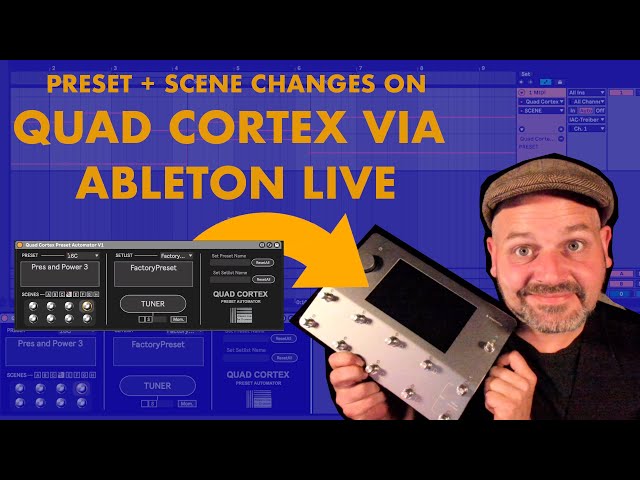
https://www.youtube.com/watch?v=dp6elgW2JwQ
(FREE) MAX for LIVE devices
http://blog.abletondrummer.com/free-max ... e-devices/
ABLETON LIVE for (but not only) DRUMMERS
http://www.abletondrummer.com
http://blog.abletondrummer.com/free-max ... e-devices/
ABLETON LIVE for (but not only) DRUMMERS
http://www.abletondrummer.com