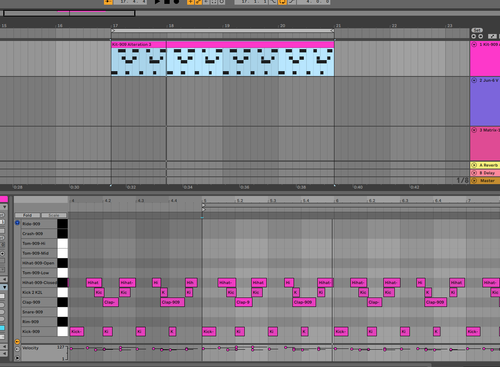
What is going on in this screen shot?
-
mastodon88
- Posts: 2
- Joined: Sun Feb 19, 2023 5:11 pm
What is going on in this screen shot?
I am new to Ableton, been using Logic for years. I'm simply playing back an 8 bar drum loop, and in the midi note editor window, it is showing the midi notes extending before and after the 8 bar loop, and it's starting on bar 5, when its placed at bar 17. What is the deal? Thanks and sorry if this is a stupid question.
Re: What is going on in this screen shot?
Each Clip is independent from each other and has separate properties from other Clips and the Arrangement.
♥♥♥
Re: What is going on in this screen shot?
Yeah. Pottering has basically answered the question. But to delve a little deeper into the concept and how ot affects things,
A clip is on its own and has its own bar count. You can have notes start on 1.1.1 to 2.1.1 within the clip and then place this clip anywhere on the arrangement. In the arrangement it might be placed on 65.1.1 but when you go into the clip editor to edit the clip, you’re only editing in relation to the clip itself.
If you’re looping clips, you’re basically stuck with this paradigm. However, if you really need a clip to reflect the Arrangement View timeline, then you’d need to start with a fully drawn out clip that begins at 1.1.1 or the arrangement and extends to the end. For every channel. I don’t think this would be the easiest to work with though. Especially considering that when adding new material, you might still be surprised with new clips still being with respect to only themselves.
In order to continue working in Live without losing your mind, you’ll have to just get accustomed to the idea that clip timing is from the context of itself. And it can be placed anywhere in the Live timeline without affecting the clip timeline.
I think this is primarily a consequence of the idea of the Session View being clip-based, and allowing for non-linear exploration of ideas. And those properties then being carried over to the Arrangement View.
A clip is on its own and has its own bar count. You can have notes start on 1.1.1 to 2.1.1 within the clip and then place this clip anywhere on the arrangement. In the arrangement it might be placed on 65.1.1 but when you go into the clip editor to edit the clip, you’re only editing in relation to the clip itself.
If you’re looping clips, you’re basically stuck with this paradigm. However, if you really need a clip to reflect the Arrangement View timeline, then you’d need to start with a fully drawn out clip that begins at 1.1.1 or the arrangement and extends to the end. For every channel. I don’t think this would be the easiest to work with though. Especially considering that when adding new material, you might still be surprised with new clips still being with respect to only themselves.
In order to continue working in Live without losing your mind, you’ll have to just get accustomed to the idea that clip timing is from the context of itself. And it can be placed anywhere in the Live timeline without affecting the clip timeline.
I think this is primarily a consequence of the idea of the Session View being clip-based, and allowing for non-linear exploration of ideas. And those properties then being carried over to the Arrangement View.
-
Greenapples2019
- Posts: 283
- Joined: Wed Apr 10, 2019 6:43 pm
Re: What is going on in this screen shot?
The other thing you can do is consolidate the midi clip (by clicking on the clip and pressing command-J). This will set the clip timing so that the clip starts at 1.1.1 irrespective of where it is on the timeline i.e. your clip will still start on bar 17 but the clip itself will start at bar 1 rather than bar 5.