Discuss music production with Ableton Live.
-
tse
- Posts: 7
- Joined: Sat Oct 07, 2023 6:01 am
Post
by tse » Sat Oct 07, 2023 6:38 am
Hi
I am practicing my scales in Ableton. And noticed this at A#/Bb Minor Pentatonic scale:

Should be?:
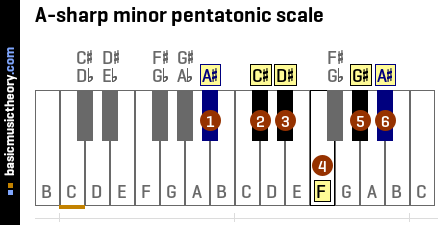
What I am doing wrong here?
My Live version:

On Mac10.13.6.
I hope i didn't brake any forum rules.

-
tse
- Posts: 7
- Joined: Sat Oct 07, 2023 6:01 am
Post
by tse » Sat Oct 07, 2023 8:01 am
Same for C#/Db Major

-
tse
- Posts: 7
- Joined: Sat Oct 07, 2023 6:01 am
Post
by tse » Sat Oct 07, 2023 8:06 am
B#3 and Cx3? in D#/Eb Major

-
tse
- Posts: 7
- Joined: Sat Oct 07, 2023 6:01 am
Post
by tse » Sat Oct 07, 2023 8:14 am
F#/Gb Major. E#4?

-
Strums'n'Drums
- Posts: 6
- Joined: Sat Sep 23, 2023 8:37 am
Post
by Strums'n'Drums » Sat Oct 07, 2023 8:27 am
You're not doing anything wrong.
A# minor scale has 7 #s in it A#, B#, C#, D#, E#, F# and G# ( the E# is F)
The A# minor pentatonic (A#, C#, D#, E#, G#) takes its notes from that.
The same with C# Major scale - 7 #s.
I think Ableton is treating the F as E# (I believe it is called the enharmonic equivalent).
I'm not aware of a a way to change that in Ableton.
-
tse
- Posts: 7
- Joined: Sat Oct 07, 2023 6:01 am
Post
by tse » Sat Oct 07, 2023 8:31 am
Thank you for your response, I was not sure i was getting musical theory.
So should this be a bug then? Its not only the notation on the screen but also the graphical view of the black an white keys. (Hard to show on pics...)
Edit: I think i get it now. Thanks
-
[jur]
- Site Admin
- Posts: 6704
- Joined: Mon Jun 01, 2015 3:04 pm
- Location: Ableton
Post
by [jur] » Sat Oct 07, 2023 11:36 am
I think adding a # to a E or B, while weird, is accepted in theory because it make sense depending on the context.
Those “x” are quite surprising though! I’m wondering if it’s the symbol used to momentarily “bypass” a sharp/flat (no idea how it it called in English)… but from my extremely basic theory knowledge it doesn’t make sense in a scale context like this.
But I really don’t have enough music theory chops. Maybe someone else can chime in ?
Ableton Forum Moderator
-
Strums'n'Drums
- Posts: 6
- Joined: Sat Sep 23, 2023 8:37 am
Post
by Strums'n'Drums » Sat Oct 07, 2023 12:43 pm
Cx is C double sharp (C##).
As I recall, it is used in a scale to distinguish the note names (so you don't have, for example, a D and D# in the list of notes for the scale). In sheet music it is denoted by a bold lower case x to the left of the note.
Cx is D natural (another enharmonic equivalent).
There is a way to change the appearance of the notes in Ableton on the piano roll. I had a look earlier and right clicking on the piano roll brings up a menu to change the accidentals to Auto, Sharps, Flats or Sharps and Flats. I haven't tried it on the scales that tse posted though.
-
tse
- Posts: 7
- Joined: Sat Oct 07, 2023 6:01 am
Post
by tse » Sat Oct 07, 2023 4:34 pm
owwww yeah. Excelent tip.
