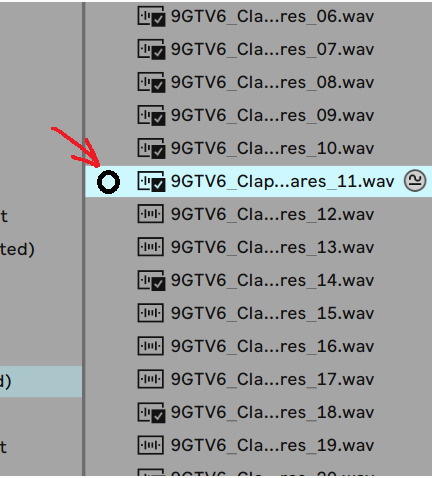
It would be great if there could be a button next to each sample in the list that lets you trigger it with zero latency, just by clicking on it with your mouse.
(see image below for suggested placement)
Obviously that means it needs to be loaded into memory first, but that could be easily solved by having a short term buffer that just loads any sample that's visible at any one moment in the list into memory, ready to be triggered instantly. And when you scroll the list away, they get unloaded from memory.
Because it's much easier to decide if a sound is good if you can play it (with a mouse click) in the actual rhythm you want to use it. This isn't possible with the present 300ms (approx) delay.
Obviously [double click = load] should be disabled for this button, so that you could play it repeatedly in rhythm without it loading.
And in relation to this, it would also be great (at least optionally) if the sample would be auditioned through the FX on the track or drum pad.
These changes would make it much easier and more pleasurable when swapping or searching for new sounds for a beat-in-progress!
Also worth noting is that when you use a 3rd party sample browser like Atlas or XO, they do already have this zero latency auditioning!!