------------------------------------------------------------------------------
I can not load .rx2 files in Live 10. I have Live 11 and 12 on this system and they both can load .rx2 files. I have the cache set properly to 'C:\Users\USER\AppData\Local\Ableton\Cache' -- and this is the same place as the cache is set in Live 11 + 12.
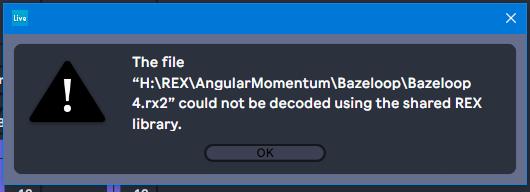
I also get this message: 'The file ... .rx2 could not be decoded using the shared REX library' - please see attachment 'rx.png'.
I have my REX shared library in the proper place and ReCycle files otherwise work perfectly in all other programs on my computer.
I have tried everything and spent nearly a whole day on this now. I have even re-installed Live 10 as well, but the problem is still there. The cache is set to the right path. The REX library is installed and working fine.
I have read: https://help.ableton.com/hc/en-us/artic ... t-licensed
Why can I not load ReCycle files in to Live 10 when they work fine in Live 11 + 12?
-----------------------------------------------------------------------------------------------
Please also see this attachment:
I'm hoping that they at least give it a try to help me out, but I didn't know they only supported the last 2 versions of Live when I posted the request. I own 2 copies of Live: Live 12 Suite and Live 9 Suite, but I often just work in Live 10 because I happen to have it set up the way I like it and am most used to it (and I'm still learning 11 + 12).
I have a dual boot system with both Win7 and WinX and this problem is happening on WinX. Live 9 and 10 work perfectly loading REX files on my Win7 system. The cache is set to the same path as well and all REX libraries are where they should be.
It's just Live 10 on Windows 10 that won't work. Any ideas?
Thanks.