Can I force Live 12 to record in Stereo even if only one Chanel is used. I know about the Mono utility that Monitors the left Chanel on both L & R. I know about converting that left channel recording to a stereo one with left and right the same. But is there no better way.
The signal is coming from Overbridge (analog Rytm MKII Audio In Left Chanel Right silence) input so I can not resolve the problem here.
Record in Stereo even if one chanel is silent (Overbrige&Rytm)
-
Designbureau
- Posts: 14
- Joined: Mon May 04, 2020 11:25 am
Re: Record in Stereo even if one chanel is silent (Overbrige&Rytm)
Is the signal coming from the Analog Rytm panned to the left within the Analog Rytm itself?
Re: Record in Stereo even if one chanel is silent (Overbrige&Rytm)
Do you really want to record two identical channels? Or do you just want the mono channel to be centered instead of panned to the left?
In that case, just select the one channel that has audio as the track source (e.g., channel 1) instead of both channels (1&2). If that option isn't available, you can enable it in the audio settings.
In that case, just select the one channel that has audio as the track source (e.g., channel 1) instead of both channels (1&2). If that option isn't available, you can enable it in the audio settings.
-
Designbureau
- Posts: 14
- Joined: Mon May 04, 2020 11:25 am
Re: Record in Stereo even if one chanel is silent (Overbrige&Rytm)
Well that's not so important. Let say its an stereo input (Live detects it as a stereo input) with a signal only the left side. Right silence.
But her's the answer to your question:
no, not really. The Analog Rytm has an input called Audio In. That input is passed to Overbridge like passing through an audio device. No possibilty of panning or gaining. And It is a stereo input with two jacks. I want to use them seperately on 2 audio tracks in Live. So if I plug the left chanel only, the result is a left channel stereo sample in Live. Can I change that?
Re: Record in Stereo even if one chanel is silent (Overbrige&Rytm)
Yes, by selecting only the input channels you want as an audio source. Live will then record a mono track instead of a stereo track with one side silent.
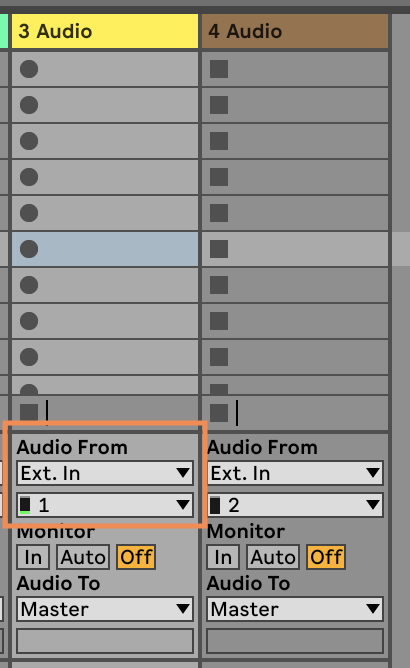
-
Designbureau
- Posts: 14
- Joined: Mon May 04, 2020 11:25 am
Re: Record in Stereo even if one chanel is silent (Overbrige&Rytm)
This is unfortunately not available for Overbridge Tracks
Re: Record in Stereo even if one chanel is silent (Overbrige&Rytm)
You need to go into the Settings / Preferences in Ableton and configure the Overbridge to be both mono and stereo.
This video shows how
https://youtu.be/wENbeUNS-IA
This video shows how
https://youtu.be/wENbeUNS-IA