Is this by design? Live 12.3.5
Even though I work in another DAW now, I am coming back to Live from time to time. I first noticed something was off with my drum grooves about six months ago. Certain rhythmic elements felt slightly smeared or just not as tight as they should have been, especially when layering sounds across Simpler, Sampler, and the newer Drum Sampler. I never had the motivation to dig into it properly until recently, and what I found is… puzzling.
The issue:
Sampler and Drum Sampler both introduce a delay into the signal path that is not reported to the DAW. Because Ableton doesn't know about this latency, it cannot compensate for it with its automatic delay compensation (PDC). Simpler does not exhibit this behavior.
How to reproduce:
1. Create two MIDI tracks.
2. Load a Simpler on track 1 and a Sampler on track 2. Use the exact same one-shot drum sample in both.
3. Program identical MIDI notes on both tracks – same velocity, same timing, same everything.
4. Make sure there are zero effects on either channel. No filters, no modulators, nothing enabled inside the instruments themselves either. Match the output levels so both channels produce the same signal at the same volume.
5. Hit play. At this point, both tracks should theoretically output an identical signal.
6. Now drop a Utility on one of the channels and use the "Phase Invert" preset – this will flip the phase for you.
If the two signals were truly sample-aligned, the result would be perfect silence – complete phase cancellation. Instead, you will clearly hear phasing artifacts, which tells you the two signals are offset in time.
7. To confirm, place an Align Delay (included with Live Suite) on the Simpler channel. In my case, I need to add approximately 48 samples of delay (~1 ms at 48 kHz) to the Simpler track before I get near-perfect phase cancellation.
This means Sampler is outputting its signal roughly 48 samples later than Simpler, and Ableton has no idea this is happening.
I repeated the same test with Drum Sampler and got the same result – it also introduces unreported latency. Simpler remains the only one of the three that does not.
Why this matters in practice:
Any time you layer a Sampler or Drum Sampler hit with a Simpler hit (It happens between various kits I build) – say a kick top layer in Simpler and a kick sub layer in Sampler – the two are not phase-aligned. This can cause comb filtering, a thinner or hollow low end, and transients that feel soft instead of punchy. In a busy mix with multiple drum layers, parallel processing, or sidechain routing, these tiny timing offsets stack up and degrade the overall tightness and impact of your drums.
My questions:
- Is this intentional? If so, what is the technical reasoning behind it?
- Why isn't this latency reported to the DAW so that automatic delay compensation can handle it?
- Has anyone else run into this, and is there an official acknowledgment from Ableton?
For the record, I have triple-checked: no effects on any channel, no filters or processing enabled inside Sampler or Drum Sampler, buffer size and sample rate consistent. The offset is reproducible every time.
Any insight would be appreciated.
Sampler & Drum Sampler introduce unreported latency into the signal path
Re: Sampler & Drum Sampler introduce unreported latency into the signal path
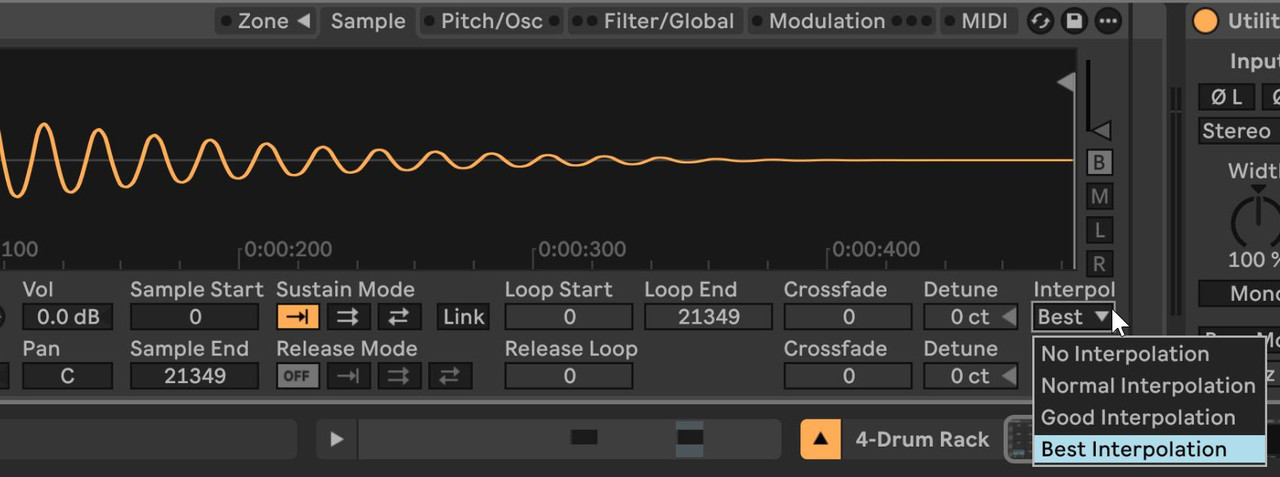
About Sampler: the difference is due to interpolation. When comparing with Simpler, just change Sampler's interpolation setting and you will phase cancel when it matches Simpler's one.
With Drum Sampler it looks like a different story, but IDK what's happening in this case. Sounds to me more like a difference in the envelope curve, as a matter of fact DS' attack minimum is 0.1ms while Simpler/Sampler's one is 0ms.
That's probably worth a discussion with Support, especially since that means that the Simpler > Drum Sampler conversion isn't neutral.
With Drum Sampler it looks like a different story, but IDK what's happening in this case. Sounds to me more like a difference in the envelope curve, as a matter of fact DS' attack minimum is 0.1ms while Simpler/Sampler's one is 0ms.
That's probably worth a discussion with Support, especially since that means that the Simpler > Drum Sampler conversion isn't neutral.
Ableton Forum Moderator
Re: Sampler & Drum Sampler introduce unreported latency into the signal path
Could you be more specific about Sampler? I am not interpolating anything; I am playing samples at their root note. Besides, I am most definitely interested in your answer, but it's very vague and unclear.[jur] wrote: ↑Sun Feb 22, 2026 12:09 amAbout Sampler: the difference is due to interpolation. When comparing with Simpler, just change Sampler's interpolation setting and you will phase cancel when it matches Simpler's one.
With Drum Sampler it looks like a different story, but IDK what's happening in this case. Sounds to me more like a difference in the envelope curve, as a matter of fact DS' attack minimum is 0.1ms while Simpler/Sampler's one is 0ms.
That's probably worth a discussion with Support, especially since that means that the Simpler > Drum Sampler conversion isn't neutral.
Are you telling me that specific settings in Sampler are adding specific delay, and when switched to something else, the delay that is introduced (and not reported) should go away? Thus, will it match the timing difference?
I am not in the studio until tomorrow.
p.s. yea I noticed Drum Sampler can not be matched to anything else, and I am hearing different curves. I'd kill to have tension shapes for the curves in Simpler, as one has in Sampler. But that's a discussion for another thread.
Re: Sampler & Drum Sampler introduce unreported latency into the signal path
In its Sample tab/view, right hand side corner there's an interpolation setting. Even at the root pitch this can have an impact (don't ask me why, i don't know).
Simpler's interpolation default setting is "normal" I think but it's hidden ( it can be changed by setting the value in Sampler > converting to Simpler > saving this Simpler instance as its default preset).
Ableton Forum Moderator
Re: Sampler & Drum Sampler introduce unreported latency into the signal path
For your information, I found the option you mentioned and tested it. That much I know, change the parameters from one to the other. I can tell you with 100% accuracy that this does not change the problem I first described. I changed the interpolation, but nothing happens. Nothing at all. Interesting Sampler says 0 delay, but as I said, there is about 48 samples delay.[jur] wrote: ↑Sun Feb 22, 2026 8:07 pmIn its Sample tab/view, right hand side corner there's an interpolation setting. Even at the root pitch this can have an impact (don't ask me why, i don't know).
Simpler's interpolation default setting is "normal" I think but it's hidden ( it can be changed by setting the value in Sampler > converting to Simpler > saving this Simpler instance as its default preset).
So Phase cancel between Sampler and Simpler is only possible when I add Align Delay plugin to the channel with Simpler and add 48 samples of delay.
You can test all this yourself. This is definitely a problem.
Here is a simple Live file. Tell me what I am doing wrong, or is this really an issue in itself? Note, file contains only one sample loaded in Sampler and Simpler. And Align Delay device in one of them. Master has a limiter. All Live deivces.
When you press play, you get silence because of phase cancellation. But as soon as you disable the Align Device or delete it, channels are out of sync regardless of the interpolation value.
https://www.mediafire.com/file/0et5lb3p ... t.zip/file
Re: Sampler & Drum Sampler introduce unreported latency into the signal path
I sure did it before answering you.
But I'll check with your Set, thx.
Ableton Forum Moderator
Re: Sampler & Drum Sampler introduce unreported latency into the signal path
Fixed!
For the sake of readability I put both Simpler and Sampler in the same track in an Instrument rack.
I just disabled the vel->vol in both devices, turned off Simpler's LFO, and found the correct interpolation setting.
For the sake of readability I put both Simpler and Sampler in the same track in an Instrument rack.
I just disabled the vel->vol in both devices, turned off Simpler's LFO, and found the correct interpolation setting.
Ableton Forum Moderator
Re: Sampler & Drum Sampler introduce unreported latency into the signal path
And for some reason, if you keep them in separate tracks, you also need to make sure that Sampler's voice retrigger is off, and increase the voices number.
See here.
See here.
Ableton Forum Moderator
Re: Sampler & Drum Sampler introduce unreported latency into the signal path
I believe the main reason the null breaks is due to the Snap setting being enabled in Simpler, but not in Sampler (in OP's "Issue Project").
Seems OP is unaware Live now has a device called Drum Sampler (separate from Sampler and Simpler)?
BTW Drum Sampler does null with Simpler, if Snap is disabled in Simpler, implying Drum Sampler has no Snap.
Seems OP is unaware Live now has a device called Drum Sampler (separate from Sampler and Simpler)?
BTW Drum Sampler does null with Simpler, if Snap is disabled in Simpler, implying Drum Sampler has no Snap.
♥♥♥
Re: Sampler & Drum Sampler introduce unreported latency into the signal path
If you actually read my post, you'll see that I used Drum Sampler - this is not about that. Seems you didn't read my issue. None of the features you mention is an issue. I'll respond to Jur so you can comment on that. I guess it will be easier for thread organisation.pottering wrote: ↑Mon Feb 23, 2026 6:08 amI believe the main reason the null breaks is due to the Snap setting being enabled in Simpler, but not in Sampler (in OP's "Issue Project").
Seems OP is unaware Live now has a device called Drum Sampler (separate from Sampler and Simpler)?
BTW Drum Sampler does null with Simpler, if Snap is disabled in Simpler, implying Drum Sampler has no Snap.
Re: Sampler & Drum Sampler introduce unreported latency into the signal path
@jur
I appreciate you taking the time to look at my Live file, but I have to be honest — your response doesn't address what I reported, and it feels like you're deflecting the issue by changing the test conditions I specifically set up.
Let me walk through this:
1. You put both Simpler and Sampler into an Instrument Rack on a single track. That is not the scenario I described. My test — and my real-world workflow — uses Sampler and Simpler on separate mixer channels. This is not some edge case. This is how a huge number of producers work. I have years' worth of presets — purchased, found online, and custom-built — that are either standalone Sampler instruments on their own channel or various Drum Rack configurations with Simplers. Virtually every tutorial and production video I've ever watched on YouTube uses the same paradigm: dedicated instruments on separate mixer channels. You changed the test conditions and then insinuated it "Fixed!" — but you fixed a scenario I never presented as the problem.
2. You mention disabling this or that, turning off the LFO, changing interpolation, adjusting voice retrigger, and increasing voice count.
None of this is applicable to my test. I am triggering a single sample with a single voice. There is no higher academic modulation involved, no LFO, no polyphony scenario where retrigger or voice count would matter. These are all red herrings in the context of what I reported. My test is as stripped-down as it gets: one sample, one note, one voice, zero effects, zero modulation — on two separate tracks.
3. Most importantly — and this is the core of my report that remains completely unaddressed — you never once mention the Align Delay result.
I gave you a Live Set where the only difference between perfect phase cancellation (silence) and audible phasing artifacts is a 48-sample Align Delay on the Simpler channel. Remove the Align Delay, you hear phasing. Add it back, silence. This is objective, measurable, and reproducible. It proves that Sampler introduces approximately 48 samples of latency that Ableton's PDC system does not know about and therefore cannot compensate for.
That is the issue. Not interpolation, not retrigger, not voice count. The issue is unreported latency in the signal path that the DAW should be compensating for but isn't.
At this point, I honestly can't tell if you're intentionally sidestepping what I reported, or if there's a language barrier getting in the way — English is not my native language, so maybe I'm not explaining this as clearly as I'd like. Either way, I'd really appreciate it if we could just be straightforward with each other and look at this problem together.
I'm not attacking Live. I'm not questioning your expertise. I've been using Ableton for years and I love the software. But I found something that seems like a real issue, I took the time to document it, build a test set, and share it here. All I'm asking is that it's met with the same care. Let's look at the evidence and figure out what's actually going on — that's all.
---
@pottering
Snap has nothing to do with this. Snap seeks the nearest zero-crossing to avoid clicks — it doesn't introduce a consistent, fixed delay of ~48 samples regardless of sample content. My offset is consistent and reproducible across different samples.
Also, if you read my original post, you'll see that I explicitly tested Drum Sampler and described the results. I am very much aware it exists. I just don't use it.
Neither of your points addresses what this thread is actually about: a measurable, unreported delay in the mixer channel that Ableton's delay compensation does not account for. That is what the Align Delay test demonstrates, and that is what I'd like to stay focused on. If possible. I mean the fix (if any) would benefit everyone so I am not sure why the circulation around it?
Re: Sampler & Drum Sampler introduce unreported latency into the signal path
Did you try my second set where I kept your 2 tracks?
Not sure why you feel cheated... you thought there was a latency issue, we just show you why you were seeing phase differences: because of the impact of different settings in each device. How do you want things to null out if they are processed differently??
Not sure why you feel cheated... you thought there was a latency issue, we just show you why you were seeing phase differences: because of the impact of different settings in each device. How do you want things to null out if they are processed differently??
Ableton Forum Moderator
Re: Sampler & Drum Sampler introduce unreported latency into the signal path
No it wasn't as stripped-down as it gets, because of the difference in the settings.
Align Delay isn't necessary once the settings match.
Ableton Forum Moderator
Re: Sampler & Drum Sampler introduce unreported latency into the signal path
What mode did OP use in Simpler? I get full cancellation between Sampler and Simpler when Simpler is in Classic mode. Filters, if set up identically, don't change the cancellation either. Switching to One Shot changes things quite...
Velocity settings the same in both devices?
Velocity settings the same in both devices?
andy
2023 Mac M2, Live 12, Push3, RME Fireface 800
2023 Mac M2, Live 12, Push3, RME Fireface 800
Re: Sampler & Drum Sampler introduce unreported latency into the signal path
1- I repeated the "How to reproduce" 6 steps from OP's 1st post, it nulled as expected here. Doing step 7 breaks the null (as expected).
2- I repeated the "How to reproduce" 6 steps from OP's 1st post again with Drum Sampler instead of Sampler, it nulled as expected here. Doing step 7 breaks the null (as expected).
3- I downloaded the "Issue Project.zip" file from the mediafire link that OP provided, in that Issue Project the problem (besides the weird +0.16dB Utility in Track 1) was the Snap setting being On in the Simpler in Track 1, and Off in the Sampler in Track 2, once disabling Snap in Track 1 or enabling it in Track 2, it nulls. Enabling the Align Delay in Track 1 completely breaks the null here (as expected).
2- I repeated the "How to reproduce" 6 steps from OP's 1st post again with Drum Sampler instead of Sampler, it nulled as expected here. Doing step 7 breaks the null (as expected).
3- I downloaded the "Issue Project.zip" file from the mediafire link that OP provided, in that Issue Project the problem (besides the weird +0.16dB Utility in Track 1) was the Snap setting being On in the Simpler in Track 1, and Off in the Sampler in Track 2, once disabling Snap in Track 1 or enabling it in Track 2, it nulls. Enabling the Align Delay in Track 1 completely breaks the null here (as expected).
♥♥♥